
AudioThing Gong Amp
Professional music gear - detailed information and where to buy
AudioThing
Gong Amp
Product Info
* Prices may vary. Check retailer for current pricing and availability.
Product Description
- It Has Chains
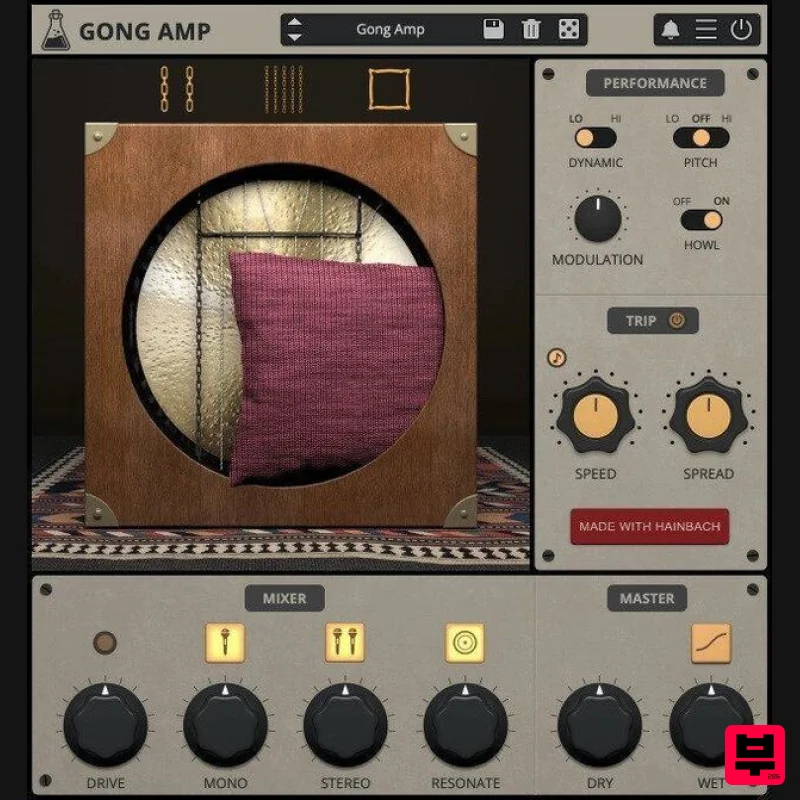
- And A Pillow The Resonance of Early Electronic Music Gong Amp takes an exciting experimental amplifier from the beginnings of electronic music to the plugin world of today. In 1932
- Maurice Martenot was looking for a way to make his groundbreaking proto-synthesizer “Ondes” audible beyond what could be archived with the horns and loudspeakers of the time. He developed a set of “diffusers”
- of which the “Métallique” was one. Instead of a paper cone or horn
- Martenot put a gong behind the amplifier circuitry. This seemingly simple idea resulted in resonances and brilliant overtones that excite audiences to this day. In 2011
- the French company Eowave took inspiration from Martenot’s invention and made their own version
- the Resonator Metallik. When Audiothing heard what Berlin composer Hainbach did with this rare and discontinued amplifier
- they knew the sound needed to be available to more than a select few. So they made Gong Amp
- their third collaboration with Hainbach since Motors and Wires. Using a complex mixture of convolution processing
- physical modeling
- and feedback systems
- they created an instrument that is true to the responsiveness of the original and even transcends it in terms of sound design possibilities. The Metallik Resonator Eowave built their fantastic version of Martenot’s invention from 2011 to 2018 on demand in numbers. Much treasured by collectors
- Hainbach got the last one made especially for him from the last parts in the shop at Eowave. It was then recorded and measured in Hainbach‘s Studio. Mixer You can choose from three recording positions: mono mic
- stereo mics
- and a unique “resonator” effect Hainbach designed. Try mono for a “documentary” perspective
- stereo for beautiful ribbon mic width
- and hear reverb feeding into reverb in “resonator” mode. Try upping the input overdrive for added overtones
- and use the soft clip for output distortions. Applications Taking a page from the experimental percussionists’ handbook
- you can add thick and thin chains to the Gong. The sympathetic rattling creates effects that range from a soft shimmer to clangorous noise. The strength of the Métallique
- its long ring
- is also its weakness when playing fast: everything turns to mush. So a pillow was added that dampens the sound and makes Gong Amp “arpeggio-approved”. Performance Adjust the sound of Gong Amp to your playing style. Choose from two different gain settings on the gong with “Dynamic”. Add modulations for a slightly more psychedelic sound. Turn on “howl” to hear Gong Amp struggle beautifully when overloaded. Experiment with extreme pitch manipulations for cinematic effects. Trip Mode With Trip Mode
- you can add automated crossfading between the three signal positions of mono
- stereo and resonate. Use spread to adjust the rhythmic shift. From gentle drifts that last minutes to fast rotary effects
- this is a sound designer’s dream. Features Gong Amp Emulation Chains and Pillow Sets Dynamic
- Pitch
- Modulation
- Howl Trip Modulation Resizable Window Preset system with randomizer System Requirements PC Windows 7 - 11 2GHz CPU
- 4 GB RAM VST2
- VST3
- CLAP or AAX (64-bit) Mac OS X 10.9 – macOS 13 2GHz CPU
- 4 GB RAM Apple Silicon (M chips) Native (Universal 2 Binary) VST2
- VST3
- CLAP
- or AAX (64-bit) Universal 2 Binary Note: Wave Box is used as the example. Windows 1. Visit the AudioThing Account Signup Page and enter your personal details to set up an account. Click the Verification and "I've read and agree to the Privacy Policy" > Click Sign Up. Note: If you already have an existing AudioThing account
- Login here and skip to step 3 of the installation process. 2. A confirmation email will now be sent to your registered email > click the link within the email to activate your account and Login here. 3. Once logged into your account
- visit the Redeem Page and enter Redeem Code from your Plugin Boutique User Account into the box > Click 'Redeem'. 4. Download the PC installer and the Offline Activation License. Note: Save the Offline Activation License to a memorable location on your computer for activating the software. 5. Double-click the downloaded .zip folder to extract its contents. 6. Double-click the extracted .exe file > click 'I accept the agreement and click 'Next'. 7. Click 'Next'. 8. Select the components that you wish to install > Click ‘Next’. 9. Click ‘Next’. 10. Click 'Install'. 11. Click ‘Finish’. Offline Activation 1. Open Wave Box inside of your DAW > Click 'Offline'. 2. Click 'Load Licence File' and navigate to your Offline Activation License. 3. Click the X to close the box. The software is now activated and ready to use inside your DAW! Online Activation 1. Open Wave Box inside of your DAW > Click 'Online'. 2. Enter your AudioThing email and password > Click 'Log In'. 3. Click the X to close the box. The software is now activated and ready to use inside your DAW! Mac 1. Visit the AudioThing Account Signup Page and enter your personal details to set up an account. Click the Verification and "I've read and agree to the Privacy Policy" > Click Sign Up. Note: If you already have an existing AudioThing account
- Login here and skip to step 3 of the installation process. 2. A confirmation email will now be sent to your registered email > click the link within the email to activate your account and Login here. 3. Once logged into your account
- visit the Redeem Page and enter Redeem Code from your Plugin Boutique User Account into the box > Click 'Redeem'. 4. Download the MAC installer and the Offline Activation License. Note: Save the Offline Activation License to a memorable location on your computer for activating the software. 5. Double-click the downloaded .dmg folder to extract its contents > Double-click the .pkg file to run the installer 6. Click 'Continue'. 7. Click ‘Continue’. 8. Click 'Continue'. 9. Click ‘Agree’. 10. Select the components you would like to install > Click 'Continue'. 11. Click ‘Install’. 12. Click 'Close'. Offline Activation 1. Open Wave Box inside of your DAW > Click 'Offline'. 2. Click 'Load Licence File' and navigate to your Offline Activation License. 3. Click the X to close the box. The software is now activated and ready to use inside your DAW! Online Activation 1. Open Wave Box inside of your DAW > Click 'Online'. 2. Enter your AudioThing email and password > Click 'Log In'. 3. Click the X to close the box. The software is now activated and ready to use inside your DAW!
Additional Information
About the AudioThing Gong Amp
The AudioThing Gong Amp represents excellent craftsmanship in the Virtual Instruments category.
Why Choose the AudioThing Gong Amp?
- •Authentic AudioThing craftsmanship and design
- •Versatile sound suitable for multiple musical genres
- •Professional build quality and reliable performance
- •Part of AudioThing's respected Virtual Instruments lineup
Compare & Explore
Browse our complete selection of AudioThing instruments or explore other Virtual Instruments options. Use our comparison tools to find the perfect match for your musical style and budget.
Similar Products

Safari Audio Cubby
Virtual Instruments

ZAK Sound Asteroid
Virtual Instruments

MNTRA Instruments Nagual
Virtual Instruments

ZAK Sound Lyra
Virtual Instruments

UJAM BEAUTYFLUTE Pro
Virtual Instruments

Boom SWAMPS - 3D Surround
Virtual Instruments

Audiomodern Opacity 2: Soundbox Instrument
Virtual Instruments

MeldaProduction Electric Keys - Tines
Virtual Instruments

