
Waves Electric 200 Piano
Professional music gear - detailed information and where to buy
Waves
Electric 200 Piano
Product Info
* Prices may vary. Check retailer for current pricing and availability.
Product Description
- Electric 200 Piano Nails the Electric Piano Sound of 70s Rock
- Funk and R&B Classics “A quantum leap from other sampled Wurlitzers” according to top session musician Charlie Judge (Keith Urban
- Carrie Underwood)
- Electric 200 captures the tones heard on classics by Queen
- Pink Floyd
- and Supertramp as well as Stevie Wonder
- Marvin Gaye
- and Aretha Franklin. Each original 200 model had its own subtle tonal variations. For Electric 200
- we’ve sampled two different pianos
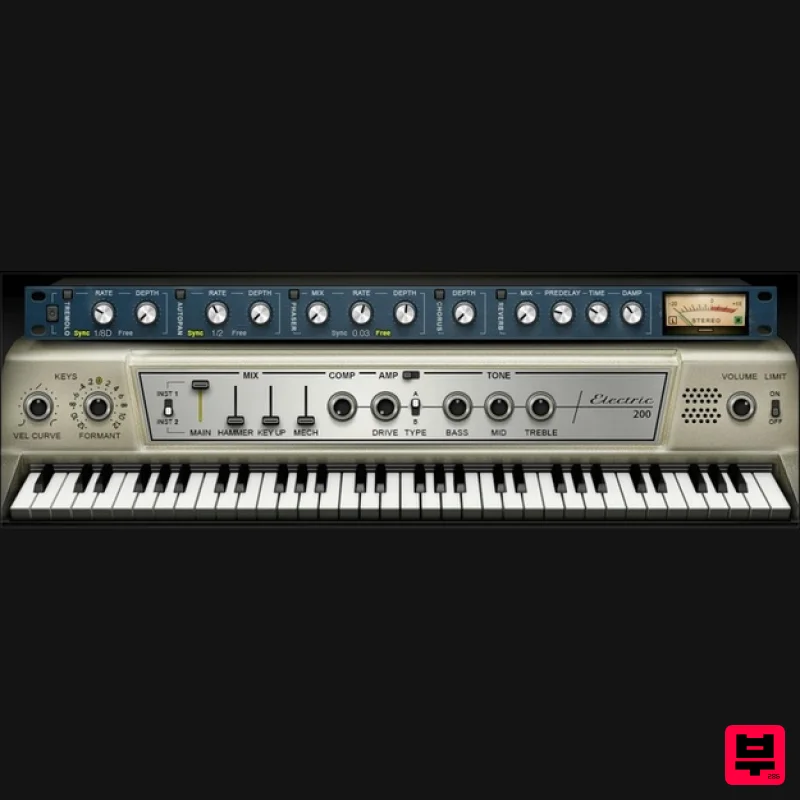
- capturing every nuance of the keys’ response and the instruments’ authentic mechanical reaction. Features Complete sample sets of two different piano flavors Detailed multisampling for optimum velocity response Optimize the tone for rock with tone and format controls Authentic mechanical sound controls
- like hammer and key up Emulate the amplified stage sound with amp
- drive
- and mic controls Includes tremolo
- autopan
- phaser
- chorus
- and reverb “pedal” effects Punch up the sound with compression and limiting Choose the velocity curve best-suited to your touch For live performance
- use in standalone app mode NKS-ready for NI Komplete Kontrol and Maschine System Requirements Mac macOS Monterey 12
- Ventura 13
- Sonoma 14
- Sequoia 15 VST / AU / AAX PC Windows 10+ VST / AAX 1. Head to https: //www.waves.com/create-account 2. Enter your email and choose a password to create an account (if you already have a Waves account
- choose Log in
- enter your details and head to Step 5) > click 'Submit' 3. Open your email inbox > click the activation link in the email from Waves 4. Click 'Log in here' > Log in to your Waves account 5. Click 'Register New Products' 6. Enter the Serial Number found in your Plugin Boutique user account > click 'Submit' 7. Click download in your Plugin Boutique user account or head to https: //www.waves.com/downloads/central > download the Waves Central app for your operating system 8. Install Waves Central > Open Waves Central 9. Click 'Log in' > enter your log in details 10. Click the 'Install Products' tab 11. Tick the blue dot on all products you wish to install or click the top dot to install all products > click 'Install & Activate' 12. Click 'OK' 13. Open your DAW > open the Waves plugin Your Waves plugins are installed and ready to use
- enjoy!
Additional Information
About the Waves Electric 200 Piano
The Waves Electric 200 Piano represents excellent craftsmanship in the Virtual Instruments category.
Why Choose the Waves Electric 200 Piano?
- •Authentic Waves craftsmanship and design
- •Versatile sound suitable for multiple musical genres
- •Professional build quality and reliable performance
- •Part of Waves's respected Virtual Instruments lineup
Compare & Explore
Browse our complete selection of Waves instruments or explore other Virtual Instruments options. Use our comparison tools to find the perfect match for your musical style and budget.
Similar Products

MNTRA Instruments Nagual
Virtual Instruments

Safari Audio Cubby
Virtual Instruments

Audiomodern Opacity 2: Soundbox Instrument
Virtual Instruments

ZAK Sound Lyra
Virtual Instruments

ZAK Sound Asteroid
Virtual Instruments

MeldaProduction Electric Keys - Tines
Virtual Instruments

Boom SWAMPS - 3D Surround
Virtual Instruments

UJAM BEAUTYFLUTE Pro
Virtual Instruments

