
Waves Clavinet
Professional music gear - detailed information and where to buy
Waves
Clavinet
Product Info
* Prices may vary. Check retailer for current pricing and availability.
Product Description
- Clavinet The Original Funk Keyboard
- Meticulously Multi-Sampled The D6 clavinet has cast its gritty
- twangy spell on musicians as diverse as Steve Wonder
- the Rolling Stones
- Herbie Hancock
- the Band
- Funkadelic
- Steely Dan
- the Wailers
- and Fleetwood Mac. And now
- Waves has painstakingly captured this instantly recognizable sound
- in all its funky glory. By multi-sampling every texture
- articulation
- and hammer strike in both muted and unmuted modes
- Clavinet nails the classic tone of this keyboard king—but most importantly
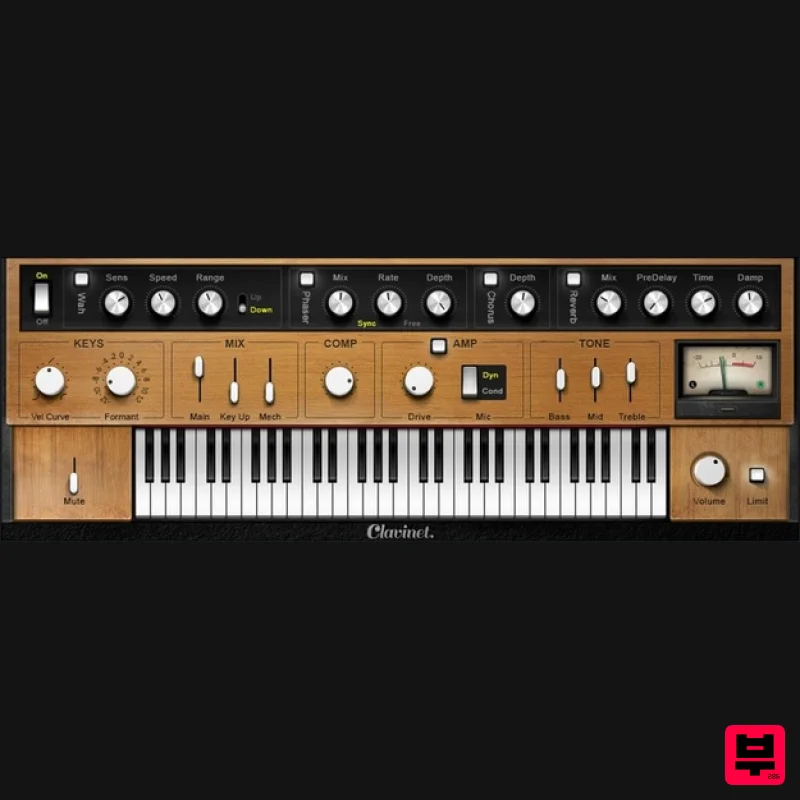
- it nails the feel. Features Exceptionally responsive velocity control for stellar dynamics Supplemented with built-in effects often used with the clav Includes EQ
- compression
- and limiting for a mix-ready sound Envelope-follower autowah tracks your playing’s dynamics Amp simulator with choice of mics gives the authentic on-stage sound Use stand-alone for live performance
- or as a plug-in Presets with the classic sounds you’ll recognize from multiple hits Phase
- chorus
- and reverb add depth and modulation System Requirements Mac macOS Monterey 12
- Ventura 13
- Sonoma 14
- Sequoia 15 VST / AU / AAX PC Windows 10+ VST / AAX 1. Head to https: //www.waves.com/create-account 2. Enter your email and choose a password to create an account (if you already have a Waves account
- choose Log in
- enter your details and head to Step 5) > click 'Submit' 3. Open your email inbox > click the activation link in the email from Waves 4. Click 'Log in here' > Log in to your Waves account 5. Click 'Register New Products' 6. Enter the Serial Number found in your Plugin Boutique user account > click 'Submit' 7. Click download in your Plugin Boutique user account or head to https: //www.waves.com/downloads/central > download the Waves Central app for your operating system 8. Install Waves Central > Open Waves Central 9. Click 'Log in' > enter your log in details 10. Click the 'Install Products' tab 11. Tick the blue dot on all products you wish to install or click the top dot to install all products > click 'Install & Activate' 12. Click 'OK' 13. Open your DAW > open the Waves plugin Your Waves plugins are installed and ready to use
- enjoy!
Additional Information
About the Waves Clavinet
The Waves Clavinet represents excellent craftsmanship in the Virtual Instruments category.
Why Choose the Waves Clavinet?
- •Authentic Waves craftsmanship and design
- •Versatile sound suitable for multiple musical genres
- •Professional build quality and reliable performance
- •Part of Waves's respected Virtual Instruments lineup
Compare & Explore
Browse our complete selection of Waves instruments or explore other Virtual Instruments options. Use our comparison tools to find the perfect match for your musical style and budget.
Similar Products

ZAK Sound Asteroid
Virtual Instruments

MNTRA Instruments Nagual
Virtual Instruments

Audiomodern Opacity 2: Soundbox Instrument
Virtual Instruments

MeldaProduction Electric Keys - Tines
Virtual Instruments

Safari Audio Cubby
Virtual Instruments

UJAM BEAUTYFLUTE Pro
Virtual Instruments

Boom SWAMPS - 3D Surround
Virtual Instruments

ZAK Sound Lyra
Virtual Instruments

