
Waves Bass Slapper
Professional music gear - detailed information and where to buy
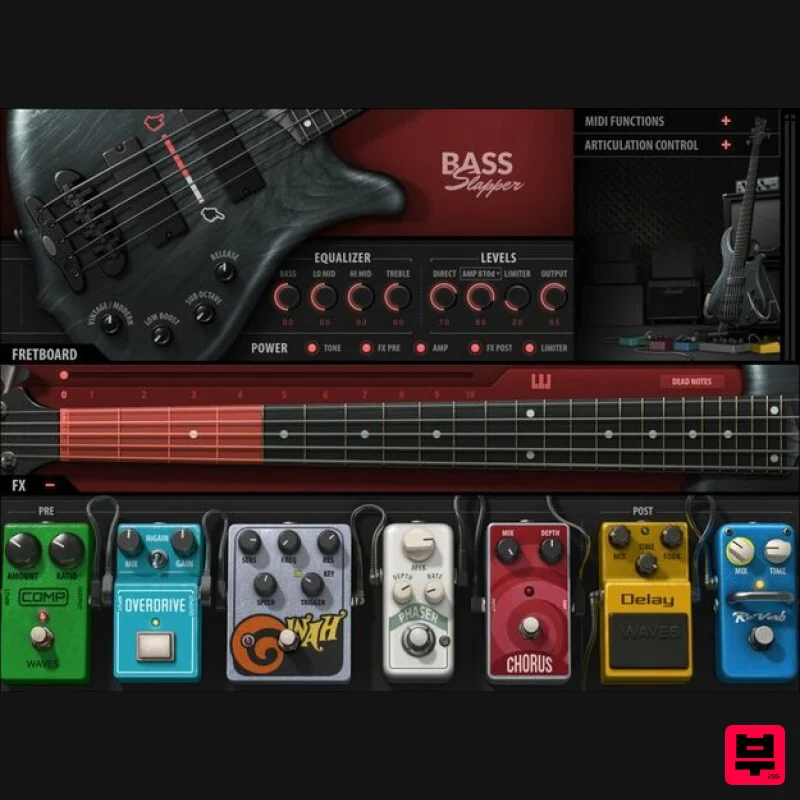
Waves
Bass Slapper
Product Info
* Prices may vary. Check retailer for current pricing and availability.
Product Description
- Bass Slapper Optimized for the Authentic Sound and Feel of Slap Bass Slapping bass with your thumb makes such a cool sound
- but it’s impossible to sample… right? Not anymore. 3
- 700 multisamples
- with round-robin note assignments and articulations
- nail the 70s bass sound that players like Larry Graham and Bootsy Collins used to power funk
- disco
- and pop. Select a warm
- old-school sound
- or bright modern—even choose the neck position where notes play
- because the same note sounds different at different positions. It’s all about slap bass realism. Features Sampled with natural sustain—no looped samples Control dynamics by selecting the number of velocity layers 11 interactive playing positions with automatic string switching Full 5-string articulation: thumbing
- popping
- mutes & more Choose 5 different legato modes
- including “always” and “off” 4 amp sim + cabinet options
- so your tone can purr or growl Pre-amp FX: compressor
- phaser
- overdrive
- triggered wah
- chorus Post-amp FX: delay (with sync-to-tempo) and reverb Adjust MIDI parameters
- such as velocity curve and depth Alter sustain
- transpose
- note release sound artifacts
- and more Use as a plugin in your DAW or play as a standalone instrument NKS-ready for NI Maschine and Komplete Kontrol System Requirements Mac macOS Monterey 12
- Ventura 13
- Sonoma 14
- Sequoia 15 VST / AU / AAX PC Windows 10+ VST / AAX 1. Head to https: //www.waves.com/create-account 2. Enter your email and choose a password to create an account (if you already have a Waves account
- choose Log in
- enter your details and head to Step 5) > click 'Submit' 3. Open your email inbox > click the activation link in the email from Waves 4. Click 'Log in here' > Log in to your Waves account 5. Click 'Register New Products' 6. Enter the Serial Number found in your Plugin Boutique user account > click 'Submit' 7. Click download in your Plugin Boutique user account or head to https: //www.waves.com/downloads/central > download the Waves Central app for your operating system 8. Install Waves Central > Open Waves Central 9. Click 'Log in' > enter your log in details 10. Click the 'Install Products' tab 11. Tick the blue dot on all products you wish to install or click the top dot to install all products > click 'Install & Activate' 12. Click 'OK' 13. Open your DAW > open the Waves plugin Your Waves plugins are installed and ready to use
- enjoy!
Additional Information
About the Waves Bass Slapper
The Waves Bass Slapper represents excellent craftsmanship in the Virtual Instruments category.
Why Choose the Waves Bass Slapper?
- •Authentic Waves craftsmanship and design
- •Versatile sound suitable for multiple musical genres
- •Professional build quality and reliable performance
- •Part of Waves's respected Virtual Instruments lineup
Compare & Explore
Browse our complete selection of Waves instruments or explore other Virtual Instruments options. Use our comparison tools to find the perfect match for your musical style and budget.
Similar Products

ZAK Sound Asteroid
Virtual Instruments

ZAK Sound Lyra
Virtual Instruments

Audiomodern Opacity 2: Soundbox Instrument
Virtual Instruments

Safari Audio Cubby
Virtual Instruments

MeldaProduction Electric Keys - Tines
Virtual Instruments

UJAM BEAUTYFLUTE Pro
Virtual Instruments

MNTRA Instruments Nagual
Virtual Instruments

Boom SWAMPS - 3D Surround
Virtual Instruments

