
Robotic Bean Portatron
Professional music gear - detailed information and where to buy
Robotic Bean
Portatron
Product Info
* Prices may vary. Check retailer for current pricing and availability.
Product Description
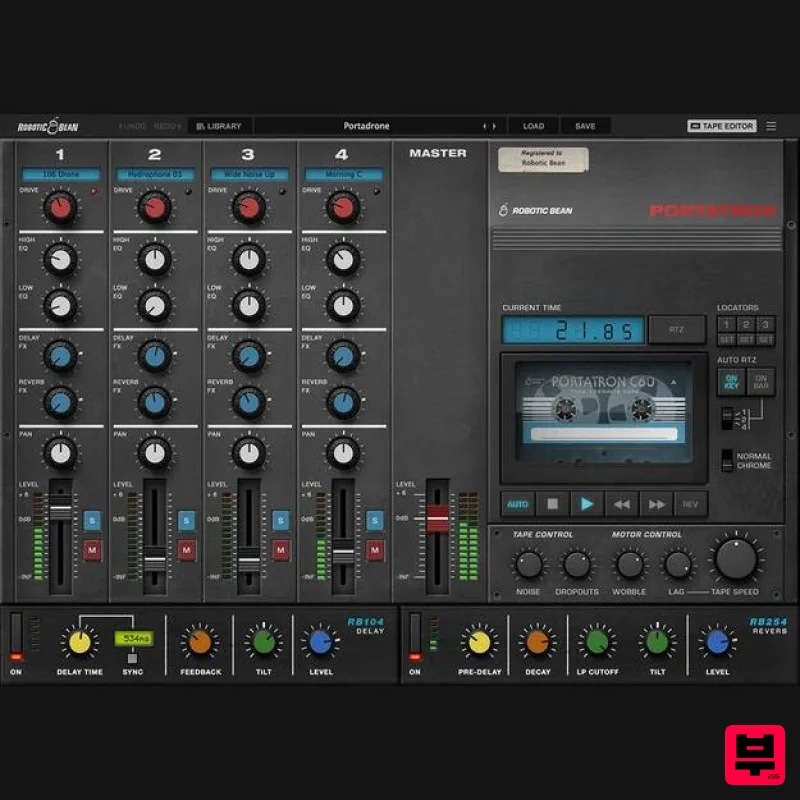
- Get all the mojo from a 4-track cassette recorder
- right in your project! From the instant lofi sound with tape saturation
- noise
- and wobble
- to breathing new life into your samples! Play tape loops that either follow your DAW’s transport or play them like a monophonic Mellotron from your keyboard. Build a complete soundscape by mixing four tracks with the built-in EQ
- delay
- and reverb. Breathing new LOFI life into your samples with tape saturation
- noise and wobble! Build soundscapes by mixing tracks with the built-in EQ
- delay
- and reverb. Let the tape loop or play it as a monophonic synth with your keyboard. Full lofi control Robotic Bean has carefully modeled and recreated the cassette sound
- giving you full control over individual aspects like Tape Speed
- Noise
- Dropouts
- Wobble
- and start/stop Lag. Switch between Normal or Chrome tape for different noise types and frequency response. And pushing Drive on a track recreates the saturation and compression you get when recording a signal hot to tape. Layer your samples Build tape loops by combining your favorite samples in new ways
- or use one of the hundreds of samples included in the sound library as a starting point. Robotic Bean recorded a bunch of instruments like piano
- vibraphone
- vocals
- and synths
- and also included stuff like hydrophones and shortwave radio. With the same wobble and other tape effects across all tracks
- the samples gel together creating a unique sound. Drone
- looper
- or instrument Portatron can be played in many ways. You can let it play along with your DAW transport
- instantly creating a drone for your project. By letting it restart on each
- the second
- or fourth bar creates a semi-synced loop which works great for ambient samples. Or just play it like a 4-track monophonic Mellotron from your MIDI keyboard
- which works great for quirky leads with vocal samples. Changes in Portatron 1.1.0: You can now import your own custom cassette artwork Parameter tooltips can now be turned off in the menu Snapping in tape editor can now be turned off in the menu Improved graphics performance
- especially in the tape editor Improved audio performance when loading samples during playback Mac: AAX version now supports Apple Silicon natively Installing the preset sounds is now optional There’s now also a separate installer without the presets Portatron now takes up less disk space
- especially on Mac Various optimisations and bug fixes Features Four tracks of sample playback Library Sound Bank with patches and samples included Realistic lofi tape sound with Noise
- Dropouts
- Wobble
- and Normal/Chrome settings Tape Speed from 0-200% Delay and Reverb Send Effects Drive
- Level
- and Pan on each track Tape Editor with resize
- move
- and repeat of samples 3 Locators Return To Zero (RTZ) Auto-RTZ on Key Auto-RTZ every 1
- or 4 bars VST3
- and AAX formats Custom Library locations: Now you can move the presets and add-on Portapacks where you want them (SSD drive recommended) Added: 6 separate outputs to Portatron: One stereo bus for each of the four tape tracks (post Drive knob) One stereo bus each for the Delay and Reverb (pre Level knob) System Requirements VST3
- AU or AAX host 64bit Windows or Mac system macOS 10.13 or higher 500MB disk space Pro Tools 11.3 or later required for the AAX version Please note: Hand Clap Studio is used as an example. Mac 1. Download the .dmg file from within your Plugin Boutique User Account and open it to begin the installation process > Open the .pkg file > Click 'Continue'. 2. Click 'Continue'. 3. Click 'Agree'. 4. Click 'Continue'. 5. Click 'Install'. 6. Enter your computer username and password > Click 'Install Software'. 7. Click 'Close'. Activation 1. Open the recently installed plugin within your DAW > Click 'Activate'. 2. Enter your first name
- last name and license key
- found within the serial number section of your Plugin Boutique User Account > Click 'Activate'. 3. Enter your email address > Click 'Next'. 4. Click 'Submit'. Your software is now activated and ready to use within your DAW. Windows 1. Download the installer from within your Plugin Boutique User Account > Double-click the .zip file to open it > Double-click the .exe file to begin the installation process. 2. Select 'I accept the agreement' > Click 'Next >'. 3. Click 'Install'. 4. Click 'Finish'. Activation 1. Open the recently installed plugin within your DAW > Click 'Activate'. 2. Enter your first name
- last name and license key
- found within the serial number section of your Plugin Boutique User Account > Click 'Activate'. 3. Enter your email address > Click 'Next'. 4. Click 'Submit'. Your software is now activated and ready to use within your DAW.
Additional Information
About the Robotic Bean Portatron
Discover the distinctive sound and feel of the Robotic Bean Portatron, a standout choice among Virtual Instruments.
Why Choose the Robotic Bean Portatron?
- •Authentic Robotic Bean craftsmanship and design
- •Versatile sound suitable for multiple musical genres
- •Professional build quality and reliable performance
- •Part of Robotic Bean's respected Virtual Instruments lineup
Compare & Explore
Browse our complete selection of Robotic Bean instruments or explore other Virtual Instruments options. Use our comparison tools to find the perfect match for your musical style and budget.
Similar Products

Audiomodern Opacity 2: Soundbox Instrument
Virtual Instruments

MNTRA Instruments Nagual
Virtual Instruments

UJAM BEAUTYFLUTE Pro
Virtual Instruments

ZAK Sound Asteroid
Virtual Instruments

MeldaProduction Electric Keys - Tines
Virtual Instruments

Boom SWAMPS - 3D Surround
Virtual Instruments

ZAK Sound Lyra
Virtual Instruments

Safari Audio Cubby
Virtual Instruments

