
Reflekt Audio YoJo
Professional music gear - detailed information and where to buy
Reflekt Audio
YoJo
Product Info
* Prices may vary. Check retailer for current pricing and availability.
Product Description
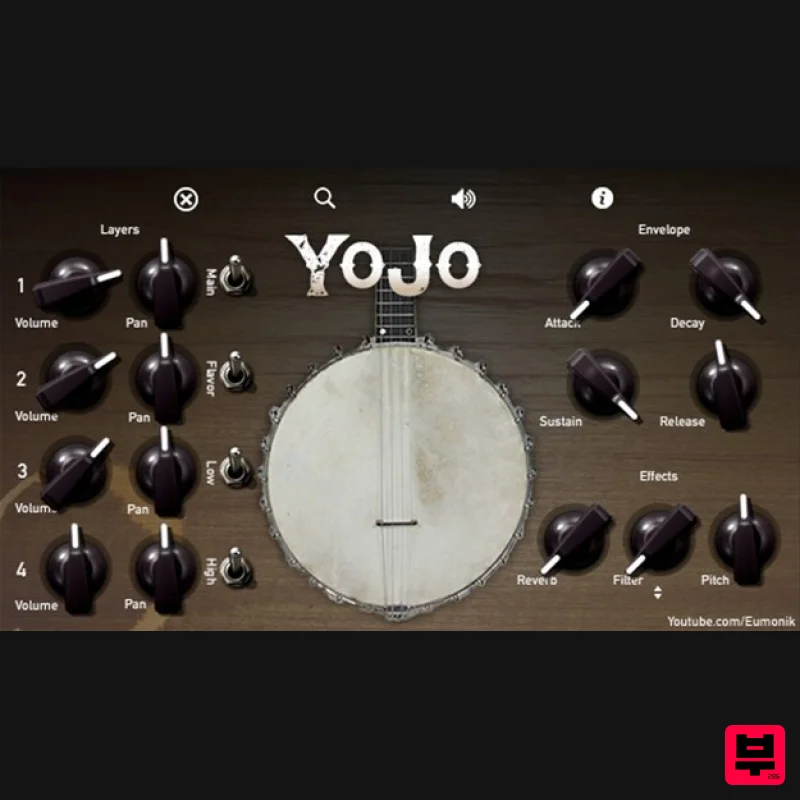
Reflekt Audio and Eumonik have worked together to bring you guys to bring music makers across the globe a 100% FREE vst plugin they like to call the “YoJo”. The YoJo is a free virtual banjo instrument that consist of 4 layers that you can blend together to create a full and awesome banjo sound. Eumonik feels that banjo instruments should be used more outside of its respected classes, so here you go! Banjo, the most underestimated instrument in Hip Hop. Features 1 Free Virtual Banjo Instrument Windows/Mac Compatible All Daw Compatible (Excluding Pro Tools) Unzipped File Size: 1.24GB Zipped File Size: 634MB 4 Blend-able Layers Envelopes A,D,S,R Filter W/Filter Type Reverb Pitch System Requirements Mac/Windows Compatible Works In Most DAWs (Excluding Pro Tools) Note: Xylo Toy is used as an example. Mac Installation 1. Download the .zip file from within your Plugin Boutique User Account > Double-click it to extract the contents. 2. Navigate to the folder that contains the AU and VST3 components > copy the necessary files. 3. Navigate to the file path Macintosh HD:/Library/Audio/Plug-Ins/Components/ > Paste the component in this folder. 4. Navigate to the file path Macintosh HD:/Library/Audio/Plug-Ins/VST 3 > Paste the .vst3 file in this folder. Your software is now installed and ready to use within your DAW. Windows 32-bit Installation 1. Download the .zip file from within your Plugin Boutique User Account > Double-click it to extract the contents. 2. Open the x32 folder. 3. Select 'Xylo Toy.dll' > copy the necessary file. 4. Navigate to the file path C:\Program Files (x86)\Common Files\VST3 > Paste the 'Xylo Toy.dll' file in this folder. Your software is now installed and ready to use within your DAW. Windows 64-bit Installation 1. Download the .zip file from within your Plugin Boutique User Account > Double-click it to extract the contents. 2. Open the x64 folder. 3. Select 'Xylo Toy.dll' > copy the necessary file. 4. Navigate to the file path C:\Program Files\VST Plugins > Paste the 'Xylo Toy.dll' file in this folder. Your software is now installed and ready to use within your DAW.
Additional Information
About the Reflekt Audio YoJo
Discover the distinctive sound and feel of the Reflekt Audio YoJo, a standout choice among Virtual Instruments.
Why Choose the Reflekt Audio YoJo?
- •Authentic Reflekt Audio craftsmanship and design
- •Versatile sound suitable for multiple musical genres
- •Professional build quality and reliable performance
- •Part of Reflekt Audio's respected Virtual Instruments lineup
Compare & Explore
Browse our complete selection of Reflekt Audio instruments or explore other Virtual Instruments options. Use our comparison tools to find the perfect match for your musical style and budget.
Similar Products

MeldaProduction Electric Keys - Tines
Virtual Instruments

MNTRA Instruments Nagual
Virtual Instruments

Safari Audio Cubby
Virtual Instruments

ZAK Sound Asteroid
Virtual Instruments

Boom SWAMPS - 3D Surround
Virtual Instruments

ZAK Sound Lyra
Virtual Instruments

Audiomodern Opacity 2: Soundbox Instrument
Virtual Instruments

UJAM BEAUTYFLUTE Pro
Virtual Instruments

