
Lunacy Audio CUBE Mini
Professional music gear - detailed information and where to buy
Lunacy Audio
CUBE Mini
Product Info
* Prices may vary. Check retailer for current pricing and availability.
Product Description
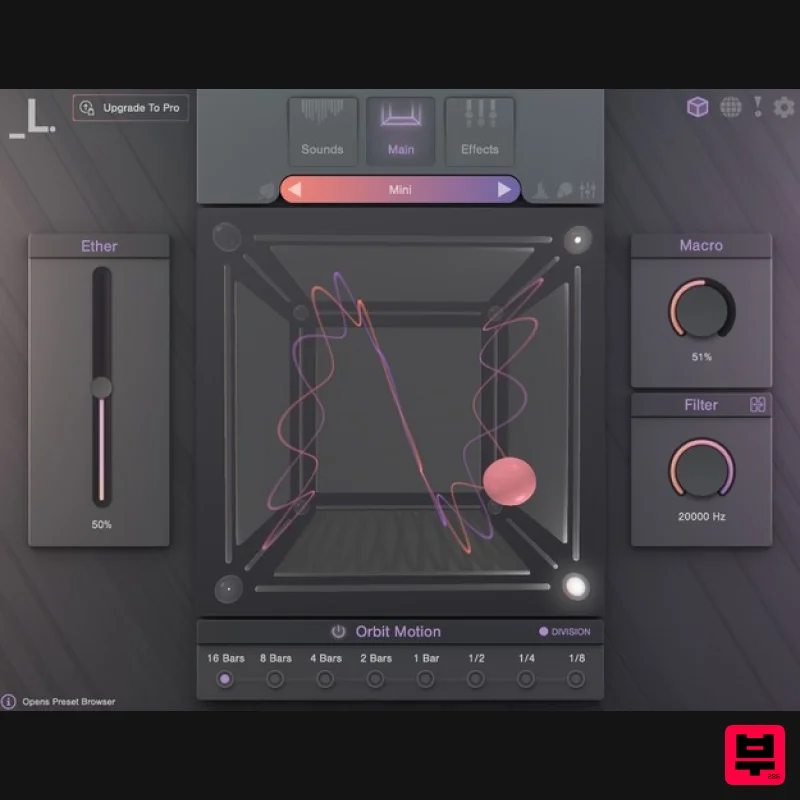
- 3D Sample Morphing at Your Fingertips CUBE Mini is a game-changing sampler and vector synth plugin for immediate sonic inspiration. Using the same award-winning engine and seamless 3D interface that powers CUBE
- Mini unlocks 35 expertly-crafted sampled instruments
- 120 hype-worthy presets
- and a curated set of essential sound design tools
- all perfectly suited for modern electronic
- hip hop
- and genre-bending tracks. A Portal to a New Sonic Dimension CUBE Mini’s vector orbit system automatically blends up to 8 advanced samplers with a 3D interface to create never-heard-before evolving sounds and textures. Reverse
- loop
- arpeggiate and tweak the built-in sound library for infinite variations
- or spice up presets with CUBE Mini’s deep FX suite
- featuring gritty distortion
- lush reverbs
- dazzling delays
- and much more. An Expansive Sonic Palette with Infinite Possibilities 35 sound sources - an eclectic mix of multi-sampled instruments
- featuring wild analogue synths
- lush pads
- crisp percussion hits
- vivid strings
- intimate keys
- and more 120 stunning presets - painstakingly crafted by Lunacy’s collective of expert sound designers
- using cutting-edge processing techniques 8 robust sample editors - each with an arpeggiator
- filters
- envelopes
- step sequencers
- reverse
- monophonic
- glide
- and tuning 13 FX Modules - filters
- visual EQ
- saturation
- waveshaping distortion
- bitcrusher
- compressor
- chorus
- phaser
- delay
- algorithmic reverb
- convolution reverb
- limiter Expandable content - broaden CUBE’s palette even further with Air for hybrid winds
- Threads for experimental strings
- and Rumble for massive synth bass and percussion. Randomization - create unique new patches with a simple click of a button Eco-Mode - a special CPU saving feature that minimizes RAM usage and CPU load System Requirements macOS 10.15+ AU / VST3 / AAX / Standalone Windows 7+ 64 bit VST3 / AAX / Standalone Supported by all major DAWs At least 4 GB of RAM (8 GB recommended)
- and 2 GB of free drive space. Access to a stable internet connection for downloading and activating the product is required. Important note: When accessing this software via a Rent to Own plan or the Beatport Studio membership
- it's installed and run through the Beatport Access portal. An internet connection is required every 30 days to validate your license. Awards MusicTech "It’s not often we’re left open-mouthed by how good a synth is
- but Cube has us gawping like village idiots." 9/10 Sound On Sound “With CUBE you are unlikely to run out of novel sonic options any time soon… there are endless potluck options available to inspire.” FutureMusic “A very impressive soft synth
- intuitive and extremely easy to produce cool
- unique sounds.” - The Best New Synths of 2021 Important note: If you have purchased CUBE using our Rent To Own payment option or via a Beatport Studio Membership
- please follow this link for installation instructions - Lunacy Audio CUBE Rent To Own Installation Guide. Registration 1. Go to https: //lunacy.audio/register. 2. Enter your email address
- the password you wish to use and your License Key which can be found in your Plugin Boutique User Account. 3. Download the relevant CUBE Full Installer. Mac Installation 1. Download the installer from your Plugin Boutique user account and extract the zip folder. 2. Run the "CUBE_Installer_Mac_v1.0.1.dmg" installer. 3. Run the left "CUBE_v1.0.1.pkg" under the heading "Install the plugin". 4. Click "Continue". 5. Click "Continue". 6. Click "Agree". 7. Click "Install". 8. Click "Close". 9. Run the right "CUBE_Samples.pkg" under the heading "Install the samples". 10. Click "Continue". 11. Click "Install". 12. Click "Close". 13. Launch your DAW and create a new stereo instrument track
- then insert CUBE onto the channel. 14. Enter your 20 digit serial code. This can be found on your My Account page. Make sure to include the first 4 letters. Then click Activate. Your software is now activated and ready to use. Windows Installation 1. Download the installer from your Plugin Boutique user account and extract the zip folder. 2. Run the first installer "01_CUBE Plugin Installer v1.0.1.exe". 2. Click "I accept the agreement"
- then click "Next". 3. Click "Install". 4. Click "Finish". 5. Now run the second installer "02_CUBE Samples Installer.exe". 6. Click "Next". 7. Click "Install". 8. Click "Finish". 9. Launch your DAW and create a new stereo instrument track
- then insert CUBE onto the channel. 10. Enter your 20 digit serial code. This can be found on your My Account page. Make sure to include the first 4 letters. Then click Activate. Your software is now activated and ready to use.
Additional Information
About the Lunacy Audio CUBE Mini
The Lunacy Audio CUBE Mini represents excellent craftsmanship in the Virtual Instruments category.
Why Choose the Lunacy Audio CUBE Mini?
- •Authentic Lunacy Audio craftsmanship and design
- •Versatile sound suitable for multiple musical genres
- •Professional build quality and reliable performance
- •Part of Lunacy Audio's respected Virtual Instruments lineup
Compare & Explore
Browse our complete selection of Lunacy Audio instruments or explore other Virtual Instruments options. Use our comparison tools to find the perfect match for your musical style and budget.
Similar Products

ZAK Sound Asteroid
Virtual Instruments

Boom SWAMPS - 3D Surround
Virtual Instruments

ZAK Sound Lyra
Virtual Instruments

MeldaProduction Electric Keys - Tines
Virtual Instruments

UJAM BEAUTYFLUTE Pro
Virtual Instruments

Audiomodern Opacity 2: Soundbox Instrument
Virtual Instruments

MNTRA Instruments Nagual
Virtual Instruments

Safari Audio Cubby
Virtual Instruments

