
Loopcloud DRUM
Professional music gear - detailed information and where to buy
Loopcloud
DRUM
Product Info
* Prices may vary. Check retailer for current pricing and availability.
Product Description
- Unique Drums in Seconds When it comes to creating drums
- every producer is different. Whether you create kits from scratch or intricately edit loops
- Loopcloud DRUM will enhance the way you work with beats. DRUM turns samples into expressive kits
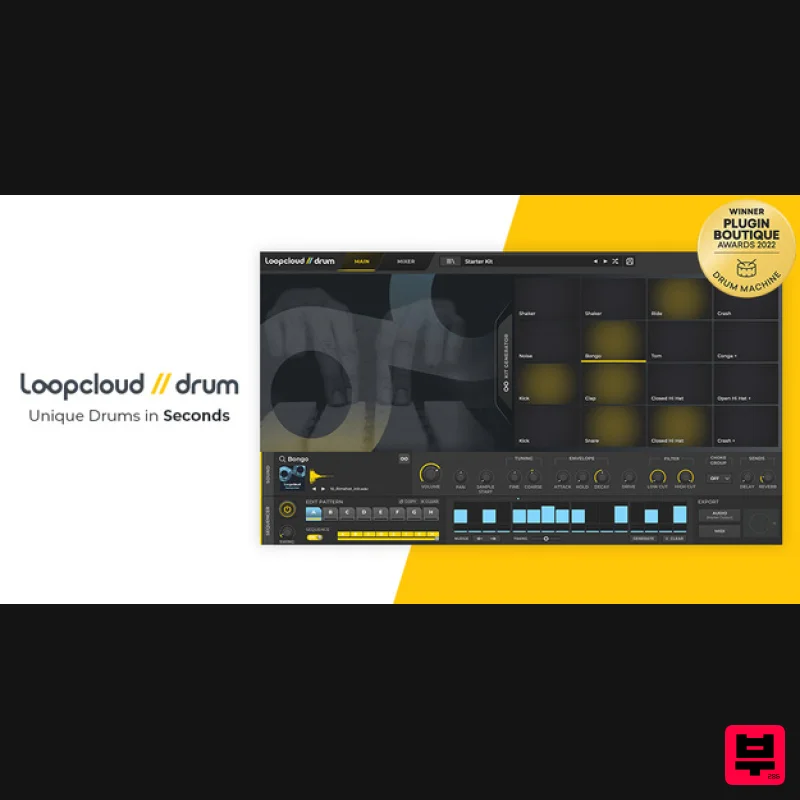
- bringing together pro-quality sounds and unique rhythm combinations to inspire unexplored grooves. Building beats from scratch? DRUM’s 16 powerful pads have everything you need to create unique loops and kits. You can use DRUM to sequence
- trigger
- or play in rhythms easily. Patterns can be programmed and edited quickly with nudge
- timing
- and velocity controls available at every step
- mixing each sound on the fly with adjustable parameters on all 16 pads. If your drum library is a little light
- DRUM’s 1000 sounds and 30 kits will instantly inspire. And when you’re ready
- Loopcloud’s extensive catalogue is ready to open up a world of sound. Every sample comes with the Loopmasters stamp of approval. If it’s not professional quality
- it doesn’t make it into the Loopmasters library. The intelligent Kit Generator inspires fresh ideas with every click. Set an instrument per pad
- hit ‘Generate kit’
- and 16 pads are instantly filled. Complete kits or individual sounds can be swapped instantly. To create your perfect kit
- keep pressing ‘Generate kit’ as you search and preview samples in real-time
- locking the pads you like. DRUM works with any sample
- whether it’s loaded up from Loopmasters’ huge collection or your own personal library. Creating and chopping up loops? DRUM is your very own loop factory. Every time you shuffle kits
- patterns
- or samples
- you’re creating new rhythms and loops to explore in your tracks. Simply export the audio or MIDI directly to your DAW and save it for future sessions. DRUM remembers every kit in its history
- allowing you to rework and revisit rhythms that have the potential for future productions. DRUM will inspire the current tracks you’re working on
- or you can use it to grow an ever-expanding loop library that will inspire you across genre
- style
- and beyond! When your rhythm is ready to add to your DAW
- drag-and-drop audio or MIDI files straight into your session
- or route individual drum sounds to specific tracks with DRUM’s intuitive multi-outputs. Every element of your percussive patterns is yours to control. Need to organise your samples? Tagging is an essential part of managing your samples and loops
- and when DRUM links with Loopcloud
- all the hard work is done for you
- automatically. Veteran producers will love the intuitive workflow for tagging
- organising
- and getting creative with your samples. Loopcloud uses its advanced AI-powered tagging technology to add instrument tags to all your content. No more manual sorting and organising – just sample searches and a faster production workflow. Add a tag to any folder with label and genre tags. Label tags mark your personal sound folders – for example
- ‘Modular Synth Samples’ – so you can quickly locate specific samples to create custom-made kits. Genre tags keep your genre-specific samples in check. Want to make a kit just using House and Garage samples? Just filter the genre tag you need. DRUM will find your sounds whether they’re on your laptop
- hard drive
- or in the cloud. If you want to strengthen your library
- more sounds can be added directly from the Loopmasters library. With 20 years of music production knowledge and expert sample curation
- millions of expertly designed sounds and kits are at your fingertips. Find every sample from your personal collection alongside your Loopmasters library: tagged
- organised
- and ready to go. What's included? Loopcloud DRUM comes with over 1000 drum samples and 30 ready to go presets to kickstart your beat creations. Included in this package you will receive a full lifetime license of Loopcloud DRUM alongside a curated selection of drum and percussion sounds and featuring full drum kits from artists such as Maribou State
- Breakage
- Sebastien Leger and
- together with one Loopcloud DRUM EXP collection loaded with extra percussion samples and starter kit templates. Use the provided full production kits as song inspirations
- grab a stripped-back starter kit to get your beat up and rolling fast
- or choose to spawn new creations with the amazing Generate Kit button. 1300 One Shot Samples 20 Full Production Kits 11 Starter Kits <iframe frameborder="0" height="315" src="https: //www.youtube.com/embed/EcCmFoKKlDU" width="560"></iframe> Features Loopcloud Connected Kit Generator Single button press swaps the samples on 1>16 pads with samples from your library Kit Generation history to quickly reload 32 previous Kit Generations Pad lock
- keeping loaded sample on any pad-locked from the Generator Use any factory sample
- or import your samples from your local drive Loopcloud AI will auto-tag all samples with the correct drum/instrument type Or drag and drop any .wav or .aiff file directly to the pads 16 Pad Drum Sampler with the following Controls Volume and pan Fine and coarse pitch Amp Envelope HP and LP Filter Delay and Reverb Send Mixer with FX and Multi Outputs Delay and Reverb send controls Master Lo-Fi
- Distortion
- ‘DJ’ filter
- and Limiter 16 assignable stereo outputs 16-Step
- 8 Bar Chainable Sequencer with Swing Velocity and roll per step Micro timing
- step nudge
- pattern generator per lane Triggerable using keys C3-G3 with instant pattern jump Audio MIDI Export Drag and drop audio mixdown or MIDI file to your DAW All exports are imported and AI tagged in the Loopcloud app System Requirements Mac macOS 10.15 and later (earlier OS should work but are not officially supported) (M1 Apple Silicon not supported) VST
- VST3
- AU Windows Windows 10 and later (earlier OS should work but are not officially supported) (64-bit only) VST
- VST3 Additional Information Internet connection is required for the first-time launch of the plugin. The Loopcloud application is installed with Loopcloud DRUM. It is required to be running on your computer for Loopcloud DRUM to work. DRUM is NOT compatible with MOTU Digital Performer. VST2 and VST3 not compatible with the DAW 'Waveform PRO' MusicRadar “DRUM will considerably enhance your sampling setup
- with dense tonal manipulation and originality encouraged.” Loopcloud DRUM VST Installation & Syncing Tutorial <iframe allow="accelerometer; autoplay; clipboard-write; encrypted-media; gyroscope; picture-in-picture" allowfullscreen="" frameborder="0" height="315" src="https: //www.youtube.com/embed/3D9CB7bicOs" title="YouTube video player" width="560"></iframe> Connect your Plugin Boutique and Loopmasters Accounts 1. Click the yellow 'Connect' button. 2. Either register for a Loopmasters account and click 'Get Started'
- or log in to your existing account and click 'Login'. 3. If you are setting up a new Loopmasters account
- confirm your account via the link in your email inbox. 4. Navigate back to your web browser and click 'Authorize'. 5. Your Loopmasters and Plugin Boutique accounts are now connected > Click 'Download' to download the application installer. Mac 1. Launch the 'Install Loopcloud x.x.x Mac.pkg' installer. 2. Click 'Continue'. 3. Click 'Continue'. 4. Click 'Agree'. 5. Click 'Continue'. 6. Click 'Install'. 7. Enter your system password > Click 'Install Software'. 8. Click 'Close'. 9. Launch the Loopcloud application > Enter your Loopcloud account details > Click 'Login'. 10. After logging in to Loopcloud
- your account will synchronise and add all the content from your purchase. 11. Launch your DAW and insert Loopcloud DRUM on a new instrument channel > Click 'Start Creating'. Loopcloud DRUM is now installed and ready to use. Windows 1. Launch the 'Install Loopcloud_x.x.x_Windows.exe' installer. 2. Click 'I accept the agreement' > Click 'Next'. 3. Click 'Next'. 4. Click 'Next'. 5. Click 'Next'. 6. Click 'Next'. 7. Click 'Next'. 8. Launch the Loopcloud application > Enter your Loopcloud account details > Click 'Login'. 9. After logging in to Loopcloud
- your account will synchronise and add all the content from your purchase. 10. Launch your DAW and insert Loopcloud DRUM on a new instrument channel > Click 'Start Creating'. Loopcloud DRUM is now installed and ready to use.
Additional Information
About the Loopcloud DRUM
The Loopcloud DRUM represents excellent craftsmanship in the Virtual Instruments category.
Why Choose the Loopcloud DRUM?
- •Authentic Loopcloud craftsmanship and design
- •Versatile sound suitable for multiple musical genres
- •Professional build quality and reliable performance
- •Part of Loopcloud's respected Virtual Instruments lineup
Compare & Explore
Browse our complete selection of Loopcloud instruments or explore other Virtual Instruments options. Use our comparison tools to find the perfect match for your musical style and budget.
Similar Products

ZAK Sound Lyra
Virtual Instruments

UJAM BEAUTYFLUTE Pro
Virtual Instruments

Boom SWAMPS - 3D Surround
Virtual Instruments

ZAK Sound Asteroid
Virtual Instruments

MNTRA Instruments Nagual
Virtual Instruments

Audiomodern Opacity 2: Soundbox Instrument
Virtual Instruments

Safari Audio Cubby
Virtual Instruments

MeldaProduction Electric Keys - Tines
Virtual Instruments

