
Karanyi Sounds Lofi Keys
Professional music gear - detailed information and where to buy
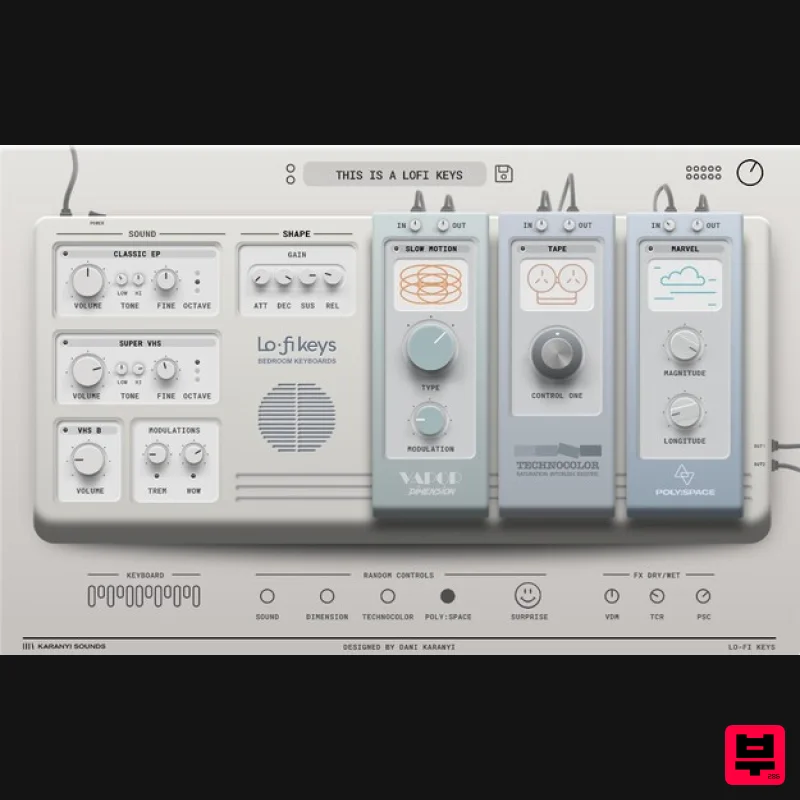
Karanyi Sounds
Lofi Keys
Product Info
* Prices may vary. Check retailer for current pricing and availability.
Product Description
- Daytime Dreams Lofi Keys VST
- AU plugin for Mac & Windows brings the classic lo-fi sound to your music productions with a radically simple user interface. It features legendary electric pianos and synth classics
- all resampled on vintage tape players
- cassettes
- and VHS players. Create dreamy themes for your lo-fi beats or add lush-sounding hybrid soundscapes to your scores. Cozy Spaces. Lazy Sounds The Lofi Keys VST instrument will give you access to 8 iconic electric pianos and analog synths including the award-winning Blüthner acoustic piano (from Midiwood by Richard Vossgatter)
- all in one place. You can freely combine these to get your own unique blend and process it with a line of creative effects and even noises (VHS
- Tape & Vinyl). Vintage Style. Modern Vibe. Create some truly inspiring sounds with Lofi Keys! Choose from 40 different sound sources on two sound slots. Add some extra touch with five different tape
- VHS and vinyl noise layers
- control the tape wow and shape your overall sounds with other super intuitive controls! Instant Sound Variations Impressive sounds from a single touch of your finger! With the ' Random' control
- you can create exciting fresh new sounds with just one click! 3 Exceptional Effect Units Lofi Keys comes with 3 amazing effect units to bring you the desired lo-fi vibe. Dimension is a vintage chorus module from the famous Vapor Keys series
- Technocolor is a newly designed exciter and Poly Space is Karanyi Sounds' best-selling reverb FX module. These modules include over 30 various effect algorithms that will make your sound authentic right away! Features 40+ Factory & Artist presets Studio-grade sounds from legendary instruments 2 sound layers for blending A streamlined set of controls (all MIDI-learnable) including: Volume ADSR Sound layer controls: volume
- fine-tune
- octave
- tone eq Different noises for colouring: VHS
- Tape
- Vinyl Modulators: Tremolo; Wow Main Gain Effect rack including: Vapor Dimension – Chorus effect variations from Vapor Keys Technocolor – Exciter FX custom made for this instrument for advanced character shaping Poly Space – A much-loved reverb fx for lush
- unreal spaces Effect presets for easy dial-in Dry/Wet knobs for a mix In/Out Gain for each effect Randomizer technology
- including: Random instrument sources (Modules) Random Sound controls (ADSR
- modulators
- etc.) Random effects (All the 3 FX modules separately) Surprise ( Random All) System Requirements Mac macOS 10.11 or higher (Intel / M1 Apple Silicon supported) (64-bit only) 4 GB of RAM (8 GB recommended) 2 GHz CPU with at least 4 cores 2 GB Free Disk Space AU
- VST3 Windows Windows 7 or higher (64-bit only) 4 GB of RAM (8 GB recommended) 2 GHz CPU with at least 4 cores 2 GB Free Disk Space VST3 Please Note: Pro Tools and Maschine are NOT supported. Please note: Minipol is used as the example. Mac 1. Download the .zip from within your Plugin Boutique User Account and double-click it to extract the contents > Open the .pkg file to begin the installation. 2. Click 'Continue'. 3. Click 'Continue'. 4. Click 'Agree'. 5. Click 'Install'. 6. Click 'Close'. 7. Click 'Install Samples'. 8. Click 'OK'. 9. Navigate to the .hri file included in the downloaded .zip > Click 'Open'. 10. Click 'OK'. 11. Navigate to where you would like to install the samples to > Click 'Open'. 12. Click 'OK'. 13. Click 'OK'. 14. Click 'Ignore' and close the software. 15. Launch the software again > Enter the serial number from your Plugin Boutique User Account > Click 'AUTHORISE'. The software is now authorised and ready for use! Windows 1. Download the .zip from within your Plugin Boutique User Account and double-click it to extract the contents > Open the .exe file to begin the installation. 2. Click 'Next'. 3. Select 'I accept the agreement' > Click 'Next'. 4. Click 'Next'. 5. Click 'Next'. 6. Click 'Next'. 7. Click 'Install'. 8. Click 'Finish'. 9. Click 'Install Samples'. 10. Click 'OK'. 11. Navigate to the .hri file included in the downloaded .zip > Click 'Open'. 12. Click 'OK'. 13. Navigate to where you would like to install the samples to > Click 'OK'. 14. Click 'OK'. 15. Click 'OK'. 15. Click 'Ignore' and close the software. 16. Launch the software again > Enter the serial number from your Plugin Boutique User Account > Click 'AUTHORISE'. The software is now authorised and ready for use!
Additional Information
About the Karanyi Sounds Lofi Keys
The Karanyi Sounds Lofi Keys combines traditional design with modern performance for Virtual Instruments enthusiasts.
Why Choose the Karanyi Sounds Lofi Keys?
- •Authentic Karanyi Sounds craftsmanship and design
- •Versatile sound suitable for multiple musical genres
- •Professional build quality and reliable performance
- •Part of Karanyi Sounds's respected Virtual Instruments lineup
Compare & Explore
Browse our complete selection of Karanyi Sounds instruments or explore other Virtual Instruments options. Use our comparison tools to find the perfect match for your musical style and budget.
Similar Products

ZAK Sound Asteroid
Virtual Instruments

Audiomodern Opacity 2: Soundbox Instrument
Virtual Instruments

ZAK Sound Lyra
Virtual Instruments

MNTRA Instruments Nagual
Virtual Instruments

UJAM BEAUTYFLUTE Pro
Virtual Instruments

MeldaProduction Electric Keys - Tines
Virtual Instruments

Boom SWAMPS - 3D Surround
Virtual Instruments

Safari Audio Cubby
Virtual Instruments

