
BeatSkillz Papyrus Keys
Professional music gear - detailed information and where to buy
BeatSkillz
Papyrus Keys
Product Info
* Prices may vary. Check retailer for current pricing and availability.
Product Description
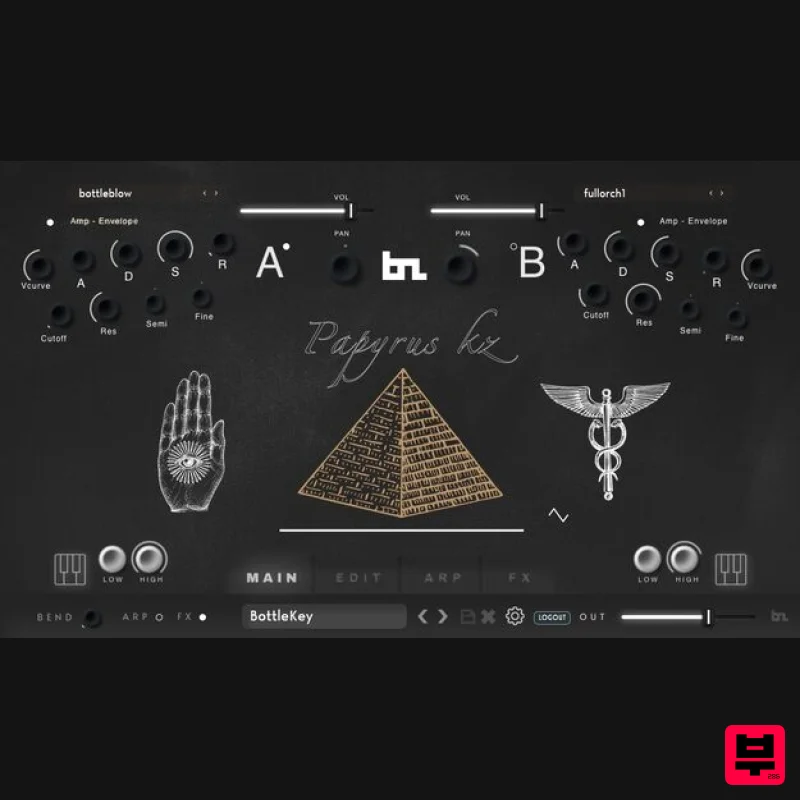
- Papyrus Keys is a virtual instrument with a collection of sounds inspired by New Age artists of the 80s and 90s like Enigma
- DeepForest
- Vangelis
- Enya
- and others. Lush Pads
- Nature sounds
- Lead Flutes
- and other Orchestral and World Elements are bundled into one instrument to inspire you. All sounds are professionally produced and sampled and preset generated using BeatSkillz's own synthesis and effects engine. These are ready to play! Just go through the presets and you will be instantly inspired to make new music. Whether you make film soundtracks or pop music
- this is a must-have collection for all artists and composers. Factory Presets Comes Bundled with 200+ Factory Presets: 19 World Sounds
- 24 Pads
- 23 Elements
- 11 Voices
- 48 Orchestra Sounds
- 10 Sequences
- 23 Keys
- 18 Bass
- 13 Key Splits
- 6 Drums Kits
- and 9 Synth sounds. Multi-Sample Maps 17 Bass maps
- 6 Drum kits maps
- 14 Elements maps
- 5 guitar maps
- 23 Keys maps
- 32 Orchestra maps
- 20 Pads maps
- 14 Synths maps
- and 17 World maps. The 2 Multisample Maps Engines A and B can be Layered or Split on the keyboard with automatic assignment via MIDI. All Controls on the plugin are MIDI mappable easily with a “right-click”. Library Relocate Easily place the content on any internal or external drive of your computer and just use the settings icon to. Locate your library once. You can move the content anywhere at any time and re-connect it with the plugin. Synthesis Features Amp Envelope – ADSR Filter envelope – ADSR Pitch Envelope – ADSR3 LFOs for Filter
- Volume
- and Pitch respectively. All Syncable to tempo. Features Rate and Depth Controls. Analog Modelled Ladder Filter with LP
- and BP modes with 12 or 24dB / Oct selections. Filter Cutoff and Resonance controls. Pitch Transpose
- Tune. Portamento (Glide) with rate parameter. Velocity to Volume Curve adjustment & Velocity to Filter Cutoff Curve Adjustment. Arpeggiator Up to 32-step Arpeggiator synced to tempo with Modulation in steps for Velocity
- Note Length
- and Pitch. Save your own patterns and load factory patterns. Step Increment
- Swing
- and other features are also implemented. FX Engine Reverb
- Chorus/Flanger
- Phaser
- 4 Band EQ
- Compressor
- Drive
- Bit Crusher
- Delay
- and Stereo Expander. Features 200+ Factory Presets 2 Multisample Maps Engines Library Relocate 32 step Arpeggiator 9 Swappable Effects available Edit/Save Presets and Arps System Requirements Mac macOS 10.14 Mojave or later (macOS Big Sur / M1 Mac supported) VST3
- AAX (64-bit only) Intel i5 or later / AMD Athlon 64 or equivalent 2 GB RAM / 300 MB HD Required Screen resolution: 1024×768 Windows Windows 10 or later VST3
- AAX (64-bit only) Intel i5 or later / AMD Athlon 64 or equivalent 2 GB RAM / 300 MB HD Screen resolution: 1024×768 Important Note: Chorust is used as an example. Installation Windows 1. Download the installation package from within your Plugin Boutique User Account and extract the contents. Launch the .exe file. 2. Click 'Install'. 3. Once installed
- click 'Finish'. Important note: To install the content
- download and extract the content file. Click the settings (cog) icon in Papyrus Keys and select the folder containing the extracted content. Mac 1. Download the installation package from within your Plugin Boutique User Account and extract the contents. Launch the .pkg file. 2. Click 'Continue'. 3. Click 'Continue'. 4. Click 'Install'. 5. Once installation is complete
- click 'Close'. Activation 1. Open the plugin within your DAW
- and click 'Register'. Alternatively
- if you already have an account on Beatskillz or Tone Empire
- enter your existing email ID and Password
- and click 'Login'. 2. You will be taken to the BeatSkillz/Tone Empire registration page. Enter your details here in the provided boxes
- and click 'Register'. 3. Having input your information
- you will now receive a verification email to your email address. Navigate to this
- and click the 'Click Here' link inside. 4. Head back to the plugin dialogue box within your DAW
- and enter the details exactly as they were input to the BeatSkillz/Tone Empire registration page in step 2. Click 'Login'. 5. Enter the serial number from within your Plugin Boutique User Account
- and click 'Activate'. Important note: To install the content
- download and extract the content file. Click the settings (cog) icon in Papyrus Keys and select the folder containing the extracted content. 6. Your plugin is now activated and ready to use!
Additional Information
About the BeatSkillz Papyrus Keys
The BeatSkillz Papyrus Keys represents excellent craftsmanship in the Virtual Instruments category.
Why Choose the BeatSkillz Papyrus Keys?
- •Authentic BeatSkillz craftsmanship and design
- •Versatile sound suitable for multiple musical genres
- •Professional build quality and reliable performance
- •Part of BeatSkillz's respected Virtual Instruments lineup
Compare & Explore
Browse our complete selection of BeatSkillz instruments or explore other Virtual Instruments options. Use our comparison tools to find the perfect match for your musical style and budget.
Similar Products

ZAK Sound Lyra
Virtual Instruments

Boom SWAMPS - 3D Surround
Virtual Instruments

MNTRA Instruments Nagual
Virtual Instruments

ZAK Sound Asteroid
Virtual Instruments

UJAM BEAUTYFLUTE Pro
Virtual Instruments

Audiomodern Opacity 2: Soundbox Instrument
Virtual Instruments

Safari Audio Cubby
Virtual Instruments

MeldaProduction Electric Keys - Tines
Virtual Instruments

