
Smartelectronix Ambience
Professional music gear - detailed information and where to buy
Smartelectronix
Ambience
Product Info
* Prices may vary. Check retailer for current pricing and availability.
Product Description
- Ambience is a reverb that rivals the quality of the best commercial reverbs. It also includes some unusual functions
- like a gater and a very useful hold function. Due to the superior quality of the plugin and its array of useful presets and functions
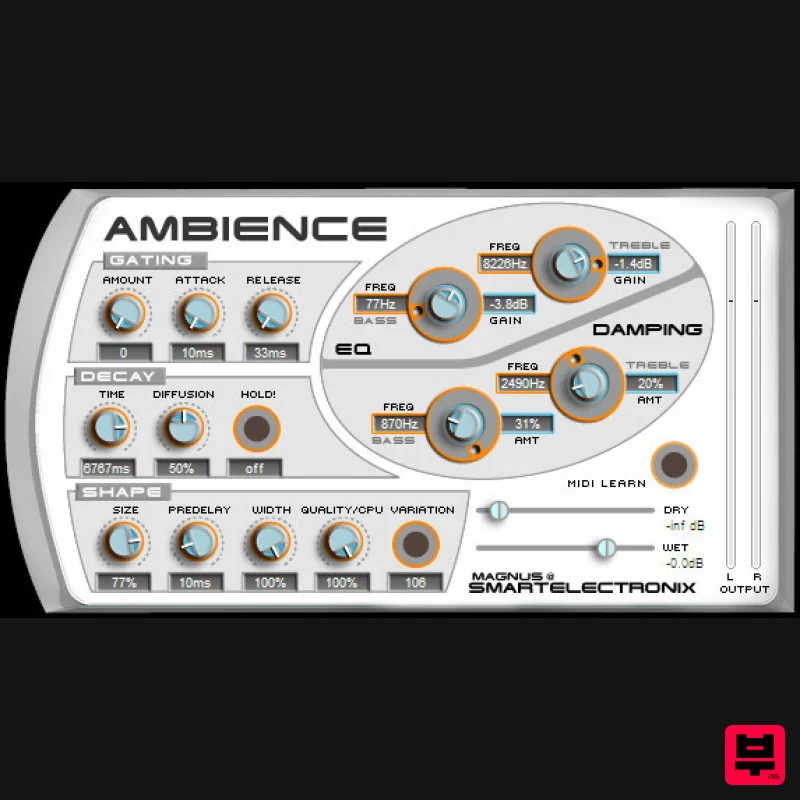
- the Ambience plugin has become somewhat of a free VST "Classic". Features Presets: An array of quality presets are included! Dry: Gain of direct (unprocessed) sound. To use Ambience as a send effect
- set this to -inf. Wet: Gain of processed sound. Time: The time it takes for the reverb echoes to die out. Size: The size of the room. Note that long reverb time and room size don't mix well. For natural sounds
- a room size should be accompanied by a short reverb time
- and vice verse. Pre-Delay: Amount of delay between the direct sound and the onset of the first echoes. Width: All the way from mono (0%) to wide stereo (100%). Probably you will want this one at 100% all the time. Quality: This knob allows you to trade off reverb quality for CPU usage. High quality <=> high cpu usage. You can make fun effects if you set it very low (try it!). Variation: This button creates a new variant of the same room. If there's some annoying echo/ringing in the reverb that bugs you
- hit this button a few times until you find a variation that you like. If it still sounds bad to you
- try raising the Quality too. More Advanced Controls: The best way to learn these is probably by trying them out and experimenting yourself
- but here are some hints: The Damping Section - This affects how the reverb's character develops over time as it decays. Use it to control the decay time of bass and treble. In normal rooms
- bass and especially treble decay quicker than the mid range. The EQ Section - This is like putting a big equalizer on the reverb. And in fact it is : ) It's mostly useful for cutting away bass that can otherwise make the reverb sound muddy. The Gating Section - If you want natural reverb
- abandon this section at once! Otherwise if you are in an experimental mood
- you may use this one to make the reverb follow the dynamics of the audio input. Can be useful if you want to preserve rhythm while still having a very wet reverb. Hold - When you press this
- the reverb will freeze at it's current sound
- holding it indefinitely until you press it again. Great if you want to create a lush pad from a plucked string or a hihat or whatever you can imagine. Try combining with the gater. Diffusion - This knob has a very subtle effect on the sound. It is especially noticable with room sizes. System Requirements Windows XP or higher (VST
- 32-bit support) Mac OS X (AU
- 64-bit and 32-bit support) Mac Installation: 1. Unzip the download file in your Plugin Boutique User Account and add the Ambience.Component file to the correct location on your computer
- following the instructions in the Ambience-README.txt file. PC Installation: 1. Unzip the download file in your Plugin Boutique User Account and add the Ambience.dll file to your VST Plugins folder. ENJOY!
Additional Information
About the Smartelectronix Ambience
Experience the quality and tone that makes the Smartelectronix Ambience a popular choice for musicians.
Why Choose the Smartelectronix Ambience?
- •Authentic Smartelectronix craftsmanship and design
- •Versatile sound suitable for multiple musical genres
- •Professional build quality and reliable performance
- •Part of Smartelectronix's respected Reverb lineup
Compare & Explore
Browse our complete selection of Smartelectronix instruments or explore other Reverb options. Use our comparison tools to find the perfect match for your musical style and budget.
Similar Products

Vegas Audio Fabricverb
Reverb

PSP Audioware PSP EasyVerb
Reverb

DDMF MagicVerb
Reverb

PSP Audioware PSP Pianoverb 2
Reverb

PSP Audioware PSP Nexcellence
Reverb

XHUN Audio ShineVerb
Reverb

Initial Audio AR1 Reverb
Reverb

DDMF Envelope
Reverb

