
PSP Audioware PSP EasyVerb 2
Professional music gear - detailed information and where to buy
PSP Audioware
PSP EasyVerb 2
Product Info
* Prices may vary. Check retailer for current pricing and availability.
Product Description
- PSP EasyVerb v.2
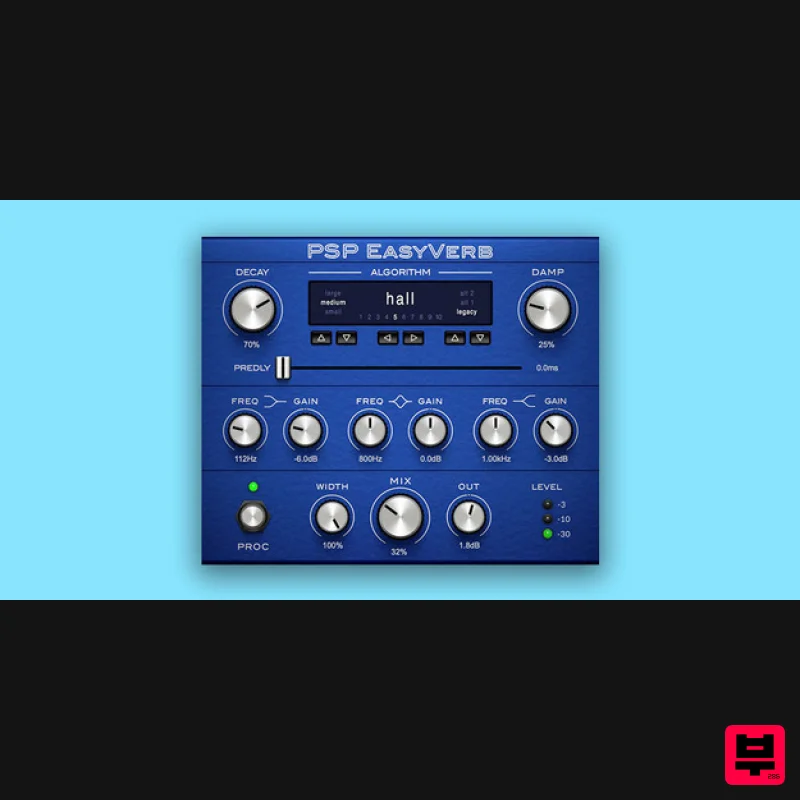
- is a multipurpose algorithmic reverberation processor designed to simulate physical spaces or popular reverb machines such as plate and spring reverbs. In developing this plug-in
- the PSP team tried to make it simple to use
- while offering enough control over each algorithm for you to customize the effect to your specific needs. In other words
- they wanted to offer you a reverb that is operationally “easy
- ” but sonically complex! PSP EasyVerb consists of ten algorithms: Ambience
- Room
- Chamber
- Club
- Hall
- Arena
- Cathedral
- Spring
- Plate and Reverse. Each of algorithm exists in three variations. The Legacy variation is the room tuning from PSP EasyVerb version 1
- for current users who don’t want to lose their original sounds. The other two variations
- Alt1 and Alt2
- are new as of version 2. Each of the algorithms can also be set to one of three sizes: Medium
- and Large. The Medium size corresponds to the setting for PSP EasyVerb version 1 – use this setting with the Legacy algorithm to faithfully recreate the sound of version 1. Each algorithm has adjustable parameters for Decay (reverb time)
- Damp (high frequency damping to simulate darker rooms) and Predelay. The reverb's frequency spectrum can be then shaped with a 3-band semi-parametric equalizer. <iframe allow="autoplay" frameborder="no" height="450" src="https: //w.soundcloud.com/player/?url=https%3A//api.soundcloud.com/playlists/1919960219&color=%2300bfff&auto_play=false&hide_related=false&show_comments=false&show_user=false&show_reposts=false&show_teaser=false" width="100%"></iframe> Features Algorithm Variations: Legacy: This is the original sound from PSP EasyVerb version 1
- for seamless compatibility with your existing projects – and it still sounds amazing
- too! Alt1 & Alt2: These new variations
- introduced in version 2
- give you expanded creative options with their lush new tonalities. Algorithm Size Options: Medium*
- and Large: *Medium: Matches the Room size setting from PSP EasyVerb version 1. When you combine Medium size with the Legacy algorithm
- you’ll have access to the authentic (and beloved!) sound of PSP EasyVerb version 1. Adjustable Parameters: Decay: Controls the reverb time to shape the overall room character. Damp: High-frequency damping for darker room simulations. Predelay: Adjusts the delay before the reverb starts to help you build convincing large spaces. 3-Band Semi-Parametric Equalizer: This EQ offers upper and lower shelving bands (that can also work as highpass and lowpass filters) as well as a peaking mid band. You can shape the reverb's frequency spectrum for precise tonal adjustments or to create drastic new effects. System Requirements Mac OS 10.14 Mojave - 15 Sequoia (64-bit) AU / VST / VST3 / AAX compatible host application Up-to-date iLok License Manager application required Windows Windows 7 - 11 VST / VST3 / AAX compatible host application Up-to-date iLok License Manager application required Please Note: PSP VintageWarmer2 is used as an example. Activation 1. Visit the PSP Registration Centre and create/log into your PSPaudioware account. 2. Select the Manual Product Activation link and copy and paste/manually enter the serial number that is provided with your User Account. > click 'Activate!.' 3. Your PSP product will now show up in your PSP customer account. Your 30-digit iLok activation code will also be listed under authorization (PACE). Download the relevant installer. iLok Registration 1. Go to the iLok website and create a new account if you are not currently registered and do not have the iLok Licence Manager installed on your computer. 2. Download and install the iLok License Manager. 3. Open your iLok license manager application > click 'Sign In'. 4. Enter your iLok registered User ID and password > click ‘Sign In'. 5. Once you are signed in
- click the ‘Redeem’ icon which is located at the top-right corner of the iLok Licence Manager’s interface. 6. Copy and paste/manually enter the 30-digit code from your PSP Audioware account into the available Activation Code boxes
- and then click ‘Next'. 7. Select your activation destination > Click 'Activate'. 8. Click 'Ok'. Installation Mac 1. Open the recently downloaded .dmg file to begin the installation. 2. Click 'Continue'. 3. Click 'Continue'. 4. Click 'Continue'. 5. Click 'Agree'. 6. Click 'Continue'. 7. Click 'Install'. 8. Click 'Close'. 9. Open your DAW > Open your newly installed software. Your software is now activated and ready to use. PC 1. Open the recently downloaded .exe file to begin the installation. 2. Click 'Next >'. 3. Select 'I Accept the Agreement' > Click 'Next'. 4. Click 'Next >'. 5. Click 'Next'. 6. Click 'Next'. 7. Click 'Next' to begin the installation. 8. Click 'Finish'. 9. Open your DAW > Open your newly installed software. Your software is now activated and ready to use.
Additional Information
About the PSP Audioware PSP EasyVerb 2
Experience the quality and tone that makes the PSP Audioware PSP EasyVerb 2 a popular choice for musicians.
Why Choose the PSP Audioware PSP EasyVerb 2?
- •Authentic PSP Audioware craftsmanship and design
- •Versatile sound suitable for multiple musical genres
- •Professional build quality and reliable performance
- •Part of PSP Audioware's respected Reverb lineup
Compare & Explore
Browse our complete selection of PSP Audioware instruments or explore other Reverb options. Use our comparison tools to find the perfect match for your musical style and budget.
Similar Products

Initial Audio AR1 Reverb
Reverb

Vegas Audio Fabricverb
Reverb

XHUN Audio ShineVerb
Reverb

DDMF Envelope
Reverb

PSP Audioware PSP Pianoverb 2
Reverb

DDMF MagicVerb
Reverb

PSP Audioware PSP Nexcellence
Reverb

PSP Audioware PSP EasyVerb
Reverb

