
AudioThing Wires
Professional music gear - detailed information and where to buy
AudioThing
Wires
Product Info
* Prices may vary. Check retailer for current pricing and availability.
Product Description
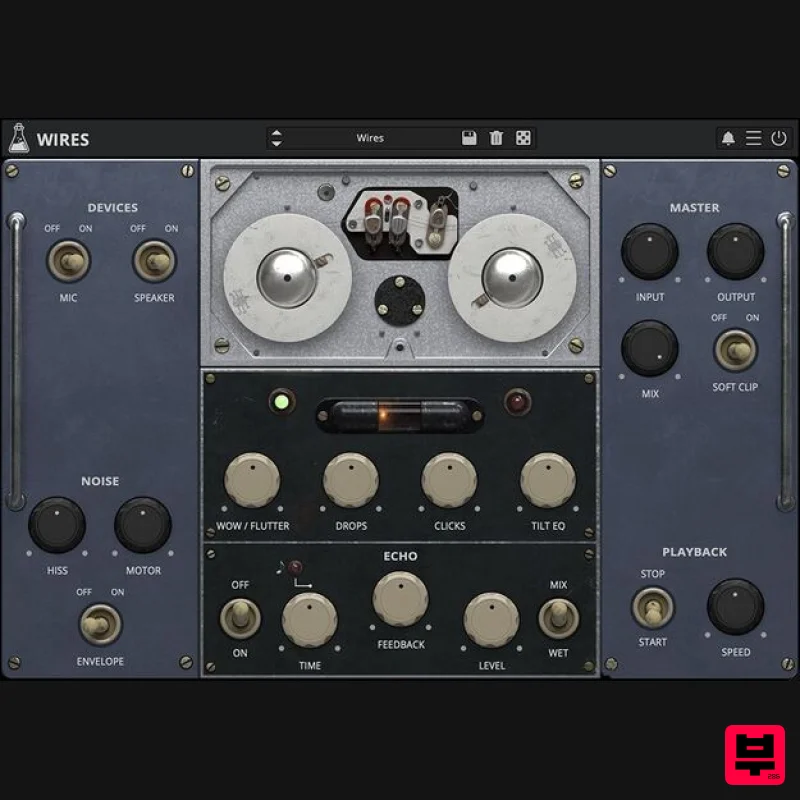
- Soviet Wire Recorder Echo Turn the echoes of the past into the music of now. German composer and YouTuber Hainbach opened his treasure chest for us: AudioThing are happy to present to you Wires
- an accurately modelled and enhanced 1970s Soviet wire recorder. Made originally for military and secret service use across the Iron Curtain
- in the hands of a few avant-garde musicians it became a magical lofi-tool and ghostly echo machine. Now this rare and rather finicky-to-operate piece of hardware is available for the first time as a faithful yet modern plugin. Transform your audio to the world of numbers stations and secret operations
- dub out to very unusual echoes or make the most lofi beats to study too. AudioThing took great care to get all the idiosyncratic behaviour exactly right – it reacts dynamically to the input and does stuff to audio that is a completely different texture to magnetic tape. There is a special tone to the hair-thin wire and the vacuum tube output stage of this machine
- unheard of anywhere else. The standard way to make a unit such as this music is to put it on an aux channel of a mixer
- to turn it into a fixed tempo echo. AudioThing offer all the variable time features you want
- as well as the option to switch off the rather high noise floor of this machine without sacrificing the rather alive sound. Wire Recorders Magnetic wire recorders went out of fashion after the advent of magnetic tape
- surviving only in special operations such as flight recorders
- space flight
- or clandestine operations (wearing a wire denotes not the cable but the recorder). The particular model of recorder AudioThing modelled comes from East German Army stock – on the reels you could still hear traces of military operations. Lo-Fi Who needs tape for lo-fi? This machine is taking the term “lo-fi” to an entirely new and haunting level. There is a special tone to the hair-thin wire and the vacuum tube output stage of this wire recorder
- unheard of anywhere else. Wires turns the most boring signals into sepia coloured magic. Hainbach Based out of Berlin
- Germany
- electronic music composer and performer Hainbach creates shifting audio landscapes THE WIRE called “One hell of a trip”. He has been fascinated with electronic sounds since he discovered the dial on the radio. Never losing his childhood wonder
- he still searches for the sounds in between on modular synths
- tape
- and test equipment
- making even the unmusical “music”. Through his YouTube channel
- Hainbach brings experimental music techniques to a wider audience. Features Magnetic Wire Emulation Echo Section Original Speaker and Mic Emulation Start and Stop effects Hiss and Motor noise with Envelope Resizable Window Preset system with randomizer Output Trim Mono Switch Routing Switch Noise Envelope Controls Big Sur / Universal Binary System Requirements Windows Windows 7 – 11 2GHz CPU
- 4 GB RAM VST2
- VST3
- CLAP (64-bit) Mac OS X 10.9 – macOS 14 Apple Silicon (M chips) Native (Universal 2 Binary) 2GHz CPU
- 4 GB RAM VST2
- VST3
- CLAP (64-bit) Universal 2 Binary Andrew Lagowski "It’s like finding that ancient reel of tape in the flea market and being transported back in time." Peter Kirn "AudioThing have done a bang-up job of the very challenging work of modelling non-linear magnetic recording mechanisms." Danielle O'Hallisey "I’ve been struggling to release an EP of some ambient/electronic music but have consistently felt that something was missing. FOUND IT!" Note: Speaker is used as the example. Windows 1. Visit the AudioThing Login/Registration Page and enter your personal details to set up an account > then read the 'Privacy Policy' and tick the box before clicking 'Sign Up'. Note: If you already have an existing AudioThing account
- Login here and skip to step 3 of the installation process. 2. A confirmation email will now be sent to your registered email > click the link within the email to activate your account and Login here. 3. Once logged into your account
- visit the Redeem Page and copy and paste the serial number from your User Account into the box provided > then click 'Redeem'. 4. Download your preferred installer as well as the Activation Licence Key. Note: Click the ‘license.atl’ file
- e.g ‘speaker_license.atl’ to download it to your computer > be sure to save this to a memorable computer location so that you can easily locate and upload it when activating your software. 5. Double-click the compressed folder to reveal the installer file. 6. Double-click the extracted .exe file > click ‘Run' to open the installation window. 7. Read through the license agreement and click ‘I accept the agreement’ > click ‘Next’. 8. Select the component (s) that you wish to install > click ‘Next’. 9. Choose and confirm the 64-bit plugin directory in which to save your software to > click ‘Next’. 10. Choose and confirm the 32-bit plugin directory in which to save your software to > click ‘Next’. 11. Review the installation and click ‘Install’. 12. The installation of your software has successfully completed > click ‘Finish’. Offline Activation 1. Restart your DAW
- and rescan your plugin selection to show the new installation (in the event it fails to appear). 2. Locate and open the plugin on an appropriate track. You will be greeted by the window shown below > click 'Offline'. 3. Load or drag and drop the downloaded Key License File into the box to activate your software. 4. The software is now activated and ready for use within your DAW. Online Activation 1. Restart your DAW
- and rescan your plugin selection to show the new installation (in the event it fails to appear). 2. Locate and open the plugin on an appropriate track. You will be greeted by the window shown below > click 'Online'. 3. Enter your registered account email and password details > click 'Log In'. 4. The software is now activated and ready for use within your DAW. Mac 1. Visit the AudioThing Login/Registration Page and enter your personal details to set up an account > then read the 'Privacy Policy' and tick the box before clicking 'Sign Up'. Note: If you already have an existing AudioThing account
- Login here and skip to step 3 of the installation process. 2. A confirmation email will now be sent to your registered email > click the link within the email to activate your account and Login here. 3. Once logged into your account
- visit the Redeem Page and copy and paste the serial number from your User Account into the box provided > then click 'Redeem'. 4. Download your preferred installer as well as the Activation Licence Key. Note: Click the ‘license.atl’ file
- e.g ‘speaker_license.atl’ to download it to your computer > be sure to save this to a memorable computer location so that you can easily locate and upload it when activating your software. 5. Double-click the .dmg file to open the installer window. 6. Double-click the installer icon to begin the installation process > click ‘Continue’. 7. Read the info and click ‘Continue’. 8. Read the Software License Agreement > click ‘Continue’ and then ‘Agree’. 8. Select the component (s) that you wish to install to your computer
- and click ‘Continue’. 9. Review the installation and click ‘Install’. 10. The installation of your software has successfully completed > click ‘Close’. Offline Activation 1. Restart your DAW
- and rescan your plugin selection to show the new installation (in the event it fails to appear). 2. Locate and open the plugin on an appropriate track. You will be greeted by the window shown below > click 'Offline'. 3. Load or drag and drop the downloaded Key License File into the box to activate your software. 4. The software is now activated and ready for use within your DAW. Online Activation 1. Restart your DAW
- and rescan your plugin selection to show the new installation (in the event it fails to appear). 2. Locate and open the plugin on an appropriate track. You will be greeted by the window shown below > click 'Online'. 3. Enter your registered account email and password details > click 'Log In'. 4. The software is now activated and ready for use within your DAW.
Additional Information
About the AudioThing Wires
Discover the distinctive sound and feel of the AudioThing Wires, a standout choice among Multi Effect .
Why Choose the AudioThing Wires?
- •Authentic AudioThing craftsmanship and design
- •Versatile sound suitable for multiple musical genres
- •Professional build quality and reliable performance
- •Part of AudioThing's respected Multi Effect lineup
Compare & Explore
Browse our complete selection of AudioThing instruments or explore other Multi Effect options. Use our comparison tools to find the perfect match for your musical style and budget.
Similar Products

Quantum DSP Q-Series Invader
Multi Effect

Jungle Audio DUKE
Multi Effect

UVI Whoosh FX
Multi Effect

UVI Click
Multi Effect

UVI Xtreme FX 2
Multi Effect

Sinevibes Cache
Multi Effect

UVI Asteroid
Multi Effect

Jonas Eriksson Tape Fiasco
Multi Effect

