
AudioThing Lines
Professional music gear - detailed information and where to buy
AudioThing
Lines
Product Info
* Prices may vary. Check retailer for current pricing and availability.
Product Description
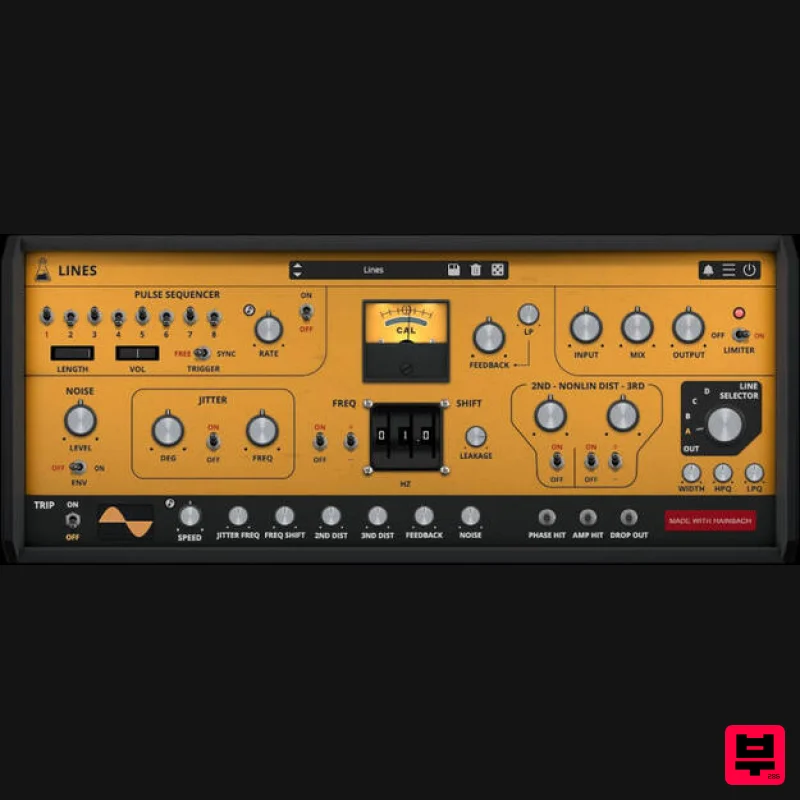
- Complex Effects Processor and Feedback Synthesizer Lines is an effect plugin that crosses borders: it can be used as a creative mangler of all kinds of signals
- ranging from lo-fi telephone sounds
- lush phasing
- warm distortions
- crushing feedback
- ring modulation and unique frequency shifting. But even without any input
- it can be an experimental synthesizer based on feedback
- allowing for a wide range of inspiring rhythms
- pulses
- and organic soundscapes. If you combine input and internal engines an unheard spectrum of sounds appears. Lines is the sixth plugin made with Hainbach
- composer and YouTuber known for his test equipment explorations. Axel Line Simulator Lines has a rare real-life inspiration
- the Axel Line Simulator
- made in the 1970s in Jamaica
- New York by long gone Axel Electronics. Despite its golden disco look
- the Axel was never intended as a piece of music equipment. It was used to simulate signal loss over telephone and data lines. It mimics the "worst case“ for message transmission
- using a plethora of unique analog effects: jitter
- noise
- intermittent pulses
- frequency shift
- distortion
- bandpass filters for various bandwidths and even playable buttons for phase
- amplitude and dropouts. This combination made Hainbach’s spider sense tingle
- as he came upon it on an auction site. Assuming it would be a great lo-fi tool
- he had it restored. And yes
- it makes a fantastic telephone voice
- but the true surprise lies elsewhere. Feedback Patching By routing the unit’s output back into itself a world of liquid rhythms
- throbbing basses
- and tropical birds appears. It becomes a playable instrument without any input
- inviting playful exploration. If you add a piano
- drums or a voice to your acid parrot sub bass rhythm
- they fold together in unpredictable and beautiful ways. Thanks to the built in limiter
- it never sounds harsh or unpleasant
- which is a constant risk with feedback patching. The Plugin Audiothing took great care to simulate the feedback and signal path down to the component level. Everything is engineered to be as close to the original as possible. Once they got the sound right
- they extended the ranges and possibilities: more range on the frequency shift
- fine-tunable filters
- an additional filter in the feedback path
- a flexible pulse sequencer
- as well as all the sync and modulation possibilities you are used to from our plugins. Let the presets show you the possibilities
- but the real joy of Lines lies in exploration. Hainbach Based out of Berlin
- Germany
- electro-acoustic composer and “that guy with the sweaters” Hainbach creates experimental music that is both visceral and whimsical. Using esoteric synthesizers
- test equipment and magnetic tape he creates one hell of a trip in his improvised live sets. He shares techniques on experimental music on his YouTube channel
- which has attracted a regular audience of over 100000 subscribers. His music has been released on Seil Records
- Opal Tapes
- SA Recordings and misc.works. Features Frequency Shifter Phase Jitter 2nd and 3rd Non-Linear Distortion Line Selector (Band Pass filters) Pulse Sequencer Feedback Noise with Envelope Trip Modulation Resizable Window Preset system with randomizer System Requirements PC Windows 7 - 11
- Ubuntu 20.04 LTS 2GHz CPU
- 4 GB RAM VST2
- VST3
- CLAP or AAX (64-bit) Mac OS X 10.9 – macOS 13 2GHz CPU
- 4 GB RAM Apple Silicon (M chips) Native (Universal 2 Binary) VST2
- VST3
- CLAP
- or AAX (64-bit) Universal 2 Binary Note: Wave Box is used as the example. Windows 1. Visit the AudioThing Account Signup Page and enter your personal details to set up an account. Click the Verification and "I've read and agree to the Privacy Policy" > Click Sign Up. Note: If you already have an existing AudioThing account
- Login here and skip to step 3 of the installation process. 2. A confirmation email will now be sent to your registered email > click the link within the email to activate your account and Login here. 3. Once logged into your account
- visit the Redeem Page and enter Redeem Code from your Plugin Boutique User Account into the box > Click 'Redeem'. 4. Download the PC installer and the Offline Activation License. Note: Save the Offline Activation License to a memorable location on your computer for activating the software. 5. Double-click the downloaded .zip folder to extract its contents. 6. Double-click the extracted .exe file > click 'I accept the agreement and click 'Next'. 7. Click 'Next'. 8. Select the components that you wish to install > Click ‘Next’. 9. Click ‘Next’. 10. Click 'Install'. 11. Click ‘Finish’. Offline Activation 1. Open Wave Box inside of your DAW > Click 'Offline'. 2. Click 'Load Licence File' and navigate to your Offline Activation License. 3. Click the X to close the box. The software is now activated and ready to use inside your DAW! Online Activation 1. Open Wave Box inside of your DAW > Click 'Online'. 2. Enter your AudioThing email and password > Click 'Log In'. 3. Click the X to close the box. The software is now activated and ready to use inside your DAW! Mac 1. Visit the AudioThing Account Signup Page and enter your personal details to set up an account. Click the Verification and "I've read and agree to the Privacy Policy" > Click Sign Up. Note: If you already have an existing AudioThing account
- Login here and skip to step 3 of the installation process. 2. A confirmation email will now be sent to your registered email > click the link within the email to activate your account and Login here. 3. Once logged into your account
- visit the Redeem Page and enter Redeem Code from your Plugin Boutique User Account into the box > Click 'Redeem'. 4. Download the MAC installer and the Offline Activation License. Note: Save the Offline Activation License to a memorable location on your computer for activating the software. 5. Double-click the downloaded .dmg folder to extract its contents > Double-click the .pkg file to run the installer 6. Click 'Continue'. 7. Click ‘Continue’. 8. Click 'Continue'. 9. Click ‘Agree’. 10. Select the components you would like to install > Click 'Continue'. 11. Click ‘Install’. 12. Click 'Close'. Offline Activation 1. Open Wave Box inside of your DAW > Click 'Offline'. 2. Click 'Load Licence File' and navigate to your Offline Activation License. 3. Click the X to close the box. The software is now activated and ready to use inside your DAW! Online Activation 1. Open Wave Box inside of your DAW > Click 'Online'. 2. Enter your AudioThing email and password > Click 'Log In'. 3. Click the X to close the box. The software is now activated and ready to use inside your DAW!
Additional Information
About the AudioThing Lines
Experience the quality and tone that makes the AudioThing Lines a popular choice for musicians.
Why Choose the AudioThing Lines?
- •Authentic AudioThing craftsmanship and design
- •Versatile sound suitable for multiple musical genres
- •Professional build quality and reliable performance
- •Part of AudioThing's respected Multi Effect lineup
Compare & Explore
Browse our complete selection of AudioThing instruments or explore other Multi Effect options. Use our comparison tools to find the perfect match for your musical style and budget.
Similar Products

UVI Whoosh FX
Multi Effect

Jungle Audio DUKE
Multi Effect

UVI Xtreme FX 2
Multi Effect

Quantum DSP Q-Series Invader
Multi Effect

UVI Asteroid
Multi Effect

Sinevibes Cache
Multi Effect

UVI Click
Multi Effect

Jonas Eriksson Tape Fiasco
Multi Effect

