
Waves Space Rider
Professional music gear - detailed information and where to buy
Waves
Space Rider
Product Info
* Prices may vary. Check retailer for current pricing and availability.
Product Description
- Space Rider Transform Audio Tracks from Ordinary to Magical—On the Fly Creating changes
- surprises
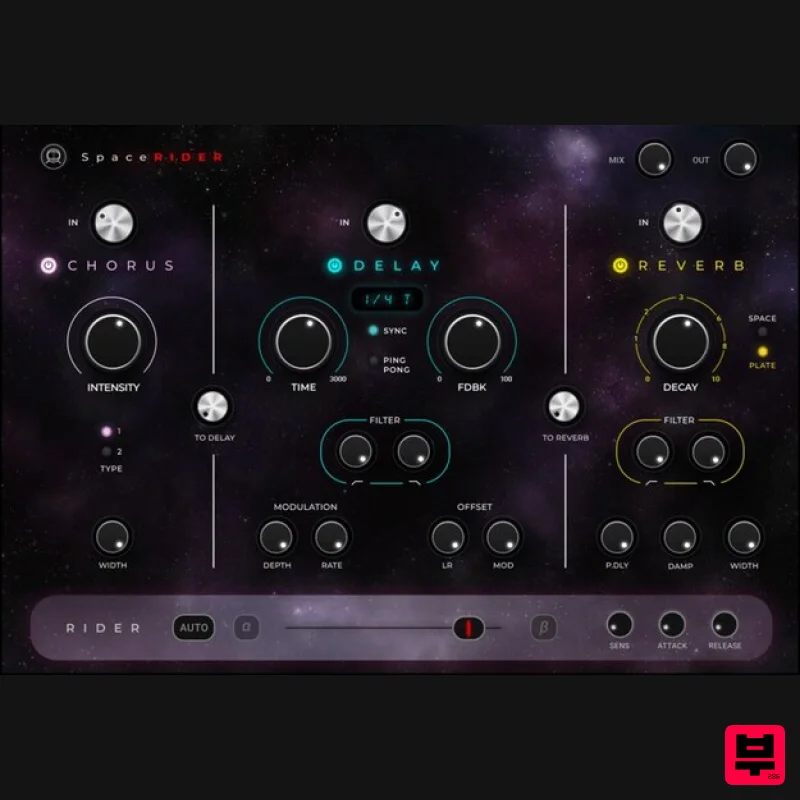
- and special moments in your tracks can be challenging. Setting up multiple effect buses and many lanes of automation can take a long time—but not with Space Rider. Space Rider combines three high-quality effects—reverb
- delay
- chorus—in one streamlined interface built for speed. You can send the chorus to the delay
- and the delay to the reverb
- at the click of a button
- for deep spatial effects that will liven up your tracks. But that’s just the beginning: Space Rider’s secret weapon is its dynamic Rider
- assignable to any parameter. Engage the Rider to morph the different effects
- instantly creating movement and interest. You can also engage the built-in envelop shaper and have the Rider dynamically respond to the incoming audio signal
- for effects that would normally take ages to set up. No more complex automations
- routing
- and send/return hassles: Deep results that used to require engineering backflips are now achievable with a few clicks. Features Reverb
- delay
- and chorus in one user-friendly UI Dynamic Rider saves you time on complex automation and routing Morph between the different effects using the Rider The Rider’s envelope shaper responds dynamically to the incoming signal New reverb/delay/chorus algorithms crafted from the ground up Easily send chorus to delay
- delay to reverb Presets by the Grammy-winning producers and mixers for Dua Lipa
- Kendrick Lamar
- Doja Cat & more System Requirements Mac macOS Monterey 12
- Ventura 13
- Sonoma 14
- Sequoia 15 VST / AU / AAX PC Windows 10+ VST / AAX 1. Head to https: //www.waves.com/create-account 2. Enter your email and choose a password to create an account (if you already have a Waves account
- choose Log in
- enter your details and head to Step 5) > click 'Submit' 3. Open your email inbox > click the activation link in the email from Waves 4. Click 'Log in here' > Log in to your Waves account 5. Click 'Register New Products' 6. Enter the Serial Number found in your Plugin Boutique user account > click 'Submit' 7. Click download in your Plugin Boutique user account or head to https: //www.waves.com/downloads/central > download the Waves Central app for your operating system 8. Install Waves Central > Open Waves Central 9. Click 'Log in' > enter your log in details 10. Click the 'Install Products' tab 11. Tick the blue dot on all products you wish to install or click the top dot to install all products > click 'Install & Activate' 12. Click 'OK' 13. Open your DAW > open the Waves plugin Your Waves plugins are installed and ready to use
- enjoy!
Additional Information
About the Waves Space Rider
The Waves Space Rider represents excellent craftsmanship in the Multi Effect category.
Why Choose the Waves Space Rider?
- •Authentic Waves craftsmanship and design
- •Versatile sound suitable for multiple musical genres
- •Professional build quality and reliable performance
- •Part of Waves's respected Multi Effect lineup
Compare & Explore
Browse our complete selection of Waves instruments or explore other Multi Effect options. Use our comparison tools to find the perfect match for your musical style and budget.
Similar Products

Quantum DSP Q-Series Invader
Multi Effect

Jungle Audio DUKE
Multi Effect

Sinevibes Cache
Multi Effect

UVI Asteroid
Multi Effect

UVI Click
Multi Effect

UVI Xtreme FX 2
Multi Effect

Jonas Eriksson Tape Fiasco
Multi Effect

UVI Whoosh FX
Multi Effect

