
Waves JJP Guitars
Professional music gear - detailed information and where to buy
Waves
JJP Guitars
Product Info
* Prices may vary. Check retailer for current pricing and availability.
Product Description
- JJP Guitars A Fresh
- Novel Alternative to Amp Sims Amp sims are the go-to for grandiose
- iconic amp sounds
- but may not provide what’s needed for country
- reggae
- folk and acoustic
- funk
- Afropop
- Americana
- and other forms of music that favor cleaner guitar sounds. JJP Guitars’ sophisticated
- nuanced processing is the answer. Jack Joseph Puig’s expertise crisscrosses genres
- yet he always nails the right guitar sound. And now
- the artistry that’s graced hits from U2 to John Mayer to Green Day has been captured in a plugin. Features Designed by Grammy winner Jack Joseph Puig (John Mayer
- U2) 7 parallel processors give guitars diverse
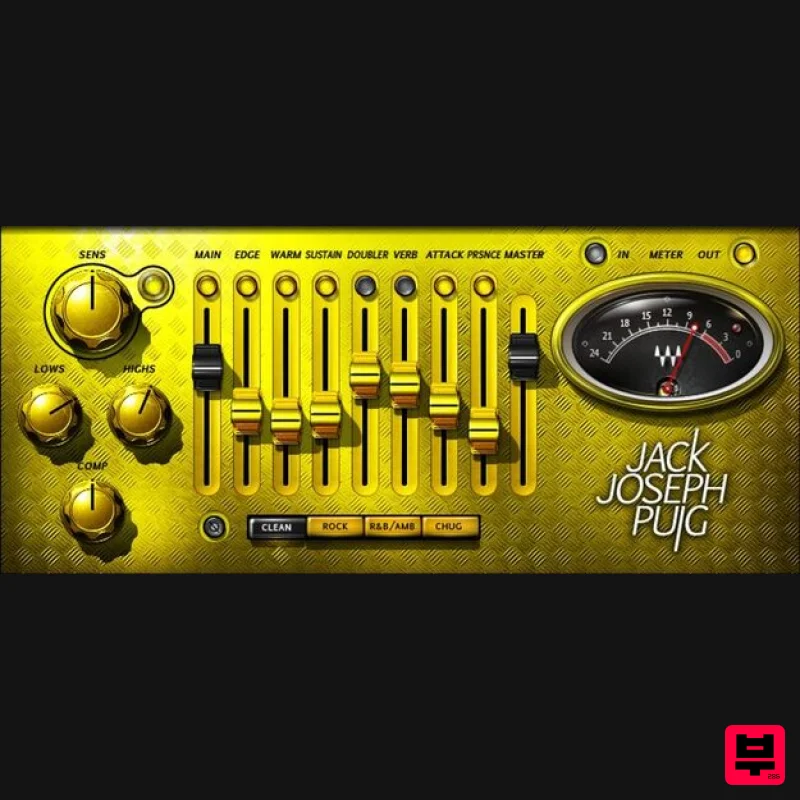
- charismatic personalities Choose one of four dedicated modes: Clean
- Rock
- or Chug Nuanced effects don’t overpower the guitar’s natural sound Pop the guitar out of the mix with Edge and Presence Start with compression and EQ
- then layer effects Add a hint of aggression by shaping transients with Attack Go for a fatter
- rounder sound with the Warm control Wrap the guitar in a space
- with doubling and reverb The effects never “ your playing’s articulations System Requirements Mac macOS Monterey 12
- Ventura 13
- Sonoma 14
- Sequoia 15 VST / AU / AAX PC Windows 10+ VST / AAX 1. Head to https: //www.waves.com/create-account 2. Enter your email and choose a password to create an account (if you already have a Waves account
- choose Log in
- enter your details and head to Step 5) > click 'Submit' 3. Open your email inbox > click the activation link in the email from Waves 4. Click 'Log in here' > Log in to your Waves account 5. Click 'Register New Products' 6. Enter the Serial Number found in your Plugin Boutique user account > click 'Submit' 7. Click download in your Plugin Boutique user account or head to https: //www.waves.com/downloads/central > download the Waves Central app for your operating system 8. Install Waves Central > Open Waves Central 9. Click 'Log in' > enter your log in details 10. Click the 'Install Products' tab 11. Tick the blue dot on all products you wish to install or click the top dot to install all products > click 'Install & Activate' 12. Click 'OK' 13. Open your DAW > open the Waves plugin Your Waves plugins are installed and ready to use
- enjoy!
Additional Information
About the Waves JJP Guitars
The Waves JJP Guitars combines traditional design with modern performance for Multi Effect enthusiasts.
Why Choose the Waves JJP Guitars?
- •Authentic Waves craftsmanship and design
- •Versatile sound suitable for multiple musical genres
- •Professional build quality and reliable performance
- •Part of Waves's respected Multi Effect lineup
Compare & Explore
Browse our complete selection of Waves instruments or explore other Multi Effect options. Use our comparison tools to find the perfect match for your musical style and budget.
Similar Products

UVI Asteroid
Multi Effect

Sinevibes Cache
Multi Effect

Jungle Audio DUKE
Multi Effect

UVI Click
Multi Effect

UVI Xtreme FX 2
Multi Effect

Quantum DSP Q-Series Invader
Multi Effect

UVI Whoosh FX
Multi Effect

Jonas Eriksson Tape Fiasco
Multi Effect

