
Waves Greg Wells PianoCentric
Professional music gear - detailed information and where to buy
Waves
Greg Wells PianoCentric
Product Info
* Prices may vary. Check retailer for current pricing and availability.
Product Description
- Greg Wells PianoCentric The Key to Mixing Piano and Keyboards The piano is a hard instrument to record—and even harder to mix properly
- especially in a busy mix. Piano and other keyboard instruments cover a wide range of frequencies and dynamics—so finding their sweet spot in a mix can be daunting. Grammy®-winning producer/mixer Greg Wells (Adele
- Dua Lipa
- Taylor Swift
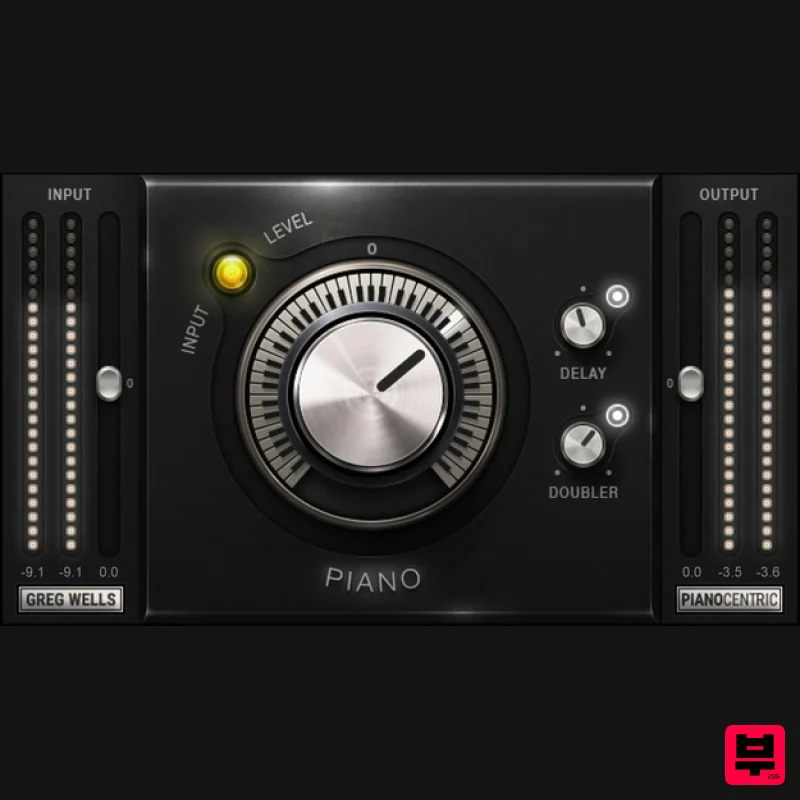
- John Legend)—a professional pianist himself—has put into PianoCentric every studio technique he’s learned over the years to make a piano sound great in a mix. The main control covers a continuum of sounds
- from dark and lo-fi
- to neutral
- to bright and punchy. Whether your keyboards need to lay back or push forward
- PianoCentric delivers. "PianoCentric is something I wish every studio I’ve ever worked in had. Under the hood
- you get every technique I know for how to make piano sound amazing. Turn the knob to the right for gorgeous
- punchy piano that will cut through any busy mix. Or turn to the left to make it sound like an old bullet microphone is sitting inside the piano—lo-fi and a little crunchy. Enjoy!"—Greg Wells Features Make piano and all keyboard instruments sit perfectly in the mix Created with Grammy®-winning producer/mixer Greg Wells Turn main knob clockwise for a brighter
- punchier sound that lifts the piano in the mix Turn counter-clockwise for darker sounds that embed the piano further in the mix Add tempo-synced Delay for animation and motion Add Doubler for a gorgeous
- richer and diffuse piano sound Use with automation to change colors during a mix Can also do wonders when mixing full-bodied acoustic guitars System Requirements Mac macOS Monterey 12
- Ventura 13
- Sonoma 14
- Sequoia 15 VST / AU / AAX PC Windows 10+ VST / AAX 1. Head to https: //www.waves.com/create-account 2. Enter your email and choose a password to create an account (if you already have a Waves account
- choose Log in
- enter your details and head to Step 5) > click 'Submit' 3. Open your email inbox > click the activation link in the email from Waves 4. Click 'Log in here' > Log in to your Waves account 5. Click 'Register New Products' 6. Enter the Serial Number found in your Plugin Boutique user account > click 'Submit' 7. Click download in your Plugin Boutique user account or head to https: //www.waves.com/downloads/central > download the Waves Central app for your operating system 8. Install Waves Central > Open Waves Central 9. Click 'Log in' > enter your log in details 10. Click the 'Install Products' tab 11. Tick the blue dot on all products you wish to install or click the top dot to install all products > click 'Install & Activate' 12. Click 'OK' 13. Open your DAW > open the Waves plugin Your Waves plugins are installed and ready to use
- enjoy!
Additional Information
About the Waves Greg Wells PianoCentric
The Waves Greg Wells PianoCentric combines traditional design with modern performance for Multi Effect enthusiasts.
Why Choose the Waves Greg Wells PianoCentric?
- •Authentic Waves craftsmanship and design
- •Versatile sound suitable for multiple musical genres
- •Professional build quality and reliable performance
- •Part of Waves's respected Multi Effect lineup
Compare & Explore
Browse our complete selection of Waves instruments or explore other Multi Effect options. Use our comparison tools to find the perfect match for your musical style and budget.
Similar Products

Jonas Eriksson Tape Fiasco
Multi Effect

Sinevibes Cache
Multi Effect

UVI Whoosh FX
Multi Effect

Quantum DSP Q-Series Invader
Multi Effect

Jungle Audio DUKE
Multi Effect

UVI Click
Multi Effect

UVI Xtreme FX 2
Multi Effect

UVI Asteroid
Multi Effect

