
W. A. Production SphereQuad
Professional music gear - detailed information and where to buy
W. A. Production
SphereQuad
Product Info
* Prices may vary. Check retailer for current pricing and availability.
Product Description
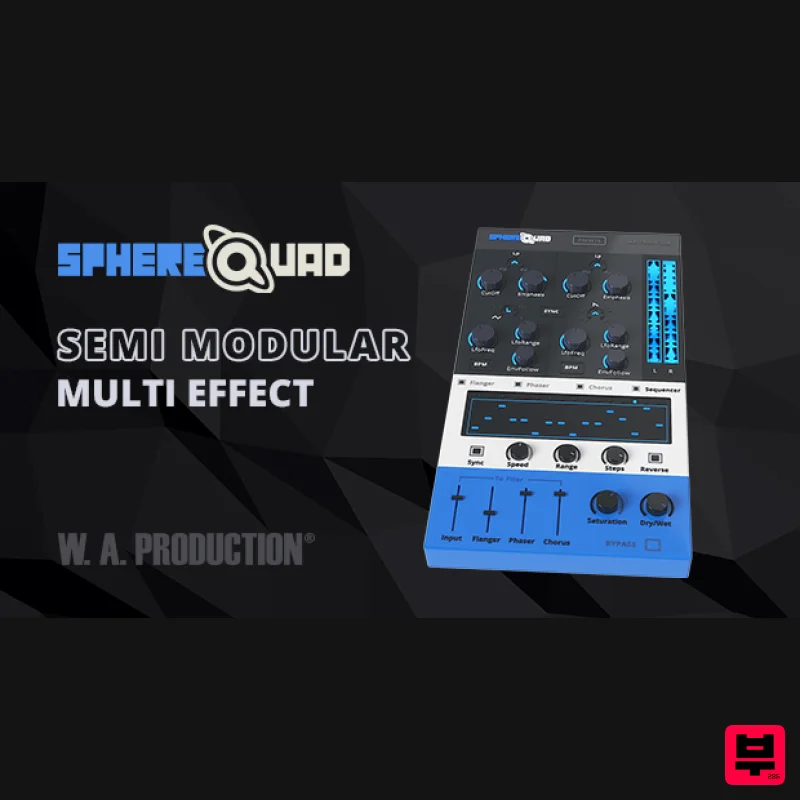
- Semi-Modular Multi-Effect W. A. Production are always looking for clever ways to add movement and excitement to your tracks. However
- it’s tiresome to keep loading up the same effects chains again and again. This is why they have created SphereQuad as an easy and extremely flexible solution for bringing complex rhythmic movement
- filter sweeps and stereo madness to your mixes. The concept behind SphereQuad is a combination of stereo flanger
- phaser and chorus effects fed into a stereo filter
- combined with an onboard step sequencer that controls the filter. However
- the execution of these effects is far more interesting as you can control the left and right filters independently to push sound around the stereo field. The flexible routing between the different modules can be quickly dialled in to create a huge variety of special effects. Each of the Flanger
- Phaser and Chorus modules has multiple parameters for adjusting the main characteristics. The modules can be activated individually
- or mixed and routed in various combinations to create a wall of unusual effects. SphereQuad is incredibly useful for everything from adding to spacey synth leads to making bass lines wobble. W.A. Production have even dialled it in on full mixes to create DJ-style breakdowns with massive filter sweeps and extreme flanging. There’s no instrument W.A. Production hasn’t tried to transformed with SphereQuad and the effect is impressively huge every time. W. A. Production are real-life producers making creative plugins to help you achieve studio effects quickly and easily. Enjoy! Features 64 Creative Presets for one-click transformations Stereo Flanger
- Phaser & Chorus modules with multiple parameters Mixer & Output controls with Saturation module Flexible signal routing between all modules 16 Step Sequencer Independent left and right filter modules for true stereo manipulation Sync to BPM Real-time waveform display corresponding to the filter cutoff Full PDF Manual The 16 step sequencer controls the filter cutoff and can be synced to the BPM of your track or be set to flow completely independently. Feed the signal from the Flanger
- Phaser and Chorus into this sequencer for ultimate rhythmic modulation. Independent left and right channel filter shapes
- speeds
- ranges and types can be programmed to make the filtered sound fly around the stereo field
- creating some mind-bending sequences at the click of a button. The real-time waveform display shows the effect of the filter cutoff
- giving visual feedback on the stereo effect of SphereQuad. Meanwhile
- the master output module provides a Dry / Wet control and Saturation dial for increasing the odd harmonics and the overall intensity of the output. Over 60 presets to act as perfect jumping-off points for your own creative ideas. They are logically named by instrument group and effect making it easy to find the descriptive definition of a particular effect. System Requirements Windows 8 or later (32 / 64 bit) macOS 10.13 and later (64-bit only) VST
- VST3 & AU Please Note: AAX format requires Pro Tools 11 or higher. Important Note for Mac Apple Silicon users: Before purchasing
- please review the current compatibility status of this plugin on your system here. BL3R "Didn't think there could be a better filter sweep than the ones I already had.. WA does it again!" The Samplecast "This plugin really takes rhythmic modulation to the next level. The standout feature here is how the signal flows between the different fx modules and I love experimenting by routing the audio in complex ways." 22Bullets "Wow
- sphere squad is works in a really creative way and easy to manipulate the sounds
- i use for easy transition in the parts of my tracks
- specially the sequencer and env followers for the fx
- love it!" Registration and Activation Video <iframe frameborder="0" height="315" src="https: //www.youtube.com/embed/YJHtWvm8z0Y" width="560"></iframe> Please Note: CHORDS is used as an example. Registration 1. Click the Download button in your Plugin Boutique account or go to https://www.waproduction.com/users/login 2. Click 'Create New Account' (if you already have a W.A Production account
- enter your details
- log in and skip to step 5). 3. Enter your details > Choose your marketing preferences > Click 'Finish Registration'. 4. Your account has been registered > Click 'Register Plugin'. 5. On the license registration page
- enter the license key from your Plugin Boutique account (which will be referred to as 'serial number' on our site) > Click 'Add'. 6. Your product will now be displayed in your W.A Production account > Scroll down to My Orders and click 'View Order'. 7. Click 'Download Files'. 8. Click 'Download'. Mac Installation 1. Once the download is complete
- extract and open the ZIP folder you just downloaded > Open the Mac folder > Double-click the CHORDS .pkg installer file. 2. Click 'Continue'. 3. Read the Software License Agreement > Click 'Continue'. 4. Click 'Agree'. 5. Click 'Install'. 6. Click 'Close'. 7. Open CHORDS in your DAW. 8. Click the information icon in the bottom left-hand corner > Enter the serial number you were given in your W.A Production account > Click 'Authorize'. Your software is now ready to use in your DAW! Windows Installation 1. Once the download is complete
- extract and open the ZIP folder you just downloaded > Open the PC folder > Double-click the CHORDS PC installer file. 2. Click 'Next'. 3. Click 'Next'. 4. Select which plugin formats you would like to install > Click 'Next' > Click 'Install'. 5. Click 'Finish'. 6. Open CHORDS in your DAW. 7. Click the information icon in the bottom left-hand corner > Enter the serial number you were given in your W.A Production account > Click 'Authorize'. Your software is now activated and ready to use in your DAW!
Additional Information
About the W. A. Production SphereQuad
Experience the quality and tone that makes the W. A. Production SphereQuad a popular choice for musicians.
Why Choose the W. A. Production SphereQuad?
- •Authentic W. A. Production craftsmanship and design
- •Versatile sound suitable for multiple musical genres
- •Professional build quality and reliable performance
- •Part of W. A. Production's respected Multi Effect lineup
Compare & Explore
Browse our complete selection of W. A. Production instruments or explore other Multi Effect options. Use our comparison tools to find the perfect match for your musical style and budget.
Similar Products

UVI Click
Multi Effect

UVI Asteroid
Multi Effect

UVI Whoosh FX
Multi Effect

Quantum DSP Q-Series Invader
Multi Effect

UVI Xtreme FX 2
Multi Effect

Sinevibes Cache
Multi Effect

Jonas Eriksson Tape Fiasco
Multi Effect

Jungle Audio DUKE
Multi Effect

