
W. A. Production Neon Glow by Arcade
Professional music gear - detailed information and where to buy
W. A. Production
Neon Glow by Arcade
Product Info
* Prices may vary. Check retailer for current pricing and availability.
Product Description
- Luminous Lo-Fi Step into the retro world of Lo-Fi and far beyond
- with Neon Glow by Arcade
- the plugin that infuses any audio with neon-soaked vibes. This sonic sensation
- crafted in collaboration with FL Studio ambassador Arcade
- conjures a signature vintage feel at the flick of a switch. With Neon Glow
- you're not just adding effects; you're immersing your tracks in soaking wet and diffused processing. Bathe your instruments in the distinctive ambience of arcade nights - from warm
- hazy pads
- to the saturated delays of synths and percussion. But don't just stop at individual instruments. Neon Glow's versatility knows no bounds with Build and Wash controls that can send an entire mix into new sonic galaxies. Neon Glow isn’t just for those creating chilled beats
- it’s the kind of multipurpose plugin that everyone should have in their back pocket. Whether you’re creating EDM
- Ambient or anything in between
- Neon Glow is the all-in-one powerhouse you need to fire up your listeners. At the heart of Neon Glow lies the expertise of Arcade
- an FL Studio legend known for his mastery of many music production techniques - with a special emphasis on silky Lo-Fi processing. Arcade has worked his particular trademark FX chains into this plugin
- ensuring that Neon Glow delivers the authentic Lo-Fi vibes that cemented his place in the industry. Embrace the future past
- and let your Neon Glow shine bright. About Neon Glow The inner workings of this special plugin are a closely guarded secret
- with the controls only hinting at the vast amount of special processing going on under the hood. In real terms
- what you need to know is that many of these modules are interlinked
- with transformations from one module affecting others in weird and wonderful ways. Inspiring
- unusual and always musical; the output from Neon Glow will overhaul individual instruments
- vocals
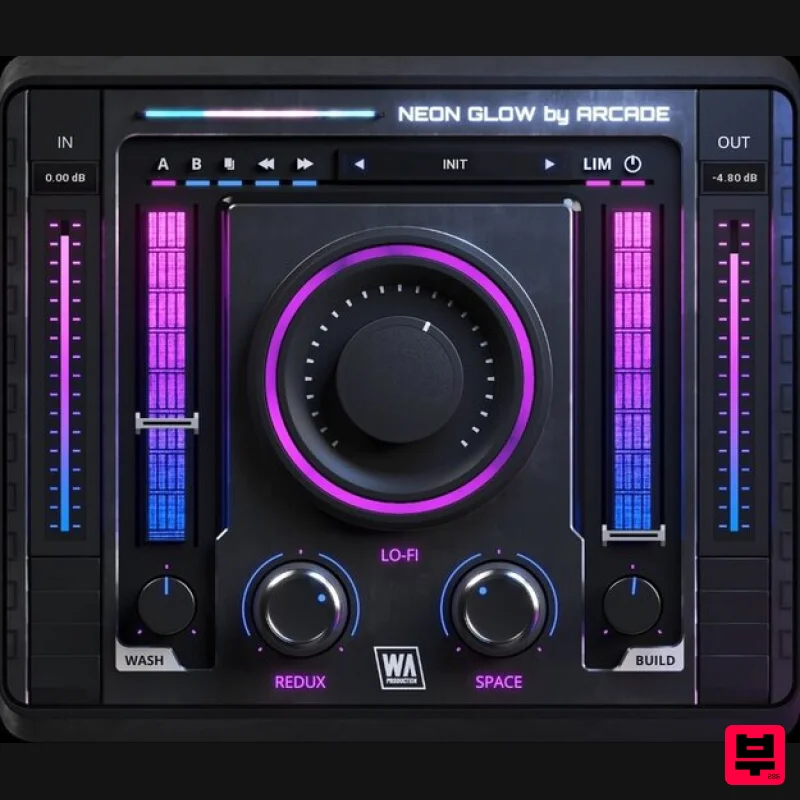
- or even your entire mix with characterful transformations that bring Arcade’s own bespoke FX chains into your productions. Lo-Fi The central Lo-Fi control remixes your sound with new-retro vibes by using an elaborate network of processors and two extra submodules
- Redux and Space. In the final mix
- the Lo-Fi parameter controls the mix of Redux and Space as well as its own processors. Redux Controls a complex series of filters and bit reduction processors which are part of the Lo-Fi module
- to add a digital retro sound to the signal. When set at 0
- the effect has a minimal impact on the sound
- only audible in specific material. Move the control clockwise or counterclockwise to hear the real magic
- introducing bit reduction and filtering
- both warmer and cooler
- depending on which way you turn the dial. Space Neon Glow houses a complicated network of chorus effects as part of the Lo-Fi module
- and the Space control is where you’ll introduce these transformations for a unique sense of spaciousness. When set at 0
- the effect is a retro multi-chorus chain. Twist the dial counterclockwise to add a more traditional multi-chorus effect. Move the control the opposite way to degrade the signal using the micro delays of the module. Wash The Wash fader adds a special wash effect with spacial elements
- using a configuration of filters
- stereo expanders
- and psychoacoustically widened diffusion generators. Use the Wash Character dial to change the essential attributes of the Wash effect. A whole rack of effect parameters are altered; from the sense of width
- to late reflection values on the diffusion generators. Be sure to experiment with these two controls to give your audio the unique character it deserves. Build Neon Glow includes a powerful Build fader
- crafted to transform your tracks with sonic tension and release. This effect harnesses a combination of strong filtering
- diffusion generators
- and psychoacoustically enhanced stereo delays
- creating an intensifying wave of energy that builds up to a dramatic climax when pushed hard. The Build Character dial sculpts the essence of this effect
- allowing fine-tuning. Explore the versatility of this control
- from the gentle saturation of specific frequency bands
- to the nuances of the introduced spaciousness. Input
- Output
- Bypass
- Limiter & More Click the LIMiter button to limit the output of the plugin. Feed more signal into the plugin by adjusting the input level
- resulting in more limiting and a more compressed result. Output level can also be adjusted. The Bypass control is to be as click and pop free as possible for unhindered comparison testing. Two versions of your settings can be saved and copied with the A / B options
- along with undo and redo controls. Presets With many included artist-curated presets
- it’s easy to find an ideal starting point for expanding and transforming your music. Clearly named
- these presets can be applied to many different kinds of audio and include everything from subtle shaping to more complex chains with heavily processed effects. W. A. Production are real-life producers making creative plugins to help you achieve studio quality processing quickly and easily. Enjoy! Features Artist-curated plugin from Arcade Creative Lo-Fi processing with poly-effect controls Advanced multi-stage processing to degrade
- saturate
- diffuse
- chorus and more Resizable interface Pop & click free bypass A/B/Copy for comparing settings Responsive & CPU friendly Artist-curated factory presets Full PDF Manual & Tutorial video System Requirements Windows 8 or later (32 / 64-bit) macOS 10.13 and later (64-bit only) Please Note: Pro Tools 11 or higher is required in order to use the AAX version of this plugin. Important Note for Mac Apple Silicon users: Before purchasing
- please review the current compatibility status of this plugin on your system here. The Samplecast "With Neon Glow
- I can audition everything from subtle chorus shaping to wild build-ups all within the same plugin. Truly inspiring. " NENE "Neon Glow is more than a plugin; it's a time machine to the vintage era. It magically saturates and diffuses sound
- essential for anyone seeking that Lo-Fi glow." Sulvida "Neon Glow revolutionizes the retro sound
- transforming my tracks into neon-soaked masterpieces. The Build and Wash controls are exceptional
- adding a unique
- vintage feel effortlessly." Registration and Activation Video <iframe frameborder="0" height="315" src="https: //www.youtube.com/embed/YJHtWvm8z0Y" width="560"></iframe> Please Note: CHORDS is used as an example. Registration 1. Click the Download button in your Plugin Boutique account or go to https://www.waproduction.com/users/login 2. Click 'Create New Account' (if you already have a W.A Production account
- enter your details
- log in and skip to step 5). 3. Enter your details > Choose your marketing preferences > Click 'Finish Registration'. 4. Your account has been registered > Click 'Register Plugin'. 5. On the license registration page
- enter the license key from your Plugin Boutique account (which will be referred to as 'serial number' on our site) > Click 'Add'. 6. Your product will now be displayed in your W.A Production account > Scroll down to My Orders and click 'View Order'. 7. Click 'Download Files'. 8. Click 'Download'. Mac Installation 1. Once the download is complete
- extract and open the ZIP folder you just downloaded > Open the Mac folder > Double-click the CHORDS .pkg installer file. 2. Click 'Continue'. 3. Read the Software License Agreement > Click 'Continue'. 4. Click 'Agree'. 5. Click 'Install'. 6. Click 'Close'. 7. Open CHORDS in your DAW. 8. Click the information icon in the bottom left-hand corner > Enter the serial number you were given in your W.A Production account > Click 'Authorize'. Your software is now ready to use in your DAW! Windows Installation 1. Once the download is complete
- extract and open the ZIP folder you just downloaded > Open the PC folder > Double-click the CHORDS PC installer file. 2. Click 'Next'. 3. Click 'Next'. 4. Select which plugin formats you would like to install > Click 'Next' > Click 'Install'. 5. Click 'Finish'. 6. Open CHORDS in your DAW. 7. Click the information icon in the bottom left-hand corner > Enter the serial number you were given in your W.A Production account > Click 'Authorize'. Your software is now activated and ready to use in your DAW!
Additional Information
About the W. A. Production Neon Glow by Arcade
Experience the quality and tone that makes the W. A. Production Neon Glow by Arcade a popular choice for musicians.
Why Choose the W. A. Production Neon Glow by Arcade?
- •Authentic W. A. Production craftsmanship and design
- •Versatile sound suitable for multiple musical genres
- •Professional build quality and reliable performance
- •Part of W. A. Production's respected Multi Effect lineup
Compare & Explore
Browse our complete selection of W. A. Production instruments or explore other Multi Effect options. Use our comparison tools to find the perfect match for your musical style and budget.
Similar Products

UVI Xtreme FX 2
Multi Effect

Jonas Eriksson Tape Fiasco
Multi Effect

Sinevibes Cache
Multi Effect

Jungle Audio DUKE
Multi Effect

UVI Whoosh FX
Multi Effect

UVI Asteroid
Multi Effect

UVI Click
Multi Effect

Quantum DSP Q-Series Invader
Multi Effect

