
W. A. Production MixBoss
Professional music gear - detailed information and where to buy
W. A. Production
MixBoss
Product Info
* Prices may vary. Check retailer for current pricing and availability.
Product Description
- Boss Your Mix Mixing is an art — but it’s easy to lose your way in a sea of plugins
- tweaks
- and second-guessing. That’s where Mixboss comes in: the ultimate weapon for sculpting a cohesive
- professional-sounding track before you even touch an individual fader. Built around the “Topdown Mixing” philosophy and developed with award-winning mix engineer Emrah Celik
- Mixboss places powerful mastering-grade tools directly onto your mixbus from the very start. Instead of stacking endless plugins and fighting your way through messy stems
- you shape the overall tone
- punch
- depth
- and stereo field right from the beginning — making everything you do after faster
- easier
- and infinitely more musical. Ready to mix like a boss? Step into the driver’s seat. Topdown Mastery Mixboss is built specifically for Topdown Mixing workflows — an approach that starts at the top of your mix
- not the bottom. Instead of obsessing over the snare drum EQ for hours
- you first set the vibe of the whole song: dialing in broad tonal moves
- compression
- and width from the start. With Mixboss on your master bus
- you’ll instantly feel the benefits: Faster mix decisions A more cohesive sonic picture Reduced over-processing Fewer mix revisions down the line Think of it as building a house on a solid foundation
- not trying to fix cracks after the roof goes on. Whether you’re mixing pop
- hip-hop
- or rock
- Mixboss adapts beautifully to any genre
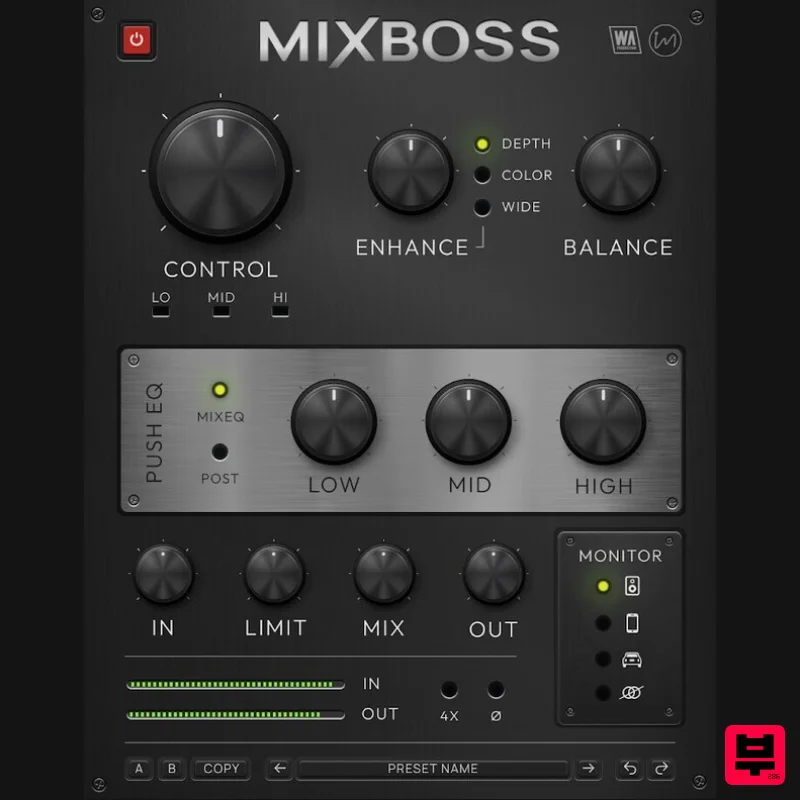
- delivering the sheen and polish your tracks deserve. Command the Core At the heart of Mixboss lies a carefully tuned multiband compressor
- driven by linear-phase crossovers that preserve the integrity of your mix while gluing everything together musically. The Control knob acts as a master Dry/Wet blend for compression
- while intuitive LED meters give you real-time feedback across the low
- and high frequency bands. Craving more energy and musicality? The Enhance knob unlocks three separate character modes: Color – Subtle yet lively saturation that breathes life into sterile mixes. Depth – A spatial enhancer that separates front-to-back positioning without muddy reverb tails. Wide – Stereo expansion with clinical precision
- increasing perceived width while maintaining mono compatibility. Activate one
- or all three — Mixboss adapts to your track’s needs. Push EQ and Spectral Balance Traditional mixbus EQ often leads to heavy-handed results. Mixboss redefines tonal shaping with the Push EQ — a specially voiced musical equalizer that lets you drive lows
- mids
- and highs into the processing chain before or after compression. Select Pre or Post processing for maximum flexibility. Need more tonal coherence? The Balance control gently guides your mix toward a custom noise profile built from thousands of top-charting songs. Think of it as a sonic compass
- keeping your tonal balance glued together without sounding forced or artificial. Loudness Without Limits Mixboss comes armed with a bespoke mixbus limiter
- purpose-built to keep your output punchy and competitive without choking your dynamics. Whether you’re preparing a track for mastering or delivering a premaster that needs to impress
- Mixboss helps you maintain loudness levels without distortion. Plus
- with the Mix knob
- you can easily dial back processing in parallel for even more refined results — blending the best of clean and processed worlds. Oversampling
- polarity flip
- and streamlined input/output controls are all included
- ensuring a rock-solid technical foundation for any mix. Real-World Monitoring Ever wondered if your pristine studio mix would collapse on a phone speaker
- in a car
- or on a cheap Bluetooth speaker? Wonder no more. Mixboss features a powerful Monitoring section that lets you instantly audition your mix through various simulations: Grotbox: speaker simulation Car: Car stereo simulation Phone: Mobile device playback Mono: True mono compatibility check With gain-matched output and realistic emulation
- you’ll quickly spot any weaknesses — and fix them — without ever leaving your workstation. Visual Feedback & Preset Power Mixboss offers a clean
- resizable GUI with easy-to-read metering and intuitive controls. Save your favorite settings
- toggle between A/B setups for critical listening
- and use undo/redo to fine-tune your mix tweaks without losing your creative flow. Factory presets crafted by industry pros are also included
- giving you instant starting points for pop
- hip-hop
- rock
- and more — or simply tweak and create your own. Whether you’re a seasoned engineer or a producer getting serious about your sound
- Mixboss makes world-class mixing approachable. Features All-in-one Topdown Mixing plugin Multiband Compression with transparent
- musical results Character Enhancement Modes: Color
- Depth
- Wide Spectral Balance Control based on thousands of pro mixes Push EQ for tonal shaping pre/post compression Professional Mixbus Limiter Real-World Monitoring Simulations: Grotbox
- Phone
- Mono Parallel Processing with Mix Control 4X Oversampling and Polarity Flip Intuitive Preset System with A/B comparison
- Undo/Redo Resizable
- CPU-friendly GUI Factory Presets for multiple genres VST
- AAX formats for Mac and Windows Full PDF Manual & Video Tutorials included System Requirements Windows 10 or higher (64 bit) macOS 10.15 or higher (64 bit) AAX - ProTools 11 or higher Important Note for Mac Apple Silicon users: Before purchasing
- please review the current compatibility status of this plugin on your system here. Registration and Activation Video <iframe frameborder="0" height="315" src="https: //www.youtube.com/embed/YJHtWvm8z0Y" width="560"></iframe> Please Note: CHORDS is used as an example. Registration 1. Click the Download button in your Plugin Boutique account or go to https://www.waproduction.com/users/login 2. Click 'Create New Account' (if you already have a W.A Production account
- enter your details
- log in and skip to step 5). 3. Enter your details > Choose your marketing preferences > Click 'Finish Registration'. 4. Your account has been registered > Click 'Register Plugin'. 5. On the license registration page
- enter the license key from your Plugin Boutique account (which will be referred to as 'serial number' on our site) > Click 'Add'. 6. Your product will now be displayed in your W.A Production account > Scroll down to My Orders and click 'View Order'. 7. Click 'Download Files'. 8. Click 'Download'. Mac Installation 1. Once the download is complete
- extract and open the ZIP folder you just downloaded > Open the Mac folder > Double-click the CHORDS .pkg installer file. 2. Click 'Continue'. 3. Read the Software License Agreement > Click 'Continue'. 4. Click 'Agree'. 5. Click 'Install'. 6. Click 'Close'. 7. Open CHORDS in your DAW. 8. Click the information icon in the bottom left-hand corner > Enter the serial number you were given in your W.A Production account > Click 'Authorize'. Your software is now ready to use in your DAW! Windows Installation 1. Once the download is complete
- extract and open the ZIP folder you just downloaded > Open the PC folder > Double-click the CHORDS PC installer file. 2. Click 'Next'. 3. Click 'Next'. 4. Select which plugin formats you would like to install > Click 'Next' > Click 'Install'. 5. Click 'Finish'. 6. Open CHORDS in your DAW. 7. Click the information icon in the bottom left-hand corner > Enter the serial number you were given in your W.A Production account > Click 'Authorize'. Your software is now activated and ready to use in your DAW!
Additional Information
About the W. A. Production MixBoss
Experience the quality and tone that makes the W. A. Production MixBoss a popular choice for musicians.
Why Choose the W. A. Production MixBoss?
- •Authentic W. A. Production craftsmanship and design
- •Versatile sound suitable for multiple musical genres
- •Professional build quality and reliable performance
- •Part of W. A. Production's respected Multi Effect lineup
Compare & Explore
Browse our complete selection of W. A. Production instruments or explore other Multi Effect options. Use our comparison tools to find the perfect match for your musical style and budget.
Similar Products

UVI Xtreme FX 2
Multi Effect

Jungle Audio DUKE
Multi Effect

UVI Whoosh FX
Multi Effect

UVI Click
Multi Effect

Sinevibes Cache
Multi Effect

Jonas Eriksson Tape Fiasco
Multi Effect

Quantum DSP Q-Series Invader
Multi Effect

UVI Asteroid
Multi Effect

