
W. A. Production ChopBeast 2 Upgrade from v1
Professional music gear - detailed information and where to buy
W. A. Production
ChopBeast 2 Upgrade from v1
Product Info
* Prices may vary. Check retailer for current pricing and availability.
Product Description
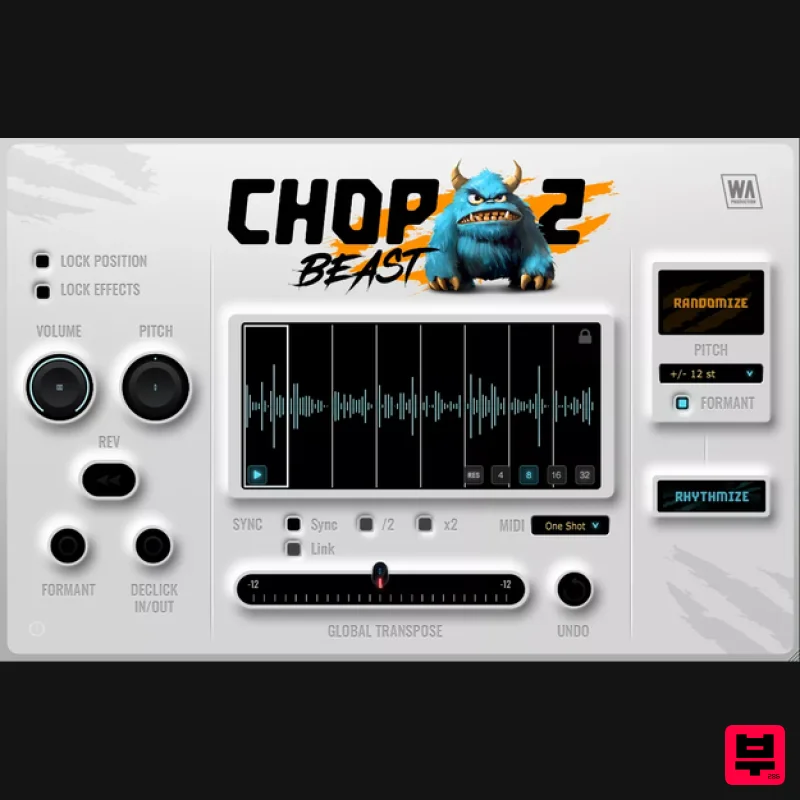
- Note: This product is an upgrade for owners of ChopBeast 1. The full version of ChopBeast 2 can be found here. Rip & Rebuild The creature has evolved… W.A. Production didn’t just add a “2” to the box - they re-engineered the Beast to be sharper
- and far more dangerous. Whilst the original plugin mastered the art of the beautiful mistake
- the sequel grants you total mastery over the chaos. From the swing-heavy stutters of 90s legends like Todd Edwards to the hyper-edited precision of Disclosure and Porter Robinson
- rhythmic slicing has been the heartbeat of electronic music for decades. ChopBeast 2 takes this legacy further
- breathing new life into percussion
- melodies
- vocals
- or entire mixes to create EDM ecstasy and French House flair. By blending surgical per-slice control with intelligent randomization
- you're conjuring melodic manipulation like never before. Rhythmical Revolution ChopBeast 2 features new innovations inspired by community feedback
- and integrated to provide a seamless workflow for creative slicing. Brand new to this version… Deeper per-slice control
- including Lock option for position and FX - so you can keep the building blocks of your sequence
- whilst randomizing around it. Volume control for each and every slice
- to help balance your sound. Pitch randomization to discrete Octaves
- Fifth
- Third
- Major and Minor intervals
- for the most melodic transformations. Formant shaping toggle also available. MIDI One Shot and Hold options for Daft Punk style per-chop looping. Sync playback to your DAW’s tempo to lock your chops to the beat of your track. Half time and Double time options are also available. Link playback to DAW so your chopped loop syncs to bar position. Favorite Features ChopBeast 2 retains the core features of the previous version - including many popular playback options… Declick slices: Achieve seamless transitions between chops
- eliminating unwanted clicks and pops for a polished and professional sound. Independent chop preview: Audition each slice individually
- giving you precise control over your rhythms. Full sequence preview: Preview the entire chopped sequence within the plugin
- allowing you to fine-tune your arrangement before exporting. Sample rate matching: Change your DAW's sample rate without affecting the playback within ChopBeast 2. Preserved sample integrity: Load a sample and retain its original playback speed and sample rate. Slices of Inspiration This plugin not only auto-generates unique audio loop iterations
- but also cuts and combines with an uncanny sonic knowhow
- taking your source material and transforming it into endless rhythmic and melodic possibilities. Drag in an audio file and ChopBeast 2 will instantly chop and rearrange any audio phrase or loop
- with the ability to select up to 32 chops. Audition or trigger your creations via MIDI
- for endless experimentation. Features such as undo
- global transposition
- and melodic randomization modes push the musicality even further. The plugin window is also resizable for optimal workflow. Per-chop Perfection Dive deep into the granular controls of ChopBeast 2 with per-slice pitch manipulation
- volume editing
- formant shifting
- declicking and the ability to reverse individual slices. Embrace the chaos with multiple randomization options
- ensuring that every riff is your own unique creation. Lock in your most-loved creations and export them seamlessly into your DAW
- ready for further sound mangling and manipulation. W. A. Production are real-life producers making creative plugins to help you achieve studio quality processing quickly and easily. Enjoy! Features Audio chop & remix plugin with advanced options Up to 32 chops per instance Per-chop Volume
- Reverse
- Pitch
- Declick
- Formant Shifting Multiple Melodic Randomization modes MIDI audition (one shot & loop) and DAW export DAW Sync with half & double time modes Lock position & FX per-slice Global transpose Resizable interface Responsive & CPU friendly Full PDF Manual & Tutorial video Windows 8 or higher (64 bit) macOS 10.10 or higher (64 bit) AAX - ProTools 11 or higher VST
- VST3 Registration and Activation Video <iframe frameborder="0" height="315" src="https: //www.youtube.com/embed/YJHtWvm8z0Y" width="560"></iframe> Please Note: CHORDS is used as an example. Registration 1. Click the Download button in your Plugin Boutique account or go to https://www.waproduction.com/users/login 2. Click 'Create New Account' (if you already have a W.A Production account
- enter your details
- log in and skip to step 5). 3. Enter your details > Choose your marketing preferences > Click 'Finish Registration'. 4. Your account has been registered > Click 'Register Plugin'. 5. On the license registration page
- enter the license key from your Plugin Boutique account (which will be referred to as 'serial number' on our site) > Click 'Add'. 6. Your product will now be displayed in your W.A Production account > Scroll down to My Orders and click 'View Order'. 7. Click 'Download Files'. 8. Click 'Download'. Mac Installation 1. Once the download is complete
- extract and open the ZIP folder you just downloaded > Open the Mac folder > Double-click the CHORDS .pkg installer file. 2. Click 'Continue'. 3. Read the Software License Agreement > Click 'Continue'. 4. Click 'Agree'. 5. Click 'Install'. 6. Click 'Close'. 7. Open CHORDS in your DAW. 8. Click the information icon in the bottom left-hand corner > Enter the serial number you were given in your W.A Production account > Click 'Authorize'. Your software is now ready to use in your DAW! Windows Installation 1. Once the download is complete
- extract and open the ZIP folder you just downloaded > Open the PC folder > Double-click the CHORDS PC installer file. 2. Click 'Next'. 3. Click 'Next'. 4. Select which plugin formats you would like to install > Click 'Next' > Click 'Install'. 5. Click 'Finish'. 6. Open CHORDS in your DAW. 7. Click the information icon in the bottom left-hand corner > Enter the serial number you were given in your W.A Production account > Click 'Authorize'. Your software is now activated and ready to use in your DAW!
Additional Information
About the W. A. Production ChopBeast 2 Upgrade from v1
The W. A. Production ChopBeast 2 Upgrade from v1 represents excellent craftsmanship in the Multi Effect category.
Why Choose the W. A. Production ChopBeast 2 Upgrade from v1?
- •Authentic W. A. Production craftsmanship and design
- •Versatile sound suitable for multiple musical genres
- •Professional build quality and reliable performance
- •Part of W. A. Production's respected Multi Effect lineup
Compare & Explore
Browse our complete selection of W. A. Production instruments or explore other Multi Effect options. Use our comparison tools to find the perfect match for your musical style and budget.
Similar Products

UVI Xtreme FX 2
Multi Effect

UVI Whoosh FX
Multi Effect

Jungle Audio DUKE
Multi Effect

Quantum DSP Q-Series Invader
Multi Effect

Sinevibes Cache
Multi Effect

Jonas Eriksson Tape Fiasco
Multi Effect

UVI Asteroid
Multi Effect

UVI Click
Multi Effect

