
VSTZone Amplio
Professional music gear - detailed information and where to buy
VSTZone
Amplio
Product Info
* Prices may vary. Check retailer for current pricing and availability.
Product Description
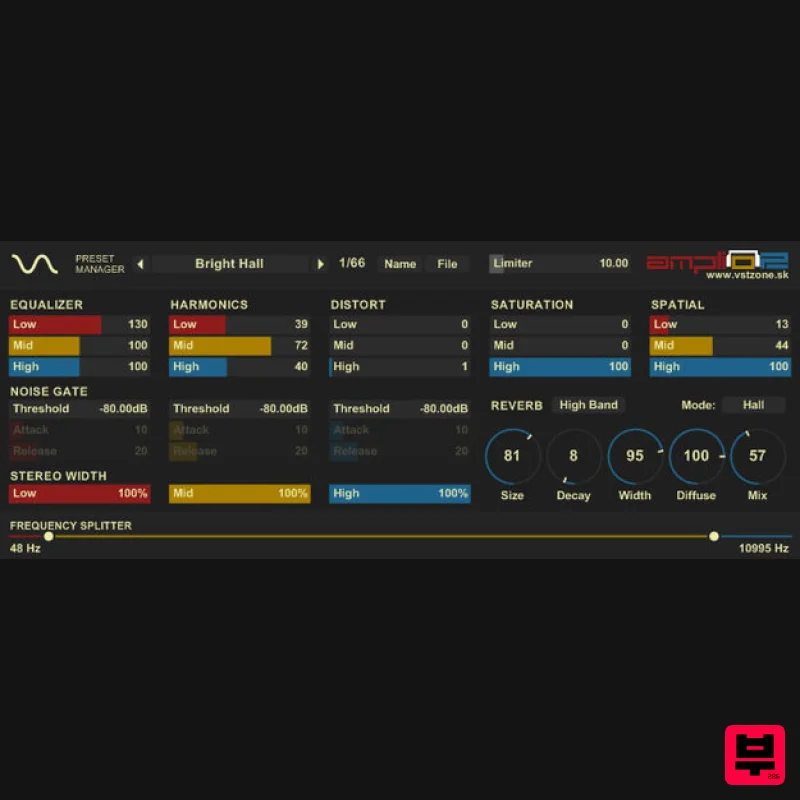
Amplio is a way to enhance boring and dull sound. It's a 3 band Equalizer with adjustable bands and additional multiband effect modules. The plug-in is originally designed to enhance drum patterns but it is powerful enough to be used on any type of sound. Reverb effect routable to any of three bands will add more space to mix and Soft Limiter will prevent any clipping on final output. Features & Changes (Version 2) New multiband Noise gate with envelope controls will help you totally change your beat and create something new Total overhaul of user interface, faster load and file-size. Improved controls. You can now use right mouse click to set default values and double right mouse click to set value to zero on all controls. Holding shift while dragging will increase sensitivity for better value settings No more overlapping band control points on Frequency splitter Improved Reverb and fixed wet/dry mix Low band saturation now working correctly Improved soft limiter to work better with distortion module Control the stereo field with new multiband stereo balance module - handy gadget for centering bass frequencies Assembly optimization of all modules in order to save as much cycles as possible. Even with new noise gate CPU usage is same or even better than in previous version Adjusted all existing presets and added new 14 new presets. Total 66 presets including Amplio presets that use Distortion module Previous Changes (Version 1.1) Additional optimization (up to 12% CPU usage reduction) Added knob readout for reverb module New distort module (see the attached audio demo) System Requirements Windows / PC 32-bit VST plugin Please Note: Amplio by VST Zone is a Virtual Effect Audio Plugin for Windows. It functions as a VST Plugin. Installation Instructions 1. Download the installer folder from your account HERE, Amplio has been 'Added' to your Downloads. 2. Extract the contents of the downloaded Amplio VST folder which contains the Amplio2.dll file. 3. Move and Place the Amplio2.dll file into your audio plug-ins folder - this is usually located here: C:\Program Files\Vstplugins (select yes if asked for an administrator's permission). 4. Once the Amplio2.dll file has been correctly placed into it's respective VST folder, Restart your DAW. 5. When your DAW starts up, it will rescan your plug-ins folder and detect Amplio. In some instances you may need to manually rescan your DAW's plug-in folder. 5. Amplio is now ready for use within your DAW!
Additional Information
About the VSTZone Amplio
The VSTZone Amplio combines traditional design with modern performance for Multi Effect enthusiasts.
Why Choose the VSTZone Amplio?
- •Authentic VSTZone craftsmanship and design
- •Versatile sound suitable for multiple musical genres
- •Professional build quality and reliable performance
- •Part of VSTZone's respected Multi Effect lineup
Compare & Explore
Browse our complete selection of VSTZone instruments or explore other Multi Effect options. Use our comparison tools to find the perfect match for your musical style and budget.
Similar Products

UVI Whoosh FX
Multi Effect

UVI Xtreme FX 2
Multi Effect

Jungle Audio DUKE
Multi Effect

UVI Asteroid
Multi Effect

UVI Click
Multi Effect

Sinevibes Cache
Multi Effect

Jonas Eriksson Tape Fiasco
Multi Effect

Quantum DSP Q-Series Invader
Multi Effect

