
United Plugins Transmutator
Professional music gear - detailed information and where to buy
United Plugins
Transmutator
Product Info
* Prices may vary. Check retailer for current pricing and availability.
Product Description
- A cross-fade effect can be useful but a simple blending of one material into another can be a bit boring. Fortunately
- there's now Transmutator which brings transition between tracks
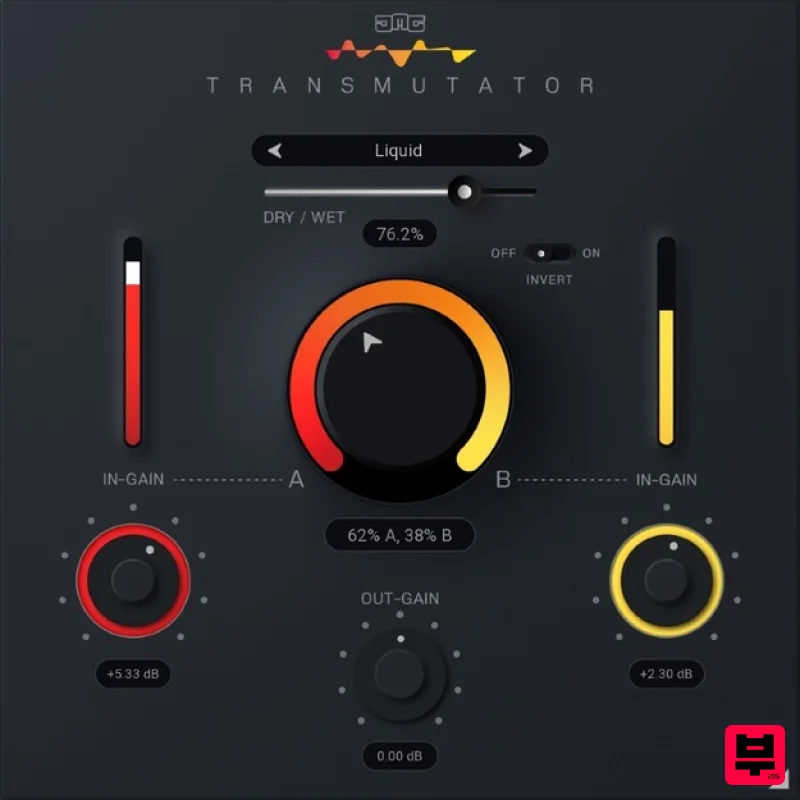
- song parts or whole songs to another level of fun and creativity. More than a Cross-Fade Transmutator is a cutting-edge tool that crossfades between two inputs in a multitude of exciting ways. Simply place the plugin on your track and feed a second track into its sidechain input. Then use the Mix dial to transition from A to B using various unique modes. 16 (x2) Astonishing Blend Modes Transmutator offers many creative ways to fade between inputs including Mid/Side
- Multi-band
- Dynamics
- Filtering
- Spectral freezing/blurring
- Pitch/Frequency shifting and much more. Plus
- the Invert parameter changes the behaviour of each of the modes. Sound Designer's Swiss Army Knife Blend and fuse 2 audio signals in many creative ways
- from spectral morphing to Noise/Tone merging. You will find so many innovative uses for Transmutator
- that it will become a powerful tool in your plugin arsenal. From Classic to Creative Use the Dry/Wet slider to blend between a traditional volume crossfader to full-on sonic mangling. Find the perfect balance that naturally fits your audio. Transition Between Track Elements Automate the mix control in your DAW to effortlessly progress from verse to chorus or build-up to drop. Transmutator will quickly create ingenious transitions to take your music productions to the next level. Mixing Between Songs DJs will fall in love with Transmutator for mixing between tracks. Say goodbye to boring song transitions using basic volume mixing and say hello to your new creative crossfader. Video-makers' Lives Improved Create effects that follow your video transitions or blend between types of music that normally do not go together well (but you simply have to use them because they fit the picture). Blend between characters voiceovers like never before. Hassle-free Software Protection No iLok
- no dongle nor internet access is required for activation. This software uses licence files to activate. You can freely use the purchased software on all your computers as long as you are the user. Realistic 3D yet Flexible GUI Photorealistic graphic user interface of the plugin gives you the feeling you are touching the real hardware. But it easily adapts to your needs. You can always drag the arrow in the bottom right corner to change its size - make it to save the valuable screen space
- or enlarge it to make it easier to use. 64-bit Audio Quality at ANY Sample Rate The plugin provides the maximum audio quality you can get. It uses internal 64-bit audio processing and can handle any sampling rate. 192 kHz or even higher. Bypass The intelligent way this plugin manages bypassing ensures that you don't get any click or harmful noises when automating the parameter. It also compensates for latency ensuring that the bypass states are perfectly in sync with each other. System Requirements Mac macOS 10.10 and later (M1 Silicon Mac and macOS 11 Big Sur supported) 64bit only Intel/AMD processor with SSE2 support VST2
- VST3
- AAX or AU compatible host Windows Windows 8 - 11 32bit or 64bit Intel/AMD processor with SSE2 support VST2
- VST3 or AAX compatible host Compatibility Warning: This product only works with sidechain signals therefore applications that do not support this kind of routing (i.e. GarageBand) do not work well with it. Alberto Rizzo Schettino "I've set up a couple of FX chains that feed into each other in a cool way and Transmutator is the basic tool to help me achieve this intricate effect." Note: FireCobra is used as an example as the installation process is the same for all United Plugins products. Registration Skip straight to 'Installation & Activation' if you already have an United Plugins account 1. Go to https://unitedplugins.com/register/ > Fill out the account registration form
- check the box that states 'I'm not a robot' and click 'Create Account'. 2. Enter your United Plugins-registered email and password > Click 'Sign in'. Installation & Activation 1. Go to https: //unitedplugins.com/download/ 2. Download and install the United Plugins Manager for your OS 3. Watch the video linked below for an in depth guide to using the plugin manager > skip to 3 minutes into the video for info on redeeming the serial number found in your Plugin Boutique User Account <iframe allow="accelerometer; autoplay; clipboard-write; encrypted-media; gyroscope; picture-in-picture; web-share" allowfullscreen="" frameborder="0" height="315" src="https://www.youtube.com/embed/1eLJ3nka39A?si=Cr3kLSRtELyr9miW" title="YouTube video player" width="560"></iframe> Your software is now activated and ready to use within your DAW.
Additional Information
About the United Plugins Transmutator
Experience the quality and tone that makes the United Plugins Transmutator a popular choice for musicians.
Why Choose the United Plugins Transmutator?
- •Authentic United Plugins craftsmanship and design
- •Versatile sound suitable for multiple musical genres
- •Professional build quality and reliable performance
- •Part of United Plugins's respected Utility lineup
Compare & Explore
Browse our complete selection of United Plugins instruments or explore other Utility options. Use our comparison tools to find the perfect match for your musical style and budget.
Similar Products

Audible Genius Building Blocks 2
Utility

Tonalic Tonalic Arranger - 30 Day Subscription
Utility

Blue Cat Audio Blue Cat's Connector
Utility

Acoustica Spin It Again
Utility

DDMF TheStrip
Utility

Audible Genius Building Blocks 1
Utility

Inphonik RX950
Utility

Soundspear Luxor
Utility

