
Tone Empire Loc-Ness V3
Professional music gear - detailed information and where to buy
Tone Empire
Loc-Ness V3
Product Info
* Prices may vary. Check retailer for current pricing and availability.
Product Description
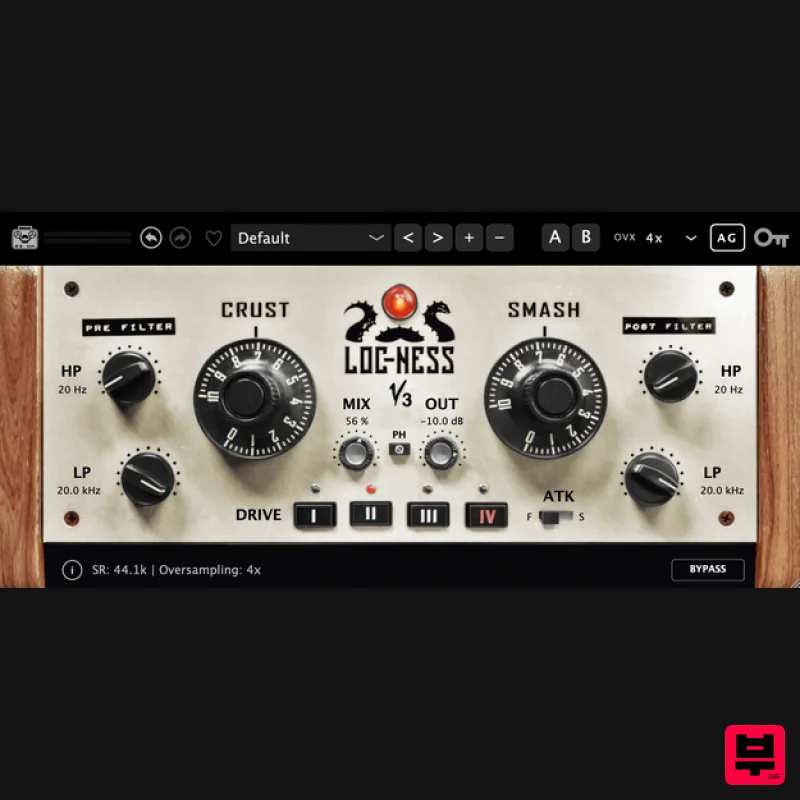
- Loc-Ness V3 is the ultimate box — combining 4 analog-modeled saturation circuits
- parallel compression/limiting
- and surgical pre/post filtering into one devastating processor. Inspired by a legendary vintage broadcast limiter but far more controllable and musical. From subtle harmonic warmth to full-on sonic destruction — on drum rooms
- guitars
- breakbeats
- synths
- and anything you throw at it. All-In-One Processing Saturation
- compression
- and filtering — everything you need to crush
- and shape any source Crust & The two main controls that define the Loc-Ness sound. Crust drives the signal through one of four carefully modeled analog saturation circuits
- adding harmonic color from gentle warmth to crunchy overdrive. feeds that saturated signal into a limiter/compressor that sustains and fattens the sound — inspired by the aggressive character of a legendary vintage broadcast limiter
- but more musical
- and far more controllable. Crust (Saturation): Input gain/drive with tonal color shaping (Limiter): Heavy limiting and sustain control Serial Processing: Signal flows from Crust into for stacked tone Autogain: Automatic level compensation as you drive harder From subtle to destruction: Covers the full range of processing intensity Drive Types & Controls Four distinct analog-modeled saturation circuits give you a palette of tonal colors
- from clean tube warmth to aggressive transistor crunch. Combined with Attack
- Phase
- and Output controls
- you have complete command over every aspect of your processed sound. 4 Drive Types: Each with unique harmonic character and color ATK (Attack): Fast mode instantly; Slow lets transients through first Phase: Retain or invert the wet signal phase for creative blending Mix: Parallel blend dry and wet signals for perfect balance Output: Final output level with +/- 12dB range Pre & Post Filters Surgical frequency-targeted processing that sets Loc-Ness apart. The Pre Filters let you isolate the exact frequency band you want to saturate and compress — leaving everything else untouched. The Post Filters shape the final output
- especially useful when blending wet and dry signals. Pre HP Filter (20-500 Hz): Remove low-end before saturation to avoid mud Pre LP Filter (3-20 kHz): Tame highs before they get amplified by Crust Post HP Filter (20-800 Hz): Shape the low-end of the processed signal Post LP Filter (1-20 kHz): harsh highs in the final output Features Autogain: Automatic level compensation keeps your output in check as you push Crust and harder. A/B Compare: Instantly compare two settings with built-in A/B comparison. Never second-guess your sound. Undo / Redo: Full undo and redo history. Experiment freely and step back to any previous state. 50+ Factory Presets: Get started instantly with 50+ professionally crafted presets. Save your own and mark favorites. 3 Activations: Use on up to 3 machines simultaneously. Studio
- laptop
- and home. Up to 8x Oversampling: Clean
- alias-free saturation with oversampling options up to 8x for pristine analog character. Mac macOS 10.13 or later (Intel / Native M1 supported) (64-bit only) VST3
- or AAX Intel i3 / AMD Ryzen or equivalent 2 GB RAM / 300 MB HD Required Screen resolution - 1024 × 768 Note: M1 Mac users running Logic Pro (10.7.2 and above) or Ableton (11.1) please use the 'M1' installer. For all other DAWs please use the regular 'Mac' installer. Windows Windows 10 or later (64-bit only) VST3 or AAX Intel i3 / AMD Ryzen or equivalent 2 GB RAM / 300 MB HD Screen resolution - 1024 × 768 Important Note: Chorust is used as an example. Installation Windows 1. Download the installation package from within your Plugin Boutique User Account and extract the contents. Launch the .exe file. 2. Click 'Install'. 3. Once installed
- click 'Finish'. Mac 1. Download the installation package from within your Plugin Boutique User Account and extract the contents. Launch the .pkg file. 2. Click 'Continue'. 3. Click 'Continue'. 4. Click 'Install'. 5. Once installation is complete
- click 'Close'. Activation 1. Open the plugin within your DAW
- and click 'Register'. Alternatively
- if you already have an account on Beatskillz or Tone Empire
- enter your existing email ID and Password
- and click 'Login'. 2. You will be taken to the BeatSkillz/Tone Empire registration page. Enter your details here in the provided boxes
- and click 'Register'. 3. Having input your information
- you will now receive a verification email to your email address. Navigate to this
- and click the 'Click Here' link inside. 4. Head back to the plugin dialogue box within your DAW
- and enter the details exactly as they were input to the BeatSkillz/Tone Empire registration page in step 2. Click 'Login'. 5. Enter the serial number from within your Plugin Boutique User Account
- and click 'Activate'. 6. Your plugin is now activated and ready to use!
Additional Information
About the Tone Empire Loc-Ness V3
The Tone Empire Loc-Ness V3 combines traditional design with modern performance for Multi Effect enthusiasts.
Why Choose the Tone Empire Loc-Ness V3?
- •Authentic Tone Empire craftsmanship and design
- •Versatile sound suitable for multiple musical genres
- •Professional build quality and reliable performance
- •Part of Tone Empire's respected Multi Effect lineup
Compare & Explore
Browse our complete selection of Tone Empire instruments or explore other Multi Effect options. Use our comparison tools to find the perfect match for your musical style and budget.
Similar Products

Jungle Audio DUKE
Multi Effect

UVI Xtreme FX 2
Multi Effect

UVI Asteroid
Multi Effect

Quantum DSP Q-Series Invader
Multi Effect

UVI Click
Multi Effect

UVI Whoosh FX
Multi Effect

Jonas Eriksson Tape Fiasco
Multi Effect

Sinevibes Cache
Multi Effect

