
Soundtoys SpaceBlender
Professional music gear - detailed information and where to buy
Product Description
- An Imaginary Space Machine SpaceBlender is your portal to a new dimension of space and time effects. It’s an experimental reverb that lets you create unreal and imaginary spaces – shapes
- textures
- and tones otherwise impossible in the real world. Inspired by the pioneers of ambient music – with their extensive use of layered tape loops and delays – SpaceBlender is designed to create massive waves of lush
- organic
- and evolving spatial effects. This is Not Normal SpaceBlender makes it easy to create absurdly long (or short) nonlinear spaces
- and rich evolving textures and can turn the simplest of sounds into dramatic cinematic swells. Its unique algorithmic architecture gives you the power to sculpt the shape
- density
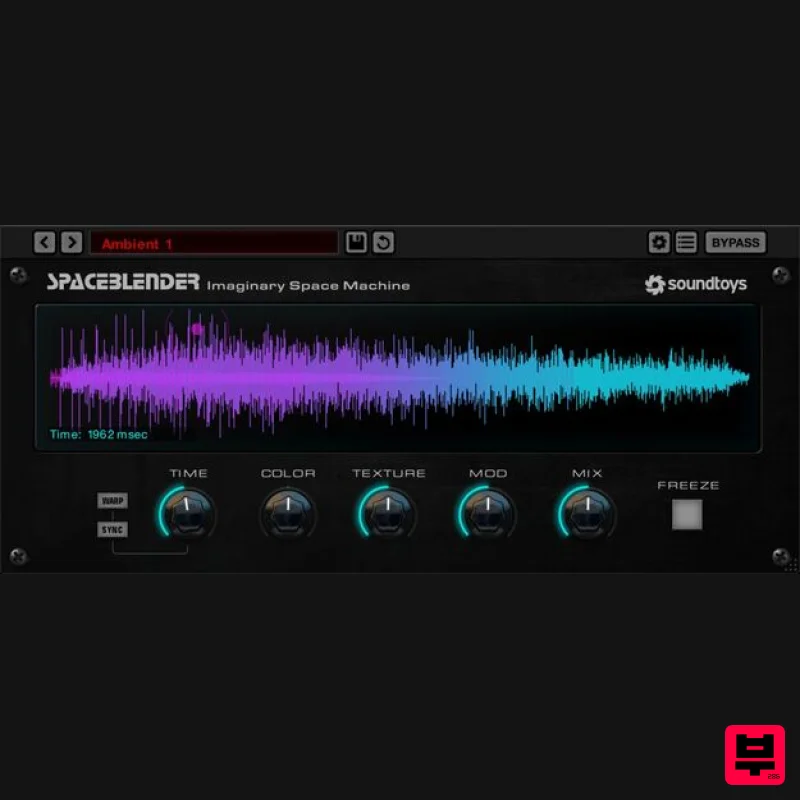
- and spectral evolution in unnatural and creative ways. The Time knob sets reverb length from 100ms to a minute. In Sync mode
- it locks to your track’s tempo — perfect for ambient loops
- frozen tails
- or gated effects. Turn the Color control down to dial in darker lo-fi effects
- or turn it up to make your reverb get brighter over time – something that’s not possible with conventional reverbs. The Texture control shapes SpaceBlender’s character—from lush reverb at the top end to sparse
- swarming repeats at the other. Mod controls the random movement deep within SpaceBlender’s processing layers. Turning it off creates a more static sound
- while turning it up increases modulation for a rich
- watery effect. Engaging Freeze feeds SpaceBlender’s output back into itself
- creating evolving
- organically degrading ambient loops. Play Space SpaceBlender’s Visualizer displays the effect’s shape
- texture
- and interaction with your sound. This is especially useful for longer time settings and shapes with slow attacks – it lets you see and anticipate the evolution of the effect. To manipulate the reverb envelope
- drag the X/Y cursor around the screen and the effect will morph as you play. It’s a fun and intuitive way to dial in the timing and shape of the effect in real time. Back to Earth SpaceBlender isn’t just for cinematic sound design or avant-garde experiments. It also shines in everyday music and audio production
- adding depth and dimension to vocals
- guitars
- synths – or anything else! Algorithmic Innovation SpaceBlender merges experimental sound design
- deep algorithmic craft
- and certain characteristics of classic digital reverbs. Soundtoys founder Ken Bogdanowicz and sound designer Andrew Schlesinger (respectively) created the DSP algorithms and patch for the original Black Hole effect in the Eventide DSP4000. They have decades of experience designing and tuning effects and reverb algorithms. SpaceBlender is also inspired by the grainy
- retro-futuristic vibe of the Ursa Major Space Station
- the dark richness of the classic Lexicon 224
- and the dense choral swarms of the obscure and rare Swarmatron synthesizer. Features Interactive control – Morph between gate
- reverse
- decay
- and bloom reverb shapes in real time Visualizer – Watch your sound flow through the reverb shape as you sculpt its envelope Spectral evolution – Reverbs grow darker or brighter over time with simple control Embedded modulation – Adds rich
- evolving motion to ambient effects Texture control – Shift from dense and lush to sparse and grainy Extreme range – From tight 100ms non-linear bursts to sprawling 60-second meditations System Requirements Operating systems: Mac OS X 10.14 or later; Windows 10 or later. Apple Silicon is supported. 64-bit only AAX Native
- AAX AudioSuite
- VST 2
- VST 3
- and Audio Units (AU) An internet connection is required at the time of activation. Notes: You need to have an iLok account in order to use the trial and purchased versions of any Soundtoys software. Decapitator is used as an example. Registration 1. First you will need to create a Soundtoys account. Go to https://accounts.soundtoys.com/#/dealer-purchases > Enter your email address > Click Continue. 1. Enter your details and select your marketing preferences > Click 'I'm not a robot' > Click Create Account. 2. Your account has been created. 3. Go to your inbox and click the orange verification link > You will be redirected to a sign-in page. 4. Enter your email and password > Click Sign In > You will be directed to your My Products page. 5. Click Dealer Purchases > Copy and paste the 10-digit code from your Plugin Boutique account > Click Submit. 6. Your new license is now registered in your Soundtoys account. 7. Click My Products > You will now see your activation code and installers. Mac Installation 1. Download the macOS installer from your Soundtoys My Products page by clicking the Apple logo > Double-click the .dmg file then double-click the pkg file to begin the installation process. 2. Click Continue. 3. Click Continue. 4. Click Continue. 5. Click Agree. 6. Click Install. 7. Enter your computer username and password > Click Install Software. 8. Click Close. Activation 1. Open the iLok License Manager > Click Sign In. 2. Enter your iLok User ID and Password > Click Sign In. 3. Click the '• • Ɪ' icon. 4. Enter the activation code found on your Soundtoys My Products page > Click Next. 5. Select your computer as the activation location > Click Activate. 6. Click OK. Your software is now activated and ready to use in your DAW. Windows Installation 1. Download the Windows installer from your Soundtoys User Account by clicking the Windows icon. 2. Double-click it to extract the contents and double-click your required installer to begin the installation process > Click Next. 3. Read the License Agreement and select 'I accept the agreement' > Click Next. 4. Click Next. 5. Click Next. 6. Click Install. 7. Click Finish (If you already have the iLok License Manager installed on your computer
- feel free to deselect the tick box). Activation 1. Open the iLok License Manager > Click Sign In. 2. Enter your iLok User ID and Password > Click Sign In. 3. Click the '• • Ɪ' icon. 4. Enter the activation code found on your Soundtoys My Products page > Click Next. 5. Select your computer as the activation location > Click Activate. 6. Click OK. Your software is now activated and ready to use in your DAW.
Additional Information
About the Soundtoys SpaceBlender
The Soundtoys SpaceBlender combines traditional design with modern performance for Reverb enthusiasts.
Why Choose the Soundtoys SpaceBlender?
- •Authentic Soundtoys craftsmanship and design
- •Versatile sound suitable for multiple musical genres
- •Professional build quality and reliable performance
- •Part of Soundtoys's respected Reverb lineup
Compare & Explore
Browse our complete selection of Soundtoys instruments or explore other Reverb options. Use our comparison tools to find the perfect match for your musical style and budget.
Similar Products

PSP Audioware PSP Nexcellence
Reverb
$30
PSP Nexcellence is a rich-sounding, spring reverb emulation inspired by and modeled after classic “necklace-type”...

PSP Audioware PSP Pianoverb 2
Reverb
$30
PSP PianoVerb2 is a redesigned and improved creative resonant reverb plug-in based on our famous and beloved freeware...

Initial Audio AR1 Reverb
Reverb
$30
Quality Algorithmic Reverb Plugin AR1 is an algorithmic reverb plugin designed to sound great on all types of...

PSP Audioware PSP EasyVerb
Reverb
$30
PSP EasyVerb is a reverberation effect plug-in (VST, RTAS and AAX for Windows; VST, AudioUnit, RTAS and AAX for Mac OS...

XHUN Audio ShineVerb
Reverb
$30
Creative Reverb Processor ShineVerb is a creative tool specially designed for reverberation, spatialization and sound...

Vegas Audio Fabricverb
Reverb
$30
Get the signature sound of the UK’s most famous nightclub on your digital audio workstation! Our new convolution...

DDMF MagicVerb
Reverb
$30
MagicVerb is the latest result of the collaboration between MagicDeathEye aka Ian Sefchick and DDMF. This journey was...

DDMF Envelope
Reverb
$30
Envelope is a true stereo reverb plugin featuring 8 different room simulations, all of which can be adjusted for size,...
Frequently Asked Questions
The Soundtoys SpaceBlender stands out for its exceptional Soundtoys craftsmanship and innovative design.
Yes! With its affordable price point and quality construction, it's perfect for learning reverb.
Browse the similar products section to see how it stacks up against other reverb.

