
Sound Particles Doppler + Air
Professional music gear - detailed information and where to buy
Sound Particles
Doppler + Air
Product Info
* Prices may vary. Check retailer for current pricing and availability.
Product Description
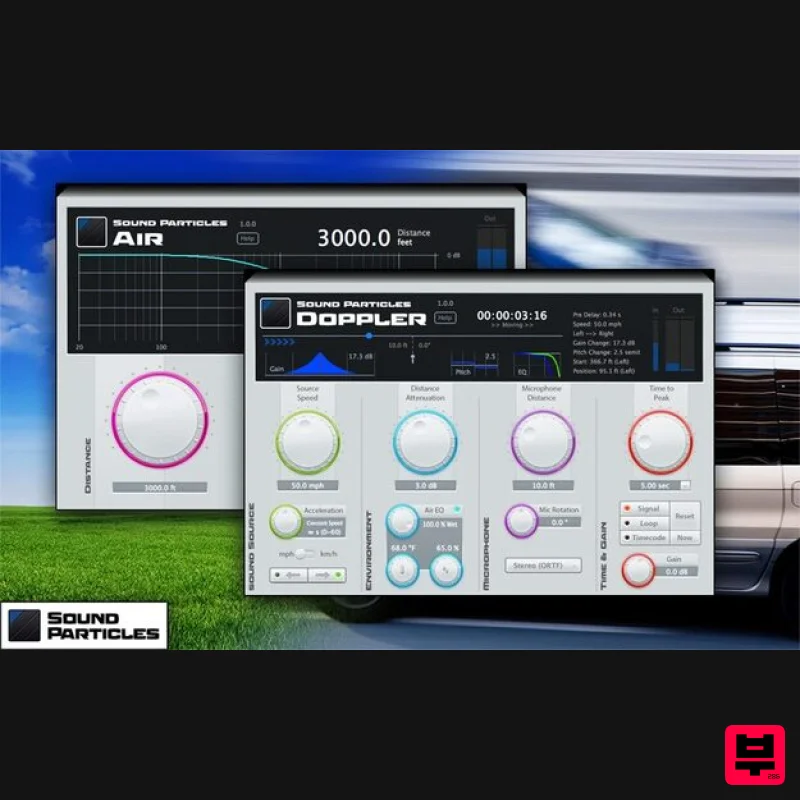
- Professional Audio Postproduction Plugins Doppler + Air is a bundle of professional audio plugins (AAX Native
- VST and VST3)
- which may be used for sound design and audio post-production. They are perfect for simulating the physical behavior of sound moving through the air
- turning your mix into an incredibly immersive sonic experience. Doppler Doppler simulates the behaviour of objects moving through air
- providing audio with highly accurate characteristics of sounds passing-by. With control of all parameters that physically affect pitch
- level and EQ in a real-world situation
- Doppler gives you the most natural-sounding emulation for your work. Features Highly Accurate Doppler: Accurate means Natural - because the brain knows what is natural and what is fake
- you need the most accurate tools. Doppler plugin uses the same engine of Sound Particles
- used in many Hollywood studios for creating the most natural-sounding Doppler effects
- but now available as a plugin. Support for Immersive Audio: Simply select between different microphones
- ranging from mono (omni
- cardoid
- figure-of-eight)
- stereo (MS
- ORTF
- Blumlein
- 9.1 Dolby Atmos bed
- or Ambisonics (up to 3rd order). The best Doppler for the best audio formats. Perfect Image Sync: Specify the time where you want the peak of the Doppler
- and all other parameters will adjust to get the perfect sync with the image. Including Distance EQ: Besides volume and pitch
- Doppler plugin also applies the perfect frequency response you would get from air dampening thru distance. World Units: Do you prefer “meters” or “feet”? “Mph" or "km/h"? Full integration with Imperial and Metric units
- for an easy and more welcoming workflow for everyone. Control Surfaces: Use control surfaces (such as AVID S6) to edit the plug-ins' parameters. Air Air simulates the natural dampening that happens to higher frequencies from sounds as they travel through air
- providing perfectly simulated frequency responses to dialogue or effects that you want to sound naturally distant. Features Several Locations: Air already includes settings from different locations around the globe
- from Antarctica to Death Valley
- but you are always able to enter your one custom values. Perfect result: Air is much more accurate than a simple low-pass filter
- using exact frequency response values of air dampening. Frequency Response: With Air
- you can see the actual frequency response that is being applied to the sound. Distance Attenuation: Control the volume over distance with the Distance Attenuation parameter. World Units: Do you prefer “meters” or “feet”? “Mph" or "km/h"? Full integration with Imperial and Metric units
- for an easy and more welcoming workflow for everyone. Control Surfaces: Use control surfaces (such as AVID S6) to edit the plug-ins' parameters. System Requirements Operating System Mac OSX 10.9 or higher (Intel and native Apple Silicon Macs supported) Windows 7/8/10 Minimum Requirements CPU - 2-core or higher RAM - 4 GB or higher Disk Space 600 MB Recommended Requirements CPU - 4-core or higher RAM - 8 GB or higher Disk Space - 600 MB Note: Energy Panner is used as an example. Windows Registration 1. Go to https://soundparticles.com/register > Enter your Name
- Email Address
- Password and Country > click 'REGISTER'. 2. Click 'CLAIM VOUCHER'. 3. Enter your voucher code
- found in the serial number section of your Plugin Boutique Account > click 'CLAIM'. Installation 1. Click 'DOWNLOAD'. 2. Select the version of the product you wish to install > click 'DOWNLOAD'. 3. Open the downloaded .zip folder and click > the .msi file. To begin the installation process > Click 'Next'. 4. Select 'I accept the terms in the License Agreement' > Click 'Next'. 5. Choose the plugin formats you would like to be installed > Click 'Next'. 6. Click 'Install' > click 'Allow' to begin the installation process. 7. Click 'Finish'. Your software is now activated and ready to use. Mac Registration 1. Go to https: //soundparticles.com/register > Enter your Name
- Email Address
- Password and Country > click 'REGISTER'. 2. Click 'CLAIM VOUCHER'. 3. Enter your voucher code
- found in the serial number section of your Plugin Boutique Account > click 'CLAIM'. Installation 1. Click 'DOWNLOAD'. 2. Select the version of the product you wish to install > click 'DOWNLOAD'. 3. Open the downloaded .dmg file > click 'Agree' on the User Agreement to begin the installation process. 4. Select 'Install'. 5. Click 'Continue'. 6. Choose the plugin formats you would like to be installed > click 'Continue'. 7. Choose your preferred 'Install Location' > click 'Install' 8. Once the software is installed > click 'Close'. Your software is now activated and ready to use.
Additional Information
About the Sound Particles Doppler + Air
The Sound Particles Doppler + Air combines traditional design with modern performance for Multi Effect enthusiasts.
Why Choose the Sound Particles Doppler + Air?
- •Authentic Sound Particles craftsmanship and design
- •Versatile sound suitable for multiple musical genres
- •Professional build quality and reliable performance
- •Part of Sound Particles's respected Multi Effect lineup
Compare & Explore
Browse our complete selection of Sound Particles instruments or explore other Multi Effect options. Use our comparison tools to find the perfect match for your musical style and budget.
Similar Products

Quantum DSP Q-Series Invader
Multi Effect

UVI Whoosh FX
Multi Effect

UVI Asteroid
Multi Effect

UVI Click
Multi Effect

Jonas Eriksson Tape Fiasco
Multi Effect

UVI Xtreme FX 2
Multi Effect

Sinevibes Cache
Multi Effect

Jungle Audio DUKE
Multi Effect

