
Sound Particles Air | Educational Version
Professional music gear - detailed information and where to buy
Sound Particles
Air | Educational Version
Product Info
* Prices may vary. Check retailer for current pricing and availability.
Product Description
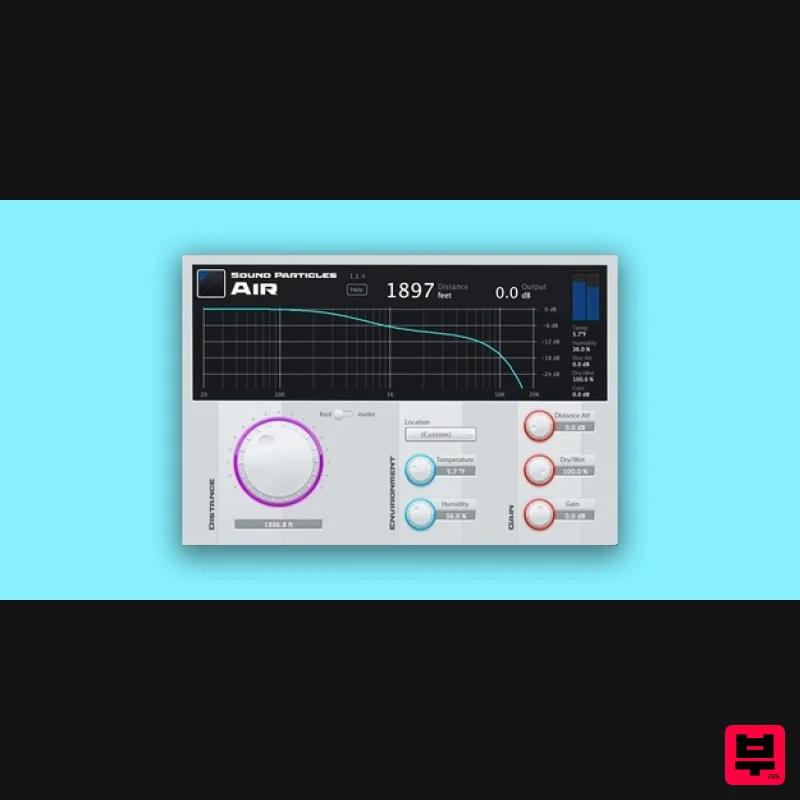
- Important Note: This is an educationally discounted version of Air and is available for full-time students or faculty at an educational institution only. Once purchased please send your order number and proof of educational status to [email protected]. The full version of Air is also available. Professional Audio Plugin Air is the perfect tool to simulate distance through high-frequency attenuation. Use it on any DAW. Air for Sound Effects A close-by object doesn't sound like a faraway object. Quickly reinvent sound effects by adding depth and distance to your sounds. No need to record everything all over again. Air for Mixing With just one knob
- it is possible to accurately simulate the distance of any sound. Air will apply the exact EQ and distance attenuation necessary to make audio assets perfectly resemble real-life sonic events. Air for Automated Dialogue Replacement The biggest challenge of ADR is making it sound as natural as if it was recorded on the original set. Air helps in achieving a natural-sounding distance effect
- so that ADR never sounds misplaced again. Air for Music Easily take away some presence of specific items within your projects. Let instruments breathe and mixes shine with this ready to go plugin. Features Several Locations: Air already includes temperature and humidity settings from different locations around the globe
- from Antarctica to Death Valley
- but you are always able to enter your one custom. Perfect Result: Air is much more accurate than a simple low-pass filter
- using scientifically measured frequency response values of air dampening. Frequency Response: With Air
- you can see the actual frequency response that is being applied to the sound. Distance Attenuation: Control the volume over distance with the Distance Attenuation parameter. World Units: Do you prefer “meters” or “feet”? “Mph" or "km/h"? Full integration with Imperial and Metric units
- for an easy and more welcoming workflow for everyone. Control Surfaces: Use control surfaces (such as AVID S6) to edit the plug-ins' parameters. System Requirements Operating System Mac OSX 10.13 or higher (Intel and native Apple Silicon Macs supported) Windows 10+ Minimum Requirements CPU - 2-core or higher RAM - 4 GB or higher Disk Space 600 MB Recommended Requirements CPU - 4-core or higher RAM - 8 GB or higher Disk Space - 600 MB Note: Energy Panner is used as an example. Windows Registration 1. Go to https://soundparticles.com/register > Enter your Name
- Email Address
- Password and Country > click 'REGISTER'. 2. Click 'CLAIM VOUCHER'. 3. Enter your voucher code
- found in the serial number section of your Plugin Boutique Account > click 'CLAIM'. Installation 1. Click 'DOWNLOAD'. 2. Select the version of the product you wish to install > click 'DOWNLOAD'. 3. Open the downloaded .zip folder and click > the .msi file. To begin the installation process > Click 'Next'. 4. Select 'I accept the terms in the License Agreement' > Click 'Next'. 5. Choose the plugin formats you would like to be installed > Click 'Next'. 6. Click 'Install' > click 'Allow' to begin the installation process. 7. Click 'Finish'. Your software is now activated and ready to use. Mac Registration 1. Go to https: //soundparticles.com/register > Enter your Name
- Email Address
- Password and Country > click 'REGISTER'. 2. Click 'CLAIM VOUCHER'. 3. Enter your voucher code
- found in the serial number section of your Plugin Boutique Account > click 'CLAIM'. Installation 1. Click 'DOWNLOAD'. 2. Select the version of the product you wish to install > click 'DOWNLOAD'. 3. Open the downloaded .dmg file > click 'Agree' on the User Agreement to begin the installation process. 4. Select 'Install'. 5. Click 'Continue'. 6. Choose the plugin formats you would like to be installed > click 'Continue'. 7. Choose your preferred 'Install Location' > click 'Install' 8. Once the software is installed > click 'Close'. Your software is now activated and ready to use.
Additional Information
About the Sound Particles Air | Educational Version
The Sound Particles Air | Educational Version combines traditional design with modern performance for Multi Effect enthusiasts.
Why Choose the Sound Particles Air | Educational Version?
- •Authentic Sound Particles craftsmanship and design
- •Versatile sound suitable for multiple musical genres
- •Professional build quality and reliable performance
- •Part of Sound Particles's respected Multi Effect lineup
Compare & Explore
Browse our complete selection of Sound Particles instruments or explore other Multi Effect options. Use our comparison tools to find the perfect match for your musical style and budget.
Similar Products

UVI Xtreme FX 2
Multi Effect

UVI Asteroid
Multi Effect

Jungle Audio DUKE
Multi Effect

Quantum DSP Q-Series Invader
Multi Effect

UVI Whoosh FX
Multi Effect

Jonas Eriksson Tape Fiasco
Multi Effect

Sinevibes Cache
Multi Effect

UVI Click
Multi Effect

