
Softube OTO Biscuit 8-bit Effects
Professional music gear - detailed information and where to buy
Softube
OTO Biscuit 8-bit Effects
Product Info
* Prices may vary. Check retailer for current pricing and availability.
Product Description
- OTO Biscuit 8-bit Effects Vive Le Biscuit Initially introduced in hardware in the late 00’s
- the French-made OTO Biscuit quickly became a cult classic with DJs and electronic music producers around the world. Gritty bit-crushing
- lo-fi multi-effects
- a sweet and analog filter
- and a quality look and feel
- made it a go-to awesome-sound-maker in clubs and studios alike. Now it’s available in software
- bringing those crunchy
- dirty
- edgy sounds closer to the DAW-based studio or laptop-based performance rig
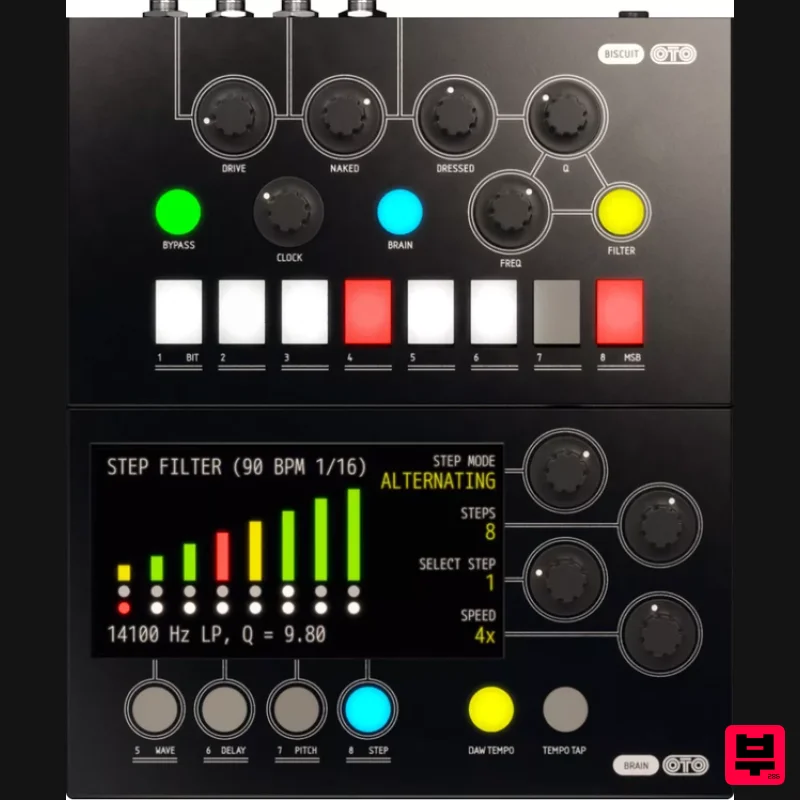
- and making it more intuitive than ever before. The Biscuit offers incredibly detailed control of these essential sonic possibilities
- with eight individually invertable or mutable bits
- control of sample rate
- waveshaping
- delay
- even pitch-shifting
- and analog filtering (controllable manually or with a built-in step sequencer) to round off sharp edges and make even the harshest digital screech sound alive and organic. Try it on a drum loop for gentle lo-fi digital distortion
- or complete screaming chaos
- and everything in-between. Take synth sounds to the next level
- creating arcade game blips and bloops
- adding insane aliasing and overtones
- making pads move and swell with the filter. Even apply to vocals or guitars to turn analog sounds into electronic
- robotic
- futuristic fantasies. We’ve modeled both the digital and analog parts of the Biscuit
- with unrelenting detail
- and the plug-in features a low-latency mode that makes live use possible – a particularly popular way to play with the Biscuit is to mangle drums or drops in a DJ set
- or create seemingly studio-bound sounds live on stage. And it’s simpler than ever before with the plug-in
- as the added visualisations of the lower ‘brain’ section make working with the digital effects on board far easier and more enjoyable. See the shapes of the 8 different waves as you apply them to your signal. Drag delay time and feedback around with their own dedicated knobs
- and sync to the DAW tempo or tap in your own. Pitch-shift and blend with your dry signal for ringing bell overtones or super-fat sub-bass. At first
- the Biscuit can seem like a novelty
- only for crazy once-in-a-while sounds
- a totally optional cherry on the cake. But dive in a little deeper and you’ll find it’s its very own confection
- sweet and moreish. Before long you’ll be using it on pretty much every project and wondering if it’s good for your teeth. In short Lo-fi 8-bit magic in a fun and easy-to-use package. Take control on a bit-by-bit level. Slow the sample rate and hear that aliasing glitter fall. analog filter. Built in digital effects – waveshaping
- delay
- pitch-shifting. 8-step sequencer to drive the filter. Very distinctive sound
- but good for many styles. Turn any run-of-the-mill electronic track into a vibrant classic. System Requirements macOS Big Sur 11
- Monterey 12
- Ventura 13 Windows 10 (64-bit)
- Windows 11 Softube account iLok account Computer with AU
- VST3
- and/or AAX-compatible DAW host software Internet access (for downloading installers and managing licenses) Supported CPU Families Apple macOS computers with Intel Core i3/i5/i7 or Apple silicon (M1 or newer) CPU. Apple silicon is supported natively. Windows computers with quad-core Intel Core i3/i5/i7 or AMD quad-core processors with SSE 4.2 support. Other Intel processors (Celeron
- Pentium
- and Xeon) are compatible if they support SSE 4.2 instructions. Supported Host Software (DAW) Any 64-bit VST
- VST3
- or AAX (Pro Tools 11.0.2 or higher) compatible host application should work. However
- due to plug-in host differences between DAWs—and our rigorous standards—Softube only officially test their plug-ins and instruments in the most recent versions of Pro Tools
- Logic Pro
- Cubase
- Ableton Live
- Studio One
- and Reaper. Softube plug-ins are not tested regularly in non-listed systems. They will likely work if the system requirements are met. However
- the manufacturer cannot guarantee a solution for issues in unsupported systems. Softube strongly recommend using VST3
- as some of their plug-ins have features that are not present in the older VST format. Supported sample rates: 44.1
- 88.2
- 176.4
- and 192 kHz
- in both mono and stereo. The most recent maintenance release of your DAW application is recommended. AAX DSP is not currently in active development. TDM/VENUE/RTAS are no longer supported. See Legacy Installers. Important Note: Make sure that you always use the latest iLok License Manager. It is not included in the Softube installer but can be downloaded from www.ilok.com Awards Carsten Nikolai (Alva Noto) "Amazing tool
- I finally have the control I always wanted to have!" Étienne de Crécy "Le biscuit changed my life! I use it just as much live as in the studio. I simply don't use a TB303 anymore without pimping it with le Biscuit!" Nicolas Godin "When I have tried everything on a song and nothing works
- I can rely on the biscuit to propose a good idea and it always saves me when I am ready to give up!" Softube OTO Biscuit Review at Resident Advisor Denis Cazajeux's instant classic bit-crusher gets the software treatment. The idea for the OTO Biscuit was born when its creator
- Denis Cazajeux
- wanted to design an effects pedal that could simulate the characteristic sound of the classic Fairlight CMI synthesiser. One of the things he discov... Read More Important Note: Spring Reverb is used as the example Installation Video <iframe frameborder="0" height="315" src="https://www.youtube.com/embed/8bY_0kx5bzw" width="560"></iframe> Note: Before starting the installation
- you are required to create a FREE iLok user ID and install the iLok License Manager. Please take a look at this Help Centre Guide for more information. Registration 1. Click 'DOWNLOAD' in your Plugin Boutique Account. This will direct you to the Softube login page. 2. Enter your details > tick the Privacy Policy box > click 'Sign up' to create an account. (If you already have a Softube account
- please log in and skip to step 5). 3. Go to your email account > find the Softube registration email > click 'ACTIVATE MY ACCOUNT'. (Your account has now been successfully created) 4. Go back to www.softube.com (you should now be logged in) > click 'MY ACCOUNT'. 5. Click 'REGISTER LICENSE'. 6. Enter the License Code (referred to as serial number on our site) found in your Plugin Boutique User Account > click 'REGISTER LICENSE'. 7. Click 'GO FOR IT!'. Your product is now registered. Mac 1. On the My Products page
- click 'MAC' > you will be directed to the Mac Installation page. 2. Click 'HERE (highlighted in orange) to start downloading Softube Central. 3. Once it has downloaded
- open the Softube Central PKG file > click 'Continue'. 4. Read through the Software License Agreement > click 'Continue'. 5. Click 'Agree'. 6. Click 'Install'. 7. Enter your password > click 'Install Software'. 8. Click 'Close'. 9. Open Softube Central > click 'INSTALL' to install all the necessary iLok licensing components. (This may take a few minutes) 10. Sign in to your Softube account. 11. Your product will now be displayed in Softube Central. Please note: if it says 'DISCONNECTED' at the top of the window
- please go to the settings and click 'RESTART'
- close Softube Central and then open it again. Your software is now activated and ready for use within your DAW. Windows 1. On the My Products page
- click 'WINDOWS' > you will be directed to the Windows Installation page. 2. Click 'here' (highlighted in orange) to start downloading Softube Central. 3. Once it has downloaded
- open the Softube Central download > click 'Yes'. 4. Read through the Software License Agreement > click 'I Agree'. 5. Softube Central will now open > click 'Install' to download the necessary iLok licensing components. 6. Please wait for the iLok licensing components to download. (This may take up to 5 minutes). 7. Click 'Yes' > the Softube Installer Helper Setup will now run. 8. Click 'Next >'. 9. Read through the License Agreement > click 'I Agree'. 10. Click 'Next >'. 11. Choose the VST file path (we recommend the default location) > click 'Install'. 12. Click 'Finish'. 13. Softube Central has now been successfully installed > click 'START'. 14. Sign in to your Softube account. 15. Click 'INSTALL'. Your software is now activated and ready for use within your DAW.
Additional Information
About the Softube OTO Biscuit 8-bit Effects
Experience the quality and tone that makes the Softube OTO Biscuit 8-bit Effects a popular choice for musicians.
Why Choose the Softube OTO Biscuit 8-bit Effects?
- •Authentic Softube craftsmanship and design
- •Versatile sound suitable for multiple musical genres
- •Professional build quality and reliable performance
- •Part of Softube's respected Multi Effect lineup
Compare & Explore
Browse our complete selection of Softube instruments or explore other Multi Effect options. Use our comparison tools to find the perfect match for your musical style and budget.
Similar Products

Quantum DSP Q-Series Invader
Multi Effect

UVI Asteroid
Multi Effect

Jungle Audio DUKE
Multi Effect

UVI Click
Multi Effect

Jonas Eriksson Tape Fiasco
Multi Effect

UVI Whoosh FX
Multi Effect

Sinevibes Cache
Multi Effect

UVI Xtreme FX 2
Multi Effect

