
Rob Papen XY-Transfer
Professional music gear - detailed information and where to buy
Rob Papen
XY-Transfer
Product Info
* Prices may vary. Check retailer for current pricing and availability.
Product Description
- Indeed
- thinking out of the box is what Rob Papen loves to do and as always
- this is the case with XY-Transfer! If you are familiar with any other RP instruments
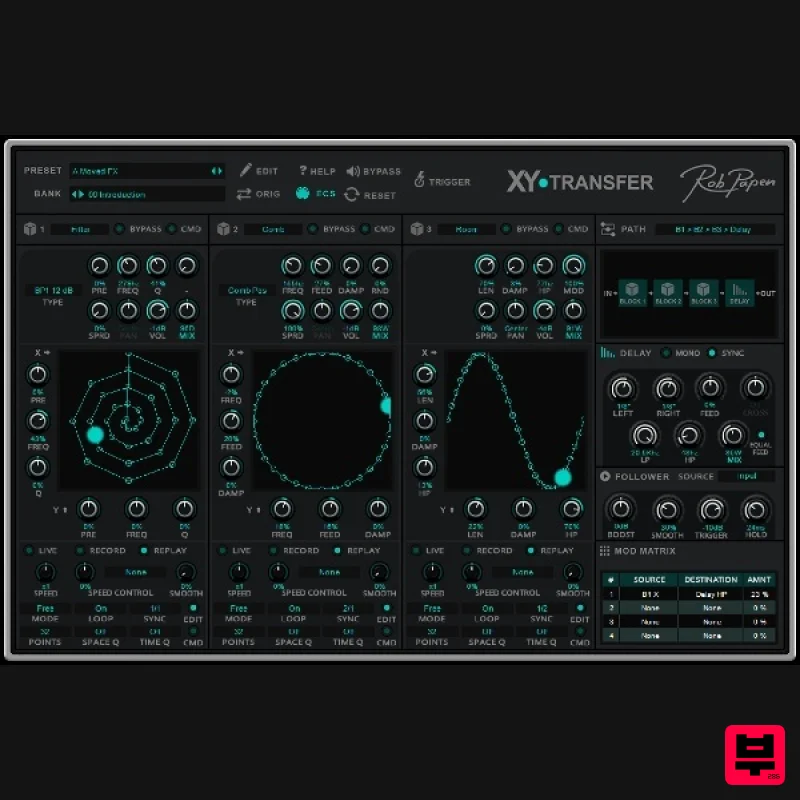
- you will know of the XY pad; it is a very creative effects tool for adding dynamic changes to a sound. XY-Transfer offers a filter bank with 36 different filter types which can be used in combination with 2 other FX
- all with their own XY pad which can be recorded and played back in a variety of creative ways! All of this is then polished off with a flexible Stereo Delay. Well
- now you can use the exciting XY pad in combination with a cool range of effects! The unique thing about XY-Transfer is that each ‘BLOCK’ which holds one of the FX
- also has its own XY field. So very complex effect types are possible which can lead to some unheard and creative effects! The available Block effects are: Filter Bank Comb Filter Shaper Room Gater These effects can be combined in these blocks and the Stereo Delay can also be placed in different combinations within with these 3 blocks. So
- if you are looking for a Filter Bank and beyond
- XY-Transfer will transfer your audio into something creatively new and unheard. System Requirements PC Windows 7 / Windows 8 / Windows 10 VST (32 & 64bit) AAX (64bit) for PT 12 or higher Mac OS-X 10.9 - 10.15. AU VST AAX (64bit) for PT 12 or higher (SubBoomBass is used as the example). Mac 1. Visit Rob Papen and create an account by selecting 'Create Account'. Note: If you already have an account set up with Ron Papen
- 'Login' to your account and skip to step 4. of the installation process. 2. Enter your personal details
- and once completed check the tick box that reads 'Yes
- I agree to Privacy Policy Rob Papen' before clicking 'Send Registration'. 3. The registration of your account has successfully been completed > select 'click here to login' to access your account area. 4. Select the 'My Products' tab
- which is located at the top-left corner of your account area. 5. Click the 'Register New' option. 6. Select the product that you have purchased
- as well as the most recent version number (which in this instance is 'Online')
- before manually entering/copying and pasting the 32-digit Serial Number that is provided within your User Account > once completed
- click the 'Save' tab to register your software. Note: Ensure that you select the correct 'Product' and 'Type'
- as well as checking that there are no spaces/mistakes when entering your Serial Number > if you receive a code error message of any kind
- refresh the web page and manually enter the digits (including the '-' hyphens) before re-clicking the 'Save' option. 7. The registration of your software has successfully completed > select the 'Download latest version: SubBoomBass' hyperlink to navigate to the software download area. 8. Select the relevant format installer download (s) in accordance with your DAW's compability specifications
- to inititiate the downloading of your purchased software. Note: The product user manual is also obtainable from this location. 9. Once the software installer file has finished downloading
- click the file entitled 'SubBoomBass_Installer.dmg' to launch the application installer application. 10. Double-click the 'SubBoomBass_Installer.pkg' application icon begin the installation process. 11. Click 'Continue' to verify the installation
- if prompted to do so. 12. Click 'Continue' once again. 13. Read through the Licence Agreement > click 'Continue' then 'Agree'. 14. Manually enter/copy and paste the original 32-digit Serial Number that you were provided with
- before clicking 'Continue' (the Serial Number is located in both your Plugin Boutique and Rob Papen User Accounts). Note: Ensure that you select the correct 'Product' and 'Type'
- as well as checkingt that there are no spaces/mistakes when entering your Serial Number > if you receive a code error message of any kind
- manually enter the digits (including the '-' hyphens) before re-clicking the 'Continue' option. 15. Review the installation before clicking 'Install'
- and then 'Continue Installation'. 16. The installation of your software has successfully completed > click 'Restart' to reboot your computer. Note: Ensure that you have saved any important work that may be open within the applications you currently have open
- before selecting the 'Restart' option. 17. After your computer has successfully restarted
- open your DAW and locate/open your newly installed/activated software VST. Note: If the software fails to appear
- rescan your DAW's Plug-in selection. The Software is now Activated and Ready for Use Within Your DAW! Windows 1. Visit Rob Papen and create an account by selecting 'Create Account'. Note: If you already have an account set up with Ron Papen
- 'Login' to your account and skip to step 4. of the installation process. 2. Enter your personal details
- and once completed check the tick box that reads 'Yes
- I agree to Privacy Policy Rob Papen' before clicking 'Send Registration'. 3. The registration of your account has successfully been completed > select 'click here to login' to access your account area. 4. Select the 'My Products' tab
- which is located at the top-left corner of your account area. 5. Click the 'Register New' option. 6. Select the product that you have purchased
- as well as the most recent version number (which in this instance is 'Online')
- before manually entering/copying and pasting the 32-digit Serial Number that is provided within your User Account > once completed
- click the 'Save' tab to register your software. Note: Ensure that you select the correct 'Product' and 'Type'
- as well as checking that there are no spaces/mistakes when entering your Serial Number > if you receive a code error message of any kind
- refresh the web page and manually enter the digits (including the '-' hyphens) before re-clicking the 'Save' option. 7. The registration of your software has successfully completed > select the 'Download latest version: SubBoomBass' hyperlink to navigate to the software download area. 8. Select the relevant format installer download (s) in accordance with your DAW's compability specifications
- to inititiate the downloading of your purchased software. Note: The product user manual is also obtainable from this location. 9. After the software installer file has finished downloading
- double-click the file entitled 'SubBoomBass_Installer' .zip folder to extract the .exe installer file. 10. Once extracted
- double-click the .exe installer file to begin the installation process > click 'Next'. 11. Read through the Licence Agreement and select 'I accept the agreement' > click 'Next'. 12. Type in your preferred User Name
- Organization and manually enter/copy and paste the original Serial Number that you were provided with
- before clicking 'Continue' (the Serial Number is located in both your Plugin Boutique and Rob Papen User Accounts). Note: Ensure that you select the correct 'Product' and 'Type'
- as well as checking that there are no spaces/mistakes when entering your Serial Number > if you receive a code error message of any kind
- manually enter the digits (including the '-' hyphens) before re-clicking the 'Next' option. 13. Select a computer VST Plug-ins folder destination in which to install/save your software to > click 'Next'. 14. Select a computer Library location in which to install/save your software to > click 'Next'. 15. Select the software format (s) that you wish to install > click 'Next'. 16. Select a Start Menu Folder to create a shortcut to your new software installation > click 'Next'. 17. Review the installation and click 'Install'. 18. The installation of your software has successfully completed > click 'Finish'. 19. After your computer has successfully restarted
- open your DAW and locate/open your newly installed/activated software VST. Note: If the software fails to appear
- rescan your DAW's Plug-in selection. The Software is now Activated and Ready for Use Within Your DAW!
Additional Information
About the Rob Papen XY-Transfer
Discover the distinctive sound and feel of the Rob Papen XY-Transfer, a standout choice among Multi Effect .
Why Choose the Rob Papen XY-Transfer?
- •Authentic Rob Papen craftsmanship and design
- •Versatile sound suitable for multiple musical genres
- •Professional build quality and reliable performance
- •Part of Rob Papen's respected Multi Effect lineup
Compare & Explore
Browse our complete selection of Rob Papen instruments or explore other Multi Effect options. Use our comparison tools to find the perfect match for your musical style and budget.
Similar Products

UVI Xtreme FX 2
Multi Effect

Sinevibes Cache
Multi Effect

UVI Click
Multi Effect

Quantum DSP Q-Series Invader
Multi Effect

UVI Whoosh FX
Multi Effect

UVI Asteroid
Multi Effect

Jonas Eriksson Tape Fiasco
Multi Effect

Jungle Audio DUKE
Multi Effect

