
PROCESS.AUDIO Filter Factory
Professional music gear - detailed information and where to buy
PROCESS.AUDIO
Filter Factory
Product Info
* Prices may vary. Check retailer for current pricing and availability.
Product Description
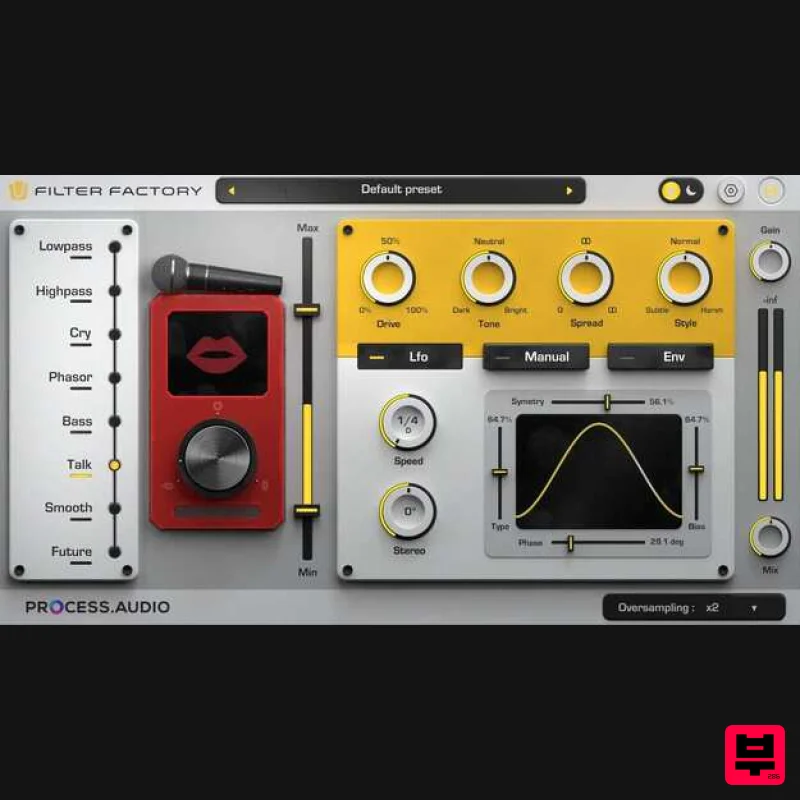
- .iframe-container{ position: relative; width: 100%; padding-bottom: 56.25%; height: 0; } .iframe-container iframe{ position: absolute; top:0; left: 0; width: 100%; height: 100%; } Add Texture & Motion to Your Tracks Filter Factory is a versatile and expressive creative filter plugin designed for producers and sound designers. Blending classic analog filter emulations with modern modulation tools
- it allows you to add texture
- movement
- and tonal character—from sultry sweeps to punchy pulsing grooves. Features 8 Filter Types for creative sound shaping Cry
- Talk
- Phasor: Vocal-like and expressive filtering options Subtle or experimental filter flavors Flexible Modulation Modes to animate your sound LFO: Sync to tempo or run free with stereo control Envelope: Reacts dynamically to signal input Texture Shaping for rich
- controlled sound Drive & Tone: Add warmth
- grit
- or shift tonal balance Spread & Resonance: Enhance stereo image and filter focus Oversampling: Cleaner sound with reduced aliasing Real-time visualizer: Instantly see modulation and filter behavior Min/Max controls: Fine-tune modulation range 70+ presets: Quick inspiration across genres Light/Dark UI themes: Visual comfort and consistency Streamlined interface: Drag-and-drop
- no deep menus CPU-efficient: Ideal for mono
- stereo
- or Mid-Side processing System Requirements Windows (64-bit) 8
- 10 or 11 Mac OS 10.13+ CPU - Apple Silicon
- Intel Core 2 Duo
- or AMD Athlon 64 X2 or newer RAM - 4GB or more Formats - VST 3
- AAX (native) iLok authorization required (via machine or cloud; no dongle necessary) Compatible DAWs Ableton Live (8/9/10+) Cubase (6+) Logic (9
- X) Pro Tools (11+) Reaper (5+) Studio One (2+) Please Note: Decibel used as an example. License Redemption 1. Copy your serial number link
- found within the serial number section of your Plugin Boutique User Account
- and paste it into your web browser or if you just have a serial number
- head to this LINK > Enter your details to create a new PROCESS.AUDIO account > Click 'REGISTER'. 2. Click 'GET YOUR PRODUCT(S)'. 3. This screen confirms which product you are attempting to redeem > Click 'GET YOUR PRODUCT(S)'. 4. This screen confirms that the code has been successfully redeemed to your account > Click 'REDEEM YOUR PLUG-IN LICENSE(S)'. 5. Locate the account activation email from your inbox > Click 'ACTIVATE YOUR ACCOUNT'. 6. Navigate back to your PROCESS.AUDIO My Licenses page. 7. Click 'REDEEM LICENSE'. 8. Enter your iLok Account ID > Click 'REDEEM LICENSE'. 9. This page confirms that you have successfully redeemed your license to your iLok account > Click 'CLOSE'. 10. Launch your iLok License Manager and log in > Navigate to the 'Available' tab > Locate your new license > Drag the license to your iLok Cloud Session (Or physical iLok2+) on the left-hand menu. 11. This screen confirms a successful activation of the license > Click 'OK'. 12. Navigate back to your PROCESS.AUDIO My Licenses page > Click 'DOWNLOAD PLUGIN'. 13. Select the appropriate format for your system to download the installer. Mac Installation 1. Launch the installer 'Decibel_X_X_X_macos.pkg'. 2. Click 'Continue'. 3. Click 'Continue'. 4. Click 'Agree'. 5. Click 'Continue'. 6. Confirm which plugin formats you wish to install > Click 'Continue'. 7. Click 'Install'. 8. Enter your system password > Click 'Install Software'. 9. Click 'Close'. 10. Launch your DAW > Insert Decibel on a new Audio Track. Your software is now installed and ready to use. Windows Installation 1. Launch the installer 'Decibel_X_X_X_win.exe'. 2. Click 'Next'. 3. Click 'I accept the agreement' > Click 'Next'. 4. Confirm which plugin formats you wish to install > Click 'Next'. 5. Click 'Next'. 6. Click 'Install'. 7. Click 'Finish'. 8. Launch your DAW > Insert Decibel on a new Audio Track. Your software is now installed and ready to use.
Additional Information
About the PROCESS.AUDIO Filter Factory
The PROCESS.AUDIO Filter Factory combines traditional design with modern performance for Multi Effect enthusiasts.
Why Choose the PROCESS.AUDIO Filter Factory?
- •Authentic PROCESS.AUDIO craftsmanship and design
- •Versatile sound suitable for multiple musical genres
- •Professional build quality and reliable performance
- •Part of PROCESS.AUDIO's respected Multi Effect lineup
Compare & Explore
Browse our complete selection of PROCESS.AUDIO instruments or explore other Multi Effect options. Use our comparison tools to find the perfect match for your musical style and budget.
Similar Products

Jonas Eriksson Tape Fiasco
Multi Effect

Jungle Audio DUKE
Multi Effect

UVI Click
Multi Effect

Sinevibes Cache
Multi Effect

UVI Xtreme FX 2
Multi Effect

UVI Whoosh FX
Multi Effect

Quantum DSP Q-Series Invader
Multi Effect

UVI Asteroid
Multi Effect

