
Plugin Boutique ResDelay
Professional music gear - detailed information and where to buy
Plugin Boutique
ResDelay
Product Info
* Prices may vary. Check retailer for current pricing and availability.
Product Description
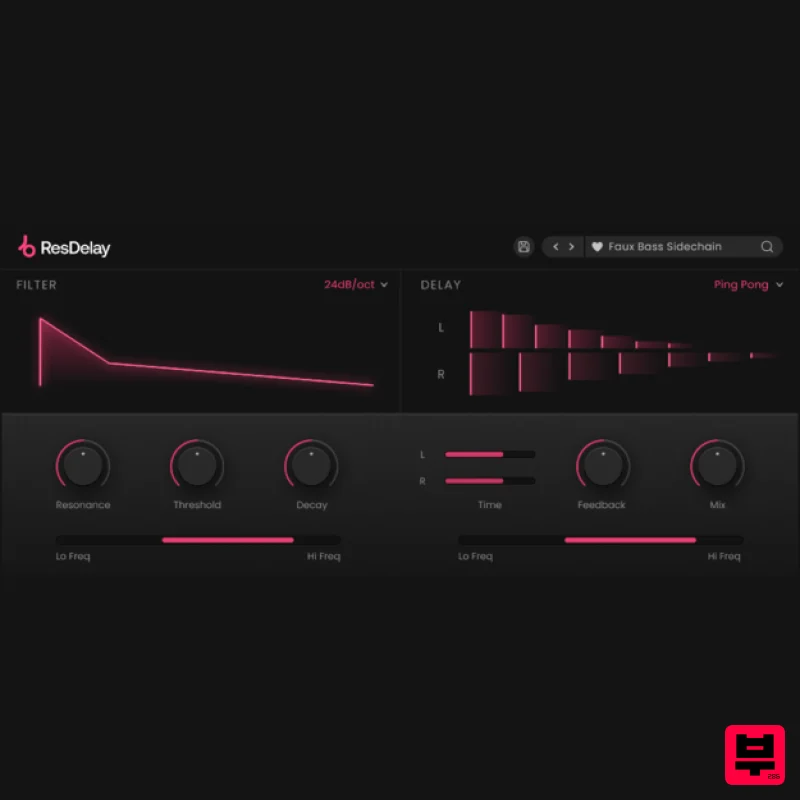
- Envelope Filtering & Stereo Delay ResDelay combines two key production techniques - envelope filter and stereo delay - into one complete unit
- giving you the potential to create resonant sweeps and rhythmic patterns out of any audio source. <iframe frameborder="0" height="315" src="https: //www.youtube.com/embed/kLoLkt3TZYg?" width="560"></iframe> Introducing: ResDelay What can ResDelay do? Create dynamic
- audio-reactive filter sweeps. Add groove and movement to drum patterns. Create squelchy
- analogue-sounding bass. Add movement to synth stabs and arpeggios. Create tension and release during key moments of a track. Glue together pluck sounds by using ResDelay on the group. Audio-Reactive Filtering ResDelay's filter reacts dynamically to your audio
- opening and closing based on the level of the incoming signal. You can customise the filter behaviour by changing the threshold and decay of the envelope
- as well as the frequency range
- resonance and cutoff steepness. Stereo Delay Patterns ResDelay's stereo delay offers complete stereo control with independent delay times for the left and right channels. It also includes stereo & ping-pong modes
- feedback and hi / lo-cut filters for fine-tuning the delay signal. Whether it be drums
- bass
- percussion
- plucks
- oneshots or even a whole mix
- ResDelay will effortlessly provide interesting rhythmic patterns and filter effects triggered entirely from your source audio. Features Audio-reactive filter. Envelope threshold & decay controls. Cut-off steepness & resonance. Hi & lo-cut sliders to set the range of the filter. Stereo delay with independent L / R time intervals. Feedback
- hi & lo-cut
- dry / wet mix parameters. Straight / Dotted / Triplet timing options. Ping-Pong and Stereo delay modes. 75 Presets System Requirements macOS macOS 10.15 or higher. Natively compatible with Apple Silicon Plugin Formats: VST
- VST3
- Standalone DAW's Supported: Ableton Live
- Pro Tools
- Logic Pro
- FL Studio
- Cubase
- Nuendo
- Reaper
- Reason + more. Compatibility: 64-bit compatible only. Windows Windows 7 or higher Plugin formats: VST
- VST3
- Standalone DAWs supported: Ableton Live
- Pro Tools
- FL Studio
- Cubase
- Nuendo
- Reaper
- Reason + more. Compatibility: 64-bit compatible only. Important note: When accessing this software via a Rent to Own plan or the Beatport Studio membership
- it's installed and run through the Beatport Access portal. An internet connection is required every 30 days to validate your license. PC Please note: If you already have Beatport Access installed
- skip to step 7. 1. Click download in your Plugin Boutique User Account to download the Beatport Access installer > Run the .exe file. 2. Click 'I accept the agreement' > Click 'Next'. 3. Click 'Next'. 4. Click 'Next'. 5. Click 'Install'. 6. Click 'Finish'. 7. Open Beatport Access. 8. Enter your Plugin Boutique account details > Click 'LOGIN'. 9. Locate your products in the 'My Products' section > Click 'DOWNLOAD' to begin the installation process (you will need to repeat this for each plugin you wish to install). 10. Click 'I accept the agreement' > Click 'Next'. 11. Click 'Next'. 12. Click 'Next'. 13. Click 'Next'. 14. Click 'Next'. 15. Click 'Install'. 16. Click 'Finish'. Your software is now activated and ready to use in your DAW! Mac Please note: If you already have Beatport Access installed
- skip to step 7. 1. Click download in your Plugin Boutique User Account to download the Beatport Access installer > Run the .pkg file. 2. Click 'Continue'. 3. Click 'Continue'. 4. Click 'Agree'. 5. Click 'Install'. 6. Click 'Close'. 7. Open Beatport Access > Enter your Plugin Boutique account details and click 'LOGIN'. 8. Locate your products in the 'My Products' section > Click 'DOWNLOAD' to begin the installation process (you will need to repeat this for each plugin you wish to install). 9. Click 'Continue'. 10. Click 'Continue'. 11. Click 'Agree'. 12. Click 'Install'. 13. Click 'Close'. Your software is now activated and ready to use in your DAW!
Additional Information
About the Plugin Boutique ResDelay
The Plugin Boutique ResDelay represents excellent craftsmanship in the Multi Effect category.
Why Choose the Plugin Boutique ResDelay?
- •Authentic Plugin Boutique craftsmanship and design
- •Versatile sound suitable for multiple musical genres
- •Professional build quality and reliable performance
- •Part of Plugin Boutique's respected Multi Effect lineup
Compare & Explore
Browse our complete selection of Plugin Boutique instruments or explore other Multi Effect options. Use our comparison tools to find the perfect match for your musical style and budget.
Similar Products

Sinevibes Cache
Multi Effect

UVI Xtreme FX 2
Multi Effect

UVI Whoosh FX
Multi Effect

Jungle Audio DUKE
Multi Effect

Jonas Eriksson Tape Fiasco
Multi Effect

UVI Click
Multi Effect

UVI Asteroid
Multi Effect

Quantum DSP Q-Series Invader
Multi Effect

