
Native Instruments Driver
Professional music gear - detailed information and where to buy
Native Instruments
Driver
Product Info
* Prices may vary. Check retailer for current pricing and availability.
Product Description
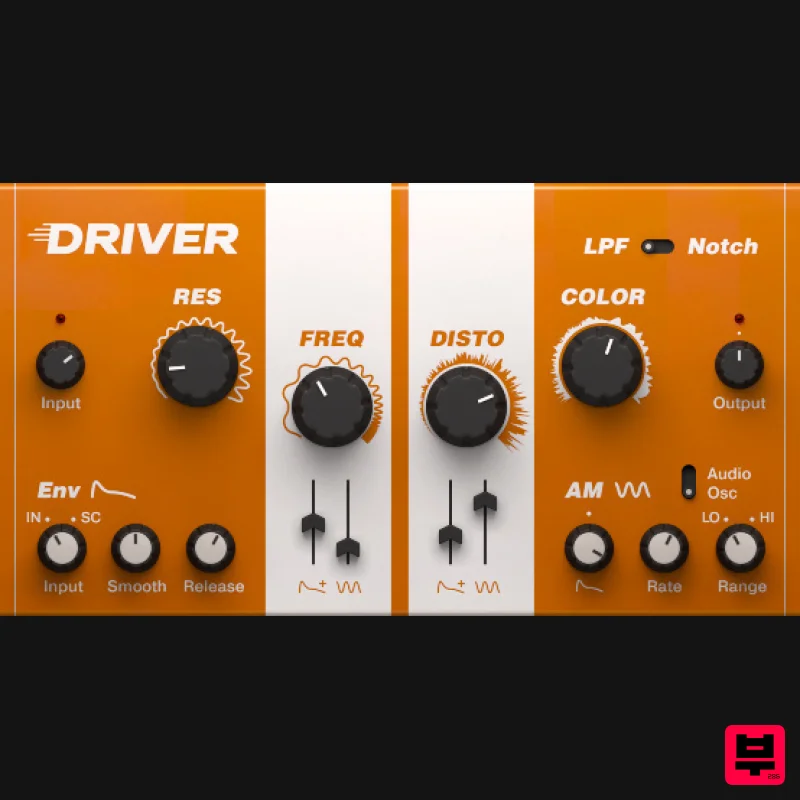
- Turbocharged Distortion Filter Textural Crunch A versatile
- creative distortion and filter effect. The filter
- powerful distortion
- and audio modulation combine to take tracks from subtle filtering to all out mayhem. Advanced Resonance DRIVER is an inspiring creative tool from the creator of MASSIVE featuring the rare pairing of a high-quality filter with a punishing distortion unit. The filter section delivers a wide range of effects
- from ultra-subtle to incredibly rich
- while two modulation sources produce dramatic textural shifts. The distortion section is capable of everything from light saturation to complete sonic destruction. Running as a stand-alone effect in any DAW
- or as an effect in MASCHINE
- DRIVER is perfect for any track needing fresh musical color
- total annihilation
- or a sweep from one to the other. Jam the Frequency Behind DRIVER’s intuitive user interface is a powerful set of highly tweakable features. The resonant filter offers both low pass and notch settings. Discover a world of wild new textures by modulating the filter with the envelope follower or audio modulation sections. Fine-tune the envelope follower with the and Release controls for precise control of the filter’s responsiveness
- or trigger DRIVER via an incoming signal to give any track a shot of dynamic motion. Sonic Fury DRIVER’s distortion section is a sonic beast ready to scratch
- abuse
- and tear your tracks to shreds. Increase resonance and distortion levels to travel from light
- crunchy overtones to thick fuzzed-out bliss – and the sound reacts dynamically in response to the audio input. When using the AM section in Audio Mode
- the Clip Cut control allows you to take your tracks deep into a dungeon of audio devastation. Features Create amazing textures from subtle to devastating Add dynamic motion to static sounds Incredible buildup and breakdown effect System Requirements macOS 11
- 12 or 13 (latest update) Windows 10 or 11 (64-bit
- latest Service Pack) Intel Core i5 or equivalent AMD CPU
- 4 GB RAM (6 GB recommended) Apple Silicon Mac (native mode or using Rosetta 2) An Internet connection and a graphics card that supports OpenGL 2.1 or higher are required to download and activate this product. Once installed and activated
- the product can be used offline. Windows (64-bit only): VST
- VST3
- AAX Mac OS X (64-bit only): VST
- VST3
- AAX Note: Massive is used as an example. Windows 1. Download the .zip installer file from your Plugin Boutique User Account. 2. Double-click the extracted .exe file to begin the installation process > click ‘Run’. 3. Read the welcome message > click 'Next'. 4. Click 'Next' to begin the installation. 5. Native Access has now been installed > Click 'Finish'. 6. Open Native Access > Create a new Native ID if you do not have one already. If you do
- skip ahead to step 8. 7. You will then receive an email with a confirmation link > Open the email and click 'CONFIRM EMAIL'. 8. Log in to Native Access with your Native ID. 9. Click 'Add a serial'. 10. Enter your Serial Number found in your Plugin Boutique User Account > Click 'ADD SERIAL'. 11. Once your serial has been registered
- click 'VIEW PRODUCTS NOT INSTALLED'. 12. Click the 'Not installed' tab > Locate Massive > Click 'INSTALL'. Your software is now activated and ready for use within your DAW. Mac 1. Download the .dmg installer file from your Plugin Boutique User Account. 2. Double-click the .dmg file to install Native Access. 3. Open Native Access > Create a new Native ID if you do not have one already. If you do
- skip ahead to step 5. 4. You will then receive an email with a confirmation link > Open the email and click 'CONFIRM EMAIL'. 5. Log in to Native Access with your Native ID. 6. Click 'Add a serial' 7. Enter your Serial Number found in your Plugin Boutique User Account > Click 'ADD SERIAL'. 8. Click the 'Not installed' tab > Locate Massive > Click 'INSTALL'. Your software is now activated and ready for use within your DAW.
Additional Information
About the Native Instruments Driver
The Native Instruments Driver combines traditional design with modern performance for Multi Effect enthusiasts.
Why Choose the Native Instruments Driver?
- •Authentic Native Instruments craftsmanship and design
- •Versatile sound suitable for multiple musical genres
- •Professional build quality and reliable performance
- •Part of Native Instruments's respected Multi Effect lineup
Compare & Explore
Browse our complete selection of Native Instruments instruments or explore other Multi Effect options. Use our comparison tools to find the perfect match for your musical style and budget.
Similar Products

Jonas Eriksson Tape Fiasco
Multi Effect

UVI Xtreme FX 2
Multi Effect

Sinevibes Cache
Multi Effect

Jungle Audio DUKE
Multi Effect

UVI Asteroid
Multi Effect

UVI Click
Multi Effect

Quantum DSP Q-Series Invader
Multi Effect

UVI Whoosh FX
Multi Effect

