
Mellowmuse IR1A Convolver
Professional music gear - detailed information and where to buy
Mellowmuse
IR1A Convolver
Product Info
* Prices may vary. Check retailer for current pricing and availability.
Product Description
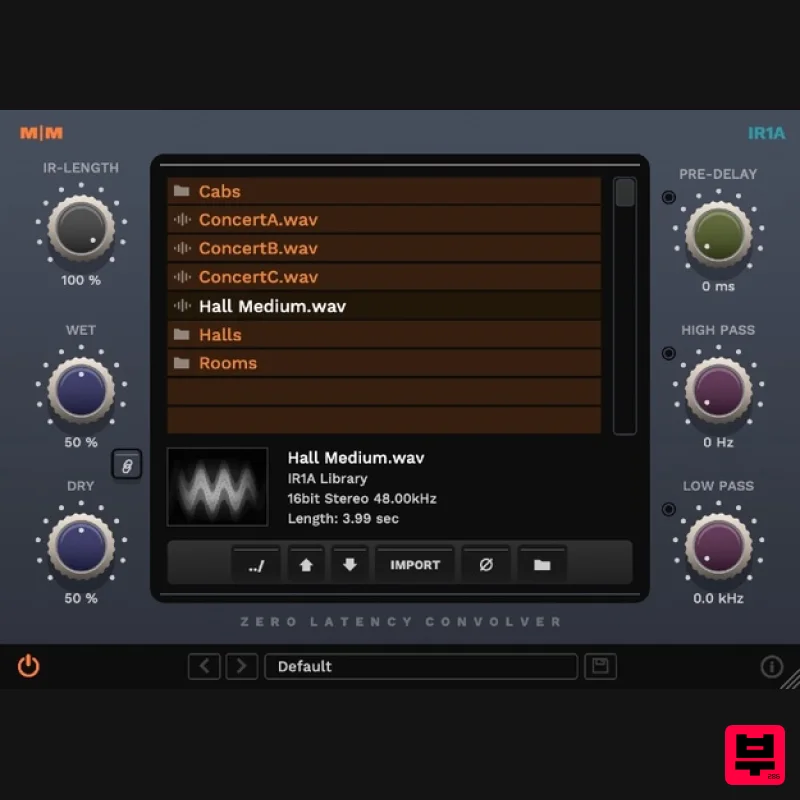
- IR1A Convolver is a convolution plugin that let you apply the sonic characteristics of one sound to another in real-time
- using an impulse response file. It features a high quality
- zero-latency convolution engine
- capable of reproducing everything from guitar cabinets to lush natural reverbs and special effects. IR length can be set
- along with high or low pass filtering
- and predelay for creative sound shaping. The integrated file browser makes it easy to navigate and load IR files including importing external files. It loads standard mono or stereo AIFF or WAV format impulse response files and comes with a starter library of presets. Features CPU efficient zero-latency convolution. IRs up to 10 seconds @ 44.1k sample rate. External IR file browser. Predelay: 0 - 250 ms. High and low pass filtering. Customisable image previews. Phase switch. 64-bit internal processing. System Requirements Windows 10 or above Mac OSX 10.9 or above 64-bit only VST
- VST3
- AU and AAX Important Note: CS1V Console Channel is used as the example. Mac Installation 1. Download the .pkg file from within your Plugin Boutique User Account and double-click it to extract the contents. 2. Open the .dmg file to begin the installation > Click 'Continue'. 3. Click 'Continue'. 4. Click 'Agree'. 5. Click 'Install'. 6. Click 'Close'. Activation 1. Open CS1V inside of your DAW > Click the i icon at the bottom right of the GUI. 2. Enter your email address and the serial number found within your Plugin Boutique User Account > press Enter on your keyboard. 3. Click the i icon again to close the registration information. Your plugin is now authorised and ready for use in your DAW! Windows Installation 1. Download the .zip file from within your Plugin Boutique User Account and double-click it to extract the contents. 2. Open the .exe file to begin the installation > Select 'I Accept the Agreement' and click 'Next'. 3. Check that the location of your VST3 folder is correct > Click 'Next'. 4. Check that the location of your VST2 folder is correct > Click 'Next'. 5. Click 'Next'. 6. Click 'Install'. 7. Click 'Finish'. Activation 1. Open CS1V inside of your DAW > Click the i icon at the bottom right of the GUI. 2. Enter your email address and the serial number found within your Plugin Boutique User Account > press Enter on your keyboard. 3. Click the i icon again to close the registration information. Your plugin is now authorised and ready for use in your DAW!
Additional Information
About the Mellowmuse IR1A Convolver
The Mellowmuse IR1A Convolver represents excellent craftsmanship in the Reverb category.
Why Choose the Mellowmuse IR1A Convolver?
- •Authentic Mellowmuse craftsmanship and design
- •Versatile sound suitable for multiple musical genres
- •Professional build quality and reliable performance
- •Part of Mellowmuse's respected Reverb lineup
Compare & Explore
Browse our complete selection of Mellowmuse instruments or explore other Reverb options. Use our comparison tools to find the perfect match for your musical style and budget.
Similar Products

DDMF Envelope
Reverb
$30
Envelope is a true stereo reverb plugin featuring 8 different room simulations, all of which can be adjusted for size,...

Initial Audio AR1 Reverb
Reverb
$30
Quality Algorithmic Reverb Plugin AR1 is an algorithmic reverb plugin designed to sound great on all types of...

PSP Audioware PSP Nexcellence
Reverb
$30
PSP Nexcellence is a rich-sounding, spring reverb emulation inspired by and modeled after classic “necklace-type”...

DDMF MagicVerb
Reverb
$30
MagicVerb is the latest result of the collaboration between MagicDeathEye aka Ian Sefchick and DDMF. This journey was...

PSP Audioware PSP Pianoverb 2
Reverb
$30
PSP PianoVerb2 is a redesigned and improved creative resonant reverb plug-in based on our famous and beloved freeware...

XHUN Audio ShineVerb
Reverb
$30
Creative Reverb Processor ShineVerb is a creative tool specially designed for reverberation, spatialization and sound...

PSP Audioware PSP EasyVerb
Reverb
$30
PSP EasyVerb is a reverberation effect plug-in (VST, RTAS and AAX for Windows; VST, AudioUnit, RTAS and AAX for Mac OS...

Vegas Audio Fabricverb
Reverb
$30
Get the signature sound of the UK’s most famous nightclub on your digital audio workstation! Our new convolution...
Frequently Asked Questions
The Mellowmuse IR1A Convolver stands out for its exceptional Mellowmuse craftsmanship and innovative design.
Yes! With its affordable price point and quality construction, it's perfect for learning reverb.
Browse the similar products section to see how it stacks up against other reverb.

