
Mastering The Mix ANIMATE
Professional music gear - detailed information and where to buy
Mastering The Mix
ANIMATE
Product Info
* Prices may vary. Check retailer for current pricing and availability.
Product Description
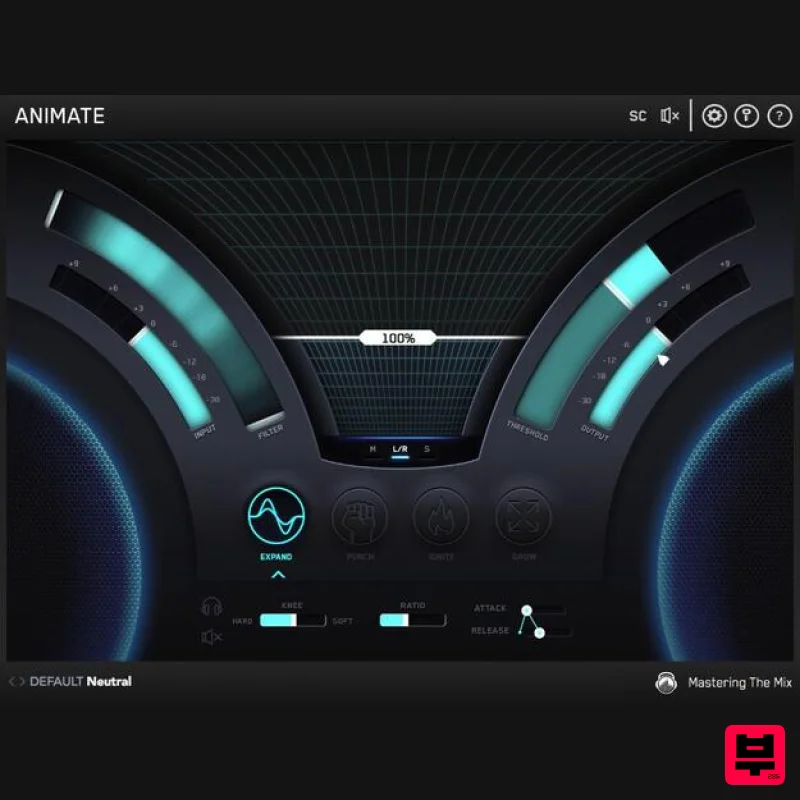
- ANIMATE helps you inject life into your mixes in a precise
- versatile and colourful way. With four different movement modes
- each with individual frequency assignments and mid/side functionality
- you’ll get your music jumping out of the speakers precisely how you want. Each individual module of the ANIMATE multi-effect plugin is also available as a separate product. Expand Expand mode allows you to dial in a pristinely clean sounding upward expansion. This increases the volume of signals over the threshold
- giving your audio more dynamic range in a transparent way. Punch Punch mode enhances the transients of your audio to help them bite through the mix. Whether you want to subtly accentuate the high-frequency transients in the mid-channel of your master or bring out serious on an individual channel
- Punch can handle the task. Ignite Ignite mode allows you to dial in rich harmonic distortion in a dynamic way based on the input signal. Ignite can increase the perceived loudness
- power and presence of a channel without the pumping effects of a compressor. Grow Grow mode lets you increase the width of the selected frequencies using a psychoacoustic precedence effect. Grow can be applied in a dynamic way meaning only the signal surpassing the threshold is widened. This along with the frequency selection gives you a new realm of movement to inject into your music. System Requirements Mac: OS X 10.15 or higher. 64-bit AU
- VST3 or AAX host. Apple Silicon Native (64-bit only) Windows: Windows 10 or higher 64-bit VST3 or 64-bit AAX host (64-bit only) Please note: AAX compatible with Pro Tools 11 and later only. Important note: When accessing this software via a Rent to Own plan or the Beatport Studio membership
- it's installed and run through the Beatport Access portal. An internet connection is required every 30 days to validate your license. Pro Tools Expert "ANIMATE adds colour and depth to tracks in really expressive and musical ways whereas other plug-ins of this type can often touch the sound too much. ANIMATE
- if used sparingly
- lifts and energise tracks in a mix in ways that I have not experienced before." James Reynolds "Love it! It’s like the Swiss Army Knife of plugins!" Audio Plugin Guy "ANIMATE can make delicate instruments more expressive and it can turn drum elements into savage pumping machines. A sound designer will love ANIMATE
- and it belongs in many mixing engineer’s arsenal. Simply put
- this kicks ass." Mastering The Mix ANIMATE review by Audio Plugin Guy Four Modules Once again a plugin creator takes it on themselves to rename common things. Expand is
- I guess
- expand
- exaggerating the differences in volume that go beyond the set threshold in a sort of upward compression. Punch is transient enhancement. Ignite is saturation. Grow is stereo spr... Read More Mac 1. Download the .zip file from within your Plugin Boutique User Account and double-click it to extract the contents > Open the .pkg file to begin the installation > Click 'Next'. 2. Select 'I accept the agreement' > Click 'Next'. 3. Select the components for the product you wish to install > Click 'Next'. 4. Click 'Next'. 5. Click 'Finish'. Activation 1. Open your recently installed plugin within your DAW > Click the Key icon
- located in the top-right hand corner of the plugin window. 2. Enter the 24-digit serial number
- located within your Plugin Boutique User Account > Click 'AUTHORISE'. 3. Click 'Close'. Your software is now activated and ready to use within your DAW. Windows Installation 1. Download the .zip file from within your Plugin Boutique User Account and double-click it to extract the contents > Open the .exe file to begin the installation > Click 'Next'. 2. Select 'I accept the agreement' > Click 'Next'. 3. Select the components for the product you wish to install > Click 'Next'. 4. Click 'Next'. 5. Click 'Finish'. Activation 1. Open your recently installed plugin within your DAW > Click the Key icon
- located in the top-right hand corner of the plugin window. 2. Enter the 24-digit serial number
- located within your Plugin Boutique User Account > Click 'AUTHORISE'. 3. Click 'Close'. Your software is now activated and ready to use within your DAW.
Additional Information
About the Mastering The Mix ANIMATE
Discover the distinctive sound and feel of the Mastering The Mix ANIMATE, a standout choice among Multi Effect .
Why Choose the Mastering The Mix ANIMATE?
- •Authentic Mastering The Mix craftsmanship and design
- •Versatile sound suitable for multiple musical genres
- •Professional build quality and reliable performance
- •Part of Mastering The Mix's respected Multi Effect lineup
Compare & Explore
Browse our complete selection of Mastering The Mix instruments or explore other Multi Effect options. Use our comparison tools to find the perfect match for your musical style and budget.
Similar Products

Jonas Eriksson Tape Fiasco
Multi Effect

Quantum DSP Q-Series Invader
Multi Effect

Jungle Audio DUKE
Multi Effect

UVI Click
Multi Effect

UVI Xtreme FX 2
Multi Effect

Sinevibes Cache
Multi Effect

UVI Asteroid
Multi Effect

UVI Whoosh FX
Multi Effect

