
Lunacy Audio Bismuth
Professional music gear - detailed information and where to buy
Lunacy Audio
Bismuth
Product Info
* Prices may vary. Check retailer for current pricing and availability.
Product Description
- Iridescent Color Resonator Crystallize your sound with Bismuth
- a new Lunacy effect designed in collaboration with one of EDM’s most respected and iconic producers
- Virtual Riot. Bismuth is an iridescent color resonator which can transform raw sound into something tonal
- melodic
- and alive. By introducing resonant filters to any incoming sound
- Bismuth generates lush harmonic layers tuned to specific chords and scales. Like light passing through a prism
- what goes in clean comes out fractured into hidden harmonics
- shimmering tones
- and vivid
- colorful textures. Designed for BEAM
- Lunacy's multi-effects engine
- Bismuth
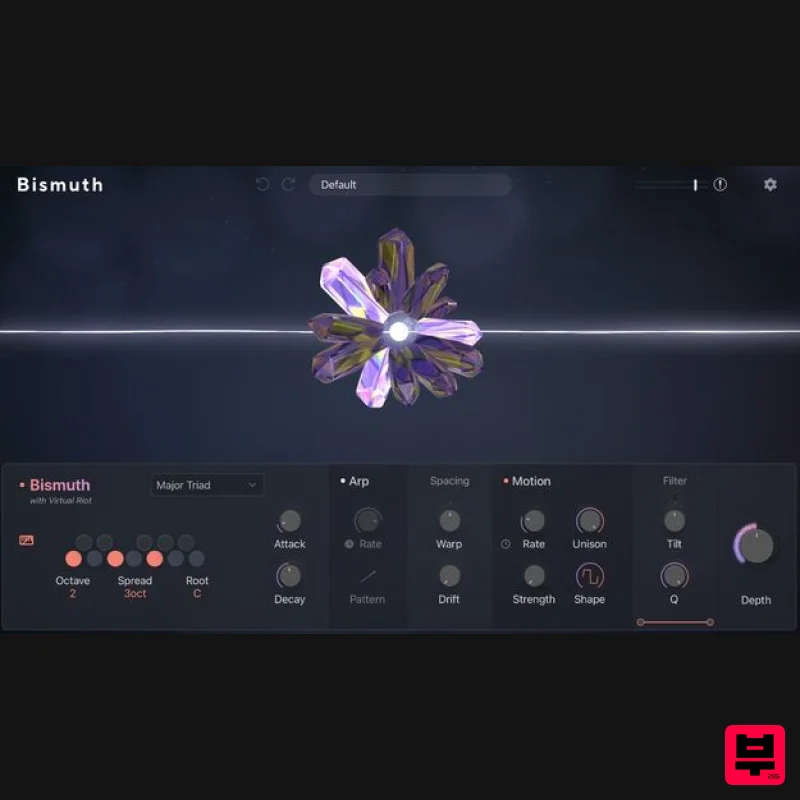
- is also offered as a standalone effect plugin. Chord Panel Tune resonant filters to any chord or scale
- shaping incoming audio into rich
- harmonically saturated textures. Octave
- Spread
- and Root position the voicing in the mix
- while Attack and Decay define its character; from tight percussive plucks to slow
- blooming swells. Arp The Arp section sets everything in motion
- cycling through the notes of your chord at a Rate that runs free or locks to tempo. Classic arp patterns provide familiar shapes
- while Random introduces unpredictable melodic movement and Chord mode produces shifting harmonic motion that evolves over time. Spacing Use Spacing to warp
- stretch
- and compress resonant frequencies
- pulling the harmonic series into territory that doesn't quite follow the rules. Drift and blurs the resonance outward
- expanding the soundstage like light scattering through crystal. Shift uses a specialized frequency shifter to change timbre. Motion Motion applies continuous amplitude modulation to Bismuth's resonance
- with Rate
- Strength
- and Shape sculpting the speed and character of the movement. At lower settings the effect breathes with a organic pulse. Push the controls further and the modulation fractures into sharp
- rhythmic bursts
- with Unison locking everything into a single driving pulse. Filter The Filter shapes which frequencies Bismuth's resonators act on
- with high and low cutoff sliders carving out any band from deep
- rolling low-end to bright
- crystalline shimmer. Q brings resonance at the cutoff points
- Tilt shifts the spectral balance from dark to bright
- and Scoop attenuates the resonating frequencies themselves; ideal for reining in tails and keeping the resonance focused and precise. Depth Depth controls how much of Bismuth's processed signal enters the mix
- from a subtle hint of harmonic shimmer sitting beneath the dry signal to full
- crystallized transformation. Features Bismuth Plugin: Use Bismuth as an audio plugin in VST
- and AAX formats compatible with all major DAWs. Bismuth in BEAM: For BEAM owners
- access the Bismuth effect inside BEAM with the ability to use up to 3 Bismuth nodes in serial or parallel. 30 Bismuth Presets: Work faster with a collection of presets crafted by sound designers including Virtual Riot himself. 50 BEAM Presets: For BEAM owners
- explore the “Gemstones” preset pack combining the Bismuth effect with all other BEAM effects. MacOS 10.15+ AU / VST3 / AAX (M1 / M2 recommended) Windows 10+ VST3 / AAX Supported by all major DAWs 8GB RAM required (16GB RAM recommended) At least 250 MB of free hard disk space Access to a stable internet connection for downloading and activating the product is required. Registration 1. Go to https: //lunacy.audio/register. 2. Enter your email address
- the password you wish to use and your License Key which can be found in your Plugin Boutique User Account. 3. Download the relevant CUBE Full Installer. Mac Installation 1. Download the installer from your Plugin Boutique user account and extract the zip folder. 2. Run the "CUBE_Installer_Mac_v1.0.1.dmg" installer. 3. Run the left "CUBE_v1.0.1.pkg" under the heading "Install the plugin". 4. Click "Continue". 5. Click "Continue". 6. Click "Agree". 7. Click "Install". 8. Click "Close". 9. Run the right "CUBE_Samples.pkg" under the heading "Install the samples". 10. Click "Continue". 11. Click "Install". 12. Click "Close". 13. Launch your DAW and create a new stereo instrument track
- then insert CUBE onto the channel. 14. Enter your 20 digit serial code. This can be found on your My Account page. Make sure to include the first 4 letters. Then click Activate. Your software is now activated and ready to use. Windows Installation 1. Download the installer from your Plugin Boutique user account and extract the zip folder. 2. Run the first installer "01_CUBE Plugin Installer v1.0.1.exe". 2. Click "I accept the agreement"
- then click "Next". 3. Click "Install". 4. Click "Finish". 5. Now run the second installer "02_CUBE Samples Installer.exe". 6. Click "Next". 7. Click "Install". 8. Click "Finish". 9. Launch your DAW and create a new stereo instrument track
- then insert CUBE onto the channel. 10. Enter your 20 digit serial code. This can be found on your My Account page. Make sure to include the first 4 letters. Then click Activate. Your software is now activated and ready to use.
Additional Information
About the Lunacy Audio Bismuth
Discover the distinctive sound and feel of the Lunacy Audio Bismuth, a standout choice among Multi Effect .
Why Choose the Lunacy Audio Bismuth?
- •Authentic Lunacy Audio craftsmanship and design
- •Versatile sound suitable for multiple musical genres
- •Professional build quality and reliable performance
- •Part of Lunacy Audio's respected Multi Effect lineup
Compare & Explore
Browse our complete selection of Lunacy Audio instruments or explore other Multi Effect options. Use our comparison tools to find the perfect match for your musical style and budget.
Similar Products

Jungle Audio DUKE
Multi Effect

Sinevibes Cache
Multi Effect

UVI Whoosh FX
Multi Effect

UVI Asteroid
Multi Effect

Quantum DSP Q-Series Invader
Multi Effect

UVI Click
Multi Effect

UVI Xtreme FX 2
Multi Effect

Jonas Eriksson Tape Fiasco
Multi Effect

