
Lese Hikari
Professional music gear - detailed information and where to buy
Product Description
- Stochastic Reverberator Hikari is an ocean-themed random reverb. Emulating uncommon digital reverbs from the 1990s and early 2000s
- Hikari aims to create something unconventional. Adding in Hikari’s navigation & anomaly system
- where moving to different positions makes the reverb behave differently according to the topology of the ground below
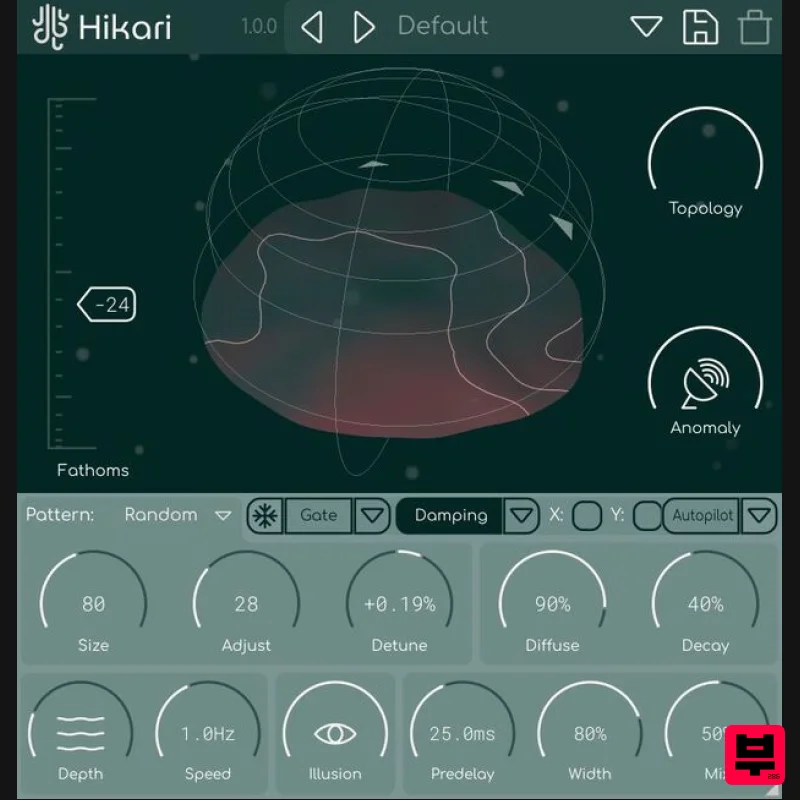
- Hikari is made for sound exploration. Highlights Navigate the Ocean Floor Central in Hikari’s interface is the “navigator”
- which lets you move around in two dimensional space. The contours of the terrain beneath the navigator are sampled and used to subtly alter various settings in the reverb algorithms. The two dimensions of the current navigation position can be used to modulate various parameters
- using the same workflow that is available in Glow. The navigator can also enter “autopilot” mode
- where the movement is automated & adjusted by various controls. Picking up an Anomaly… The navigator also points to multiple positions of interest
- called anomalies. When you get close to the anomaly positions
- the sound will change. Anomalies are randomly generated in-between plugin states
- so the positions of them
- and what they do is largely random. There are additional audio processes that only occur during anomaly states. Illusion & Fathoms Along with a reverberator
- Hikari also features multiple additional processors to add ambience & create texture on top of what is already being processed. Illusion is a short
- granularized reverse-audio effect that reads from an audio buffer. It essentially makes your sound come back again
- but very disjointed. The fathoms control adjusts the “depth” of the signal (thats why it’s measured in fathoms!). It does multistage filtering
- subtle decorrelation
- and light noise adjustments. Features Anomaly system
- allowing for unpredictable processing in special states Feedback Delay network modelling reverberation Input tone controller (filtering
- de-correlation
- noise processing) High-quality diffusion network & damping system Super cool visualizer / controller system Vectorized
- resizable interface System Requirements Windows: Supports VST3 & AAX MacOS: Supports VST3
- AU & AAX (Intel and ARM) Please Note: Glow is used as an example Installation PC 1. Download the installer from your Plugin Boutique User Account > Double click the .exe file to begin installation. 2. Click 'Next'. 3. Click 'Next'. 4. Click 'Next'. 5. Click 'Next'. 6. Click 'Install'. 7. Click 'Finish'. 8. Open your DAW
- locate Glow
- and open it. 9. Enter the serial number found in your Plugin Boutique User Account > Click 'Unlock'. 10. Click 'Okay'. Your software is now activated and ready to be used within your DAW! Mac 1. Download the installer from your Plugin Boutique User Account > Double click the .pkg file to begin installation. 2. Click 'Continue'. 3. Click 'Install'. 4. Click 'Close'. 5. Open your DAW
- locate Glow
- and open it. 6. Enter the serial number found in your Plugin Boutique User Account > Click 'Unlock'. 7. Click 'Okay'. Your software is now activated and ready to be used within your DAW!
Additional Information
About the Lese Hikari
The Lese Hikari represents excellent craftsmanship in the Reverb category.
Why Choose the Lese Hikari?
- •Authentic Lese craftsmanship and design
- •Versatile sound suitable for multiple musical genres
- •Professional build quality and reliable performance
- •Part of Lese's respected Reverb lineup
Compare & Explore
Browse our complete selection of Lese instruments or explore other Reverb options. Use our comparison tools to find the perfect match for your musical style and budget.
Similar Products

DDMF Envelope
Reverb
$30
Envelope is a true stereo reverb plugin featuring 8 different room simulations, all of which can be adjusted for size,...

PSP Audioware PSP EasyVerb
Reverb
$30
PSP EasyVerb is a reverberation effect plug-in (VST, RTAS and AAX for Windows; VST, AudioUnit, RTAS and AAX for Mac OS...

DDMF MagicVerb
Reverb
$30
MagicVerb is the latest result of the collaboration between MagicDeathEye aka Ian Sefchick and DDMF. This journey was...

PSP Audioware PSP Pianoverb 2
Reverb
$30
PSP PianoVerb2 is a redesigned and improved creative resonant reverb plug-in based on our famous and beloved freeware...

PSP Audioware PSP Nexcellence
Reverb
$30
PSP Nexcellence is a rich-sounding, spring reverb emulation inspired by and modeled after classic “necklace-type”...

XHUN Audio ShineVerb
Reverb
$30
Creative Reverb Processor ShineVerb is a creative tool specially designed for reverberation, spatialization and sound...

Initial Audio AR1 Reverb
Reverb
$30
Quality Algorithmic Reverb Plugin AR1 is an algorithmic reverb plugin designed to sound great on all types of...

Vegas Audio Fabricverb
Reverb
$30
Get the signature sound of the UK’s most famous nightclub on your digital audio workstation! Our new convolution...
Frequently Asked Questions
The Lese Hikari stands out for its exceptional Lese craftsmanship and innovative design.
Yes! With its affordable price point and quality construction, it's perfect for learning reverb.
Browse the similar products section to see how it stacks up against other reverb.

