
Kiive Audio XL-305R Dual Reverb
Professional music gear - detailed information and where to buy
Kiive Audio
XL-305R Dual Reverb
Product Info
* Prices may vary. Check retailer for current pricing and availability.
Product Description
- Working in collaboration directly with AudioScape Engineering
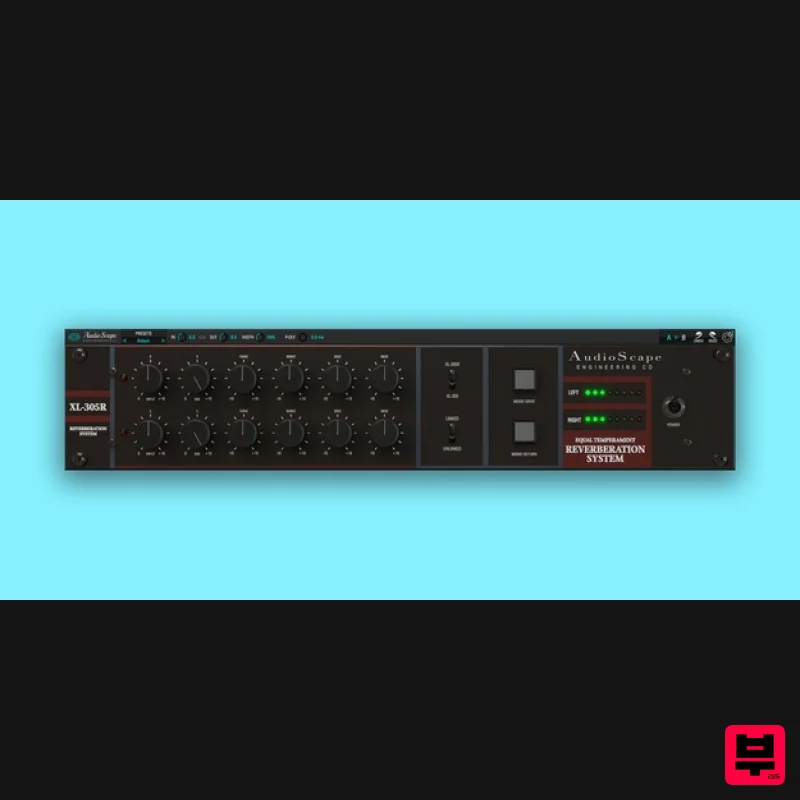
- Kiive Audio are proud to bring you the software version of this classic with the new XL-305R Equally-Tempered Spring Reverb plugin. They have stayed true to AudioScapes philosophy of more-real-than-recreated by making this plugin nearly a doppelganger of the hardware offering. 12 Springs Equally Tempered Unlike many spring reverbs
- this spring assembly has 12 springs tuned together making it equally tempered
- very similar to opening the lid of a piano
- holding the damper open and singing into the strings. This allows for a lush
- decay reverb
- with a wide range of control over the tonality of the effect Introducing The XL-305R Plugin AudioScape’s hardware version of the XL-305R has its roots in the digital-free XL-305 Spring Reverb released by Micmix in 1979. Owing to its decay and unique sonic signature
- it has been a secret weapon reverb over the years and has gained cult-like status. System Requirements macOS OS X 10.7 or higher (macOS 10.14 or higher recommended) Processor: 1 GHz Intel Dual Core or higher Screen resolution: 1024 x 768 or higher Formats: VST
- AAX 64-bit DAW support only Windows Windows 7 and above Processor: 1 GHz Intel Dual Core Processor or AMD equivalent Screen resolution: 1024 x 768 or higher Formats: VST
- AAX 64-bit DAW support only Ryan Hewitt "The best spring reverb plugin I've heard" Please note: Lunchbox Amp Sim is used as an example. Mac Installation 1. Download the .pkg file from your Plugin Boutique account > Open the .dmg installer > Click Continue. 2. Read the Software License Agreement > Click Continue. 3. Click Agree. 4. Select the installation destination > Click Continue. 5. Click Install. 6. Click Close. 7. Open your new software in your DAW > Enter the serial number found in your Plugin Boutique account > Click SUBMIT. Your software is now activated and ready to use in your DAW. Windows Installation 1. Download the .zip folder from your Plugin Boutique account. 2. Extract the contents of the folder. 3. For VST
- copy the .dll file > Paste it into your VST folder which could be one of the following: C:\Program Files\VstPlugins C:\Program Files\Steinberg\VstPlugins C:\Program Files\Common Files\VST2 C:\Program Files\Common Files\Steinberg\VST2 For AAX
- copy the AAX plugin folder > Paste it into your AAX folder which should be: C:\Program Files\Common Files\Avid\Audio\Plug-Ins 4. Open your DAW and load your new software > Enter the serial number found in your Plugin Boutique account > Click SUBMIT. Your software is now activated and ready to use in your DAW.
Additional Information
About the Kiive Audio XL-305R Dual Reverb
The Kiive Audio XL-305R Dual Reverb combines traditional design with modern performance for Reverb enthusiasts.
Why Choose the Kiive Audio XL-305R Dual Reverb?
- •Authentic Kiive Audio craftsmanship and design
- •Versatile sound suitable for multiple musical genres
- •Professional build quality and reliable performance
- •Part of Kiive Audio's respected Reverb lineup
Compare & Explore
Browse our complete selection of Kiive Audio instruments or explore other Reverb options. Use our comparison tools to find the perfect match for your musical style and budget.
Similar Products

PSP Audioware PSP EasyVerb
Reverb

PSP Audioware PSP Nexcellence
Reverb

DDMF MagicVerb
Reverb

Initial Audio AR1 Reverb
Reverb

PSP Audioware PSP Pianoverb 2
Reverb

Vegas Audio Fabricverb
Reverb

XHUN Audio ShineVerb
Reverb

DDMF Envelope
Reverb

