
Inphonik RYMCast Genesis VGM Player
Professional music gear - detailed information and where to buy
Product Description
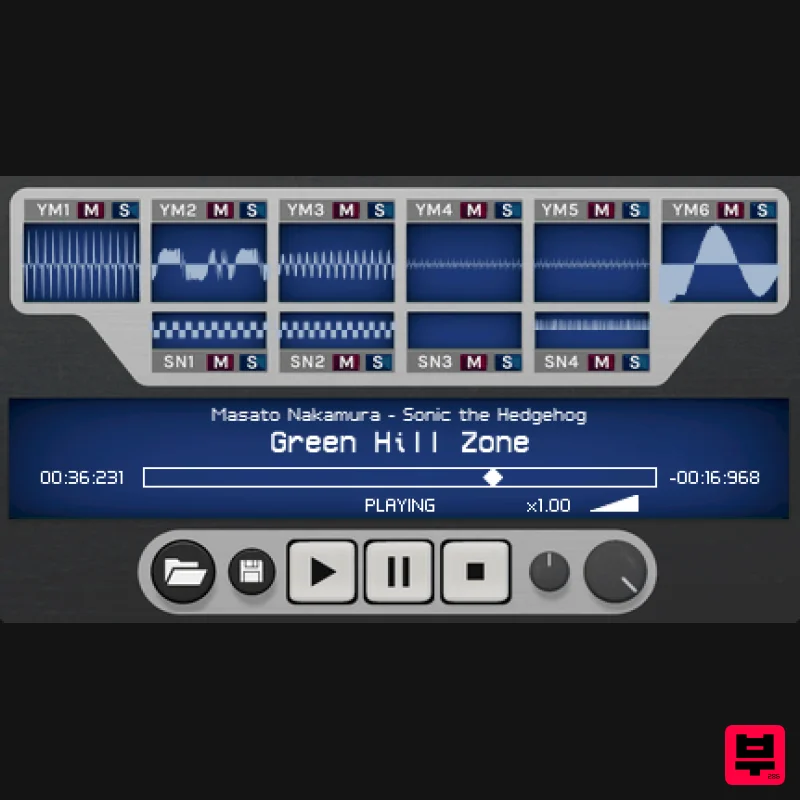
- Genesis VGM Player Genesis 35: 1-15: Revive Us Again RYMCast is a VGM player for Sega Genesis/Megadrive videogame music files. Based on their work for the RYM2612 Iconic FM Synthesizer
- Inphonik's RYMCast is a highly accurate and genuinely sounding cross-platform VGM player. It’s our humble contribution to the Sega Genesis/Megadrive community. Key Features Cycle-accurate YM2612 emulation and output modelling
- including Ladder Effect and filtering (uses the same audio engine as the RYM2612) Individual scopes for each channel Channel mute and solo VGM stream speed adjust Sequencer-like pause function Audio export to WAV
- AIFF & FLAC formats Stereo or multi-track audio export Instrument patch extractor (supports RYM2612’s .repatch and Deflemask‘s .dmp formats) The Perfect Companion App With a simple drag & drop
- extract synth patches from your favourite soundtracks to our RYM2612 Iconic FM Synthesizer. *Sega and Yamaha brand names are trademarks of their respective owners. This product is in no way affiliated with these companies. System Requirements Mac macOS (10.7 and higher) 32-bit & 64-bit VST 2 / VST 3 / AU / AAX Windows Vista and higher 32-bit & 64-bit VST 2 / VST 3 / 64-bit AAX Note: RX950 is used as the example. Mac Installation 1. Download the .dmg file from within your Plugin Boutique User Account and open it > Double-click the .pkg file to begin the installation. 2. Click 'Continue'. 3. Click 'Continue'. 4. Click 'Agree'. 5. Click 'Install'. 6. Enter your computer Username and Password > Click 'Install Software'. 7. Click 'Close'. 8. Open your DAW > Open your newly-installed plugin. Note: If your plugin does not appear
- rescan your plugin selection within your DAW. Your software is now installed and ready to use within your DAW. Windows Installation 1. Download the .zip file from within your Plugin Boutique User Account and double-click it to extract the contents > Open the .exe file to begin the installation. 2. Select your language > Click 'Ok'. 3. Click 'Next'. 4. Click 'I Agree'. 5. Select the components you wish to install > Click 'Next'. 6. Click 'Next'. 7. Click 'Next'. 8. Click 'Install'. 9. Click 'Finish'. 10. Open your DAW > Open your newly-installed plugin. Note: If your plugin does not appear
- rescan your plugin selection within your DAW. Your software is now installed and ready to use within your DAW.
Additional Information
About the Inphonik RYMCast Genesis VGM Player
The Inphonik RYMCast Genesis VGM Player combines traditional design with modern performance for Utility enthusiasts.
Why Choose the Inphonik RYMCast Genesis VGM Player?
- •Authentic Inphonik craftsmanship and design
- •Versatile sound suitable for multiple musical genres
- •Professional build quality and reliable performance
- •Part of Inphonik's respected Utility lineup
Compare & Explore
Browse our complete selection of Inphonik instruments or explore other Utility options. Use our comparison tools to find the perfect match for your musical style and budget.
Similar Products

Soundspear Luxor
Utility
$30
Luxor is the key if you want an instrument to stand out and spread in the mix. It will scoop your high frequencies to...

Inphonik RX950
Utility
$30
Legendary Grit and Crunch Meet the RX950 Classic AD/DA Converter, Inphonik’s first effect plug-in, designed to...

Audible Genius Building Blocks 2
Utility
$30
Music Theory & Composition Training Software for DAW-Based Music Makers Drum Patterns, Basslines, Chord Progressions,...

Tonalic Tonalic Arranger - 30 Day Subscription
Utility
$30
Real Musicians. Real Feel. Adaptive Performance Instrument for Your DAW Bring authentic, human musicianship into your...

DDMF TheStrip
Utility
$30
What is it? The Strip is the essential channel strip: the finest EQ, gate and compressor bundled in one beautifully...

Audible Genius Building Blocks 1
Utility
$30
Music Theory & Composition Training Software for DAW-Based Music Makers Drum Patterns, Basslines, Chord Progressions,...

Blue Cat Audio Blue Cat's Connector
Utility
$30
The Virtual Cable For Your Virtual Studio Blue Cat’s Connector is an audio & MIDI streaming plug-in that can be used...

Acoustica Spin It Again
Utility
$30
Spin It Again is the easiest way to convert your LPs and cassettes to CD and MP3. Remember all those ‘oldies but...
Frequently Asked Questions
The Inphonik RYMCast Genesis VGM Player stands out for its exceptional Inphonik craftsmanship and innovative design.
It's designed for intermediate to advanced players who appreciate professional-quality utility.
Browse the similar products section to see how it stacks up against other utility.

