
HY-Plugins HY-MBMFX3
Professional music gear - detailed information and where to buy
HY-Plugins
HY-MBMFX3
Product Info
* Prices may vary. Check retailer for current pricing and availability.
Product Description
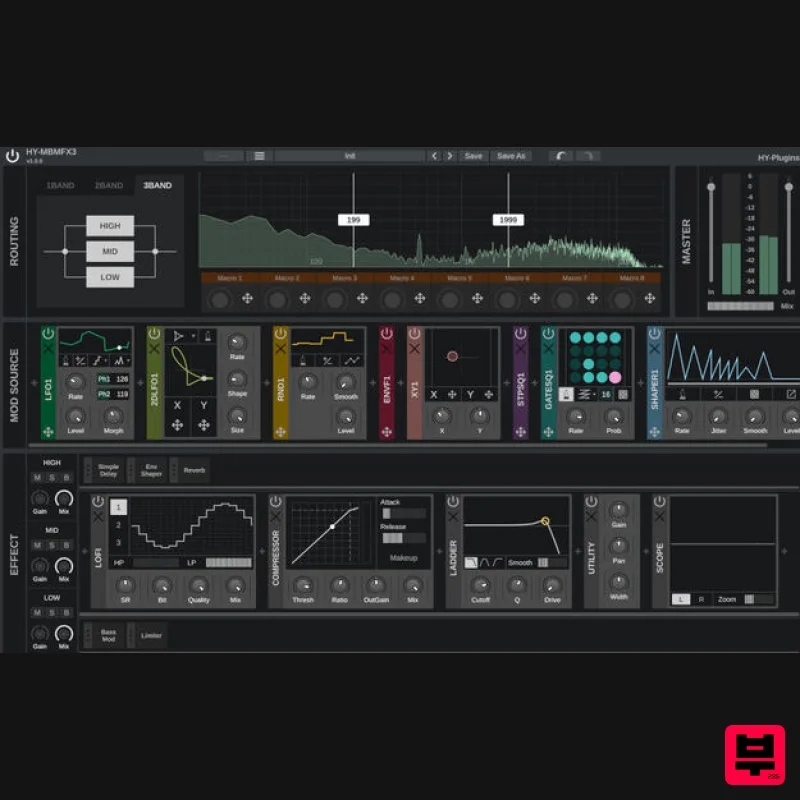
- Multiband Multi FX HY-MBMFX3 is a multiband multi-effects plugin built for deep sound design and creative flexibility. Its modular structure lets you freely combine and route FX and Modulator modules
- with the ability to modulate nearly any parameter. The plugin can split your input signal into up to three frequency bands
- allowing you to apply different effects to each band independently. Whether you're crafting subtle enhancements or complex
- evolving textures
- HY-MBMFX3 gives you the tools to shape your sound with precision. Features Multiband process Modular design 11 types of modulators 8 macro controls 41 types of FX processors Resizable UI System Requirements Mac macOS 10.13 or higher (64-bit only) AU
- VST2
- VST3 PC Windows 7 or higher (32 / 64-bit) VST2
- VST3 Note: HY-Delay4 is used as an example. Mac Installation 1. Download the .zip folder from your Plugin Boutique User Account and double-click it to extract the .dmg file. 2. Double-click the .pkg file to begin the installation process. 3. Click 'Continue'. 4. Read the License Agreement and click ‘Continue’. 5. Click 'Agree'. 6. Select the disk you want to install HY-Delay4 on
- then click 'Continue'. 7. Choose which packages to install
- then click 'Continue'. 8. Click 'Install'. 9. Click 'Close' Activation 1. Open HY-Delay4 in your DAW > Click the 'Demo' dropdown and then click 'Register'. 2. Enter your serial from your Plugin Boutique User Account > Click 'Register'. 3. Your serial will have now been registered. Your software is now activated and ready for use in your DAW. Windows Installation 1. Download the .zip folder from your Plugin Boutique User Account and double-click it to extract the .exe installer file. 2. Double-click the .exe installer file to begin the installation process. 3. Select which folder you'd like to install and click ‘Next’. 4. Select which components you would like to install. 5. Click 'Install'. 6. Click 'Finish" Activation 1. Open HY-Delay4 in your DAW > Click the 'Demo' dropdown and then click 'Register'. 2. Enter your serial from your Plugin Boutique User Account > Click 'Register'. 3. Your serial will have now been registered. Your software is now activated and ready for use in your DAW.
Additional Information
About the HY-Plugins HY-MBMFX3
The HY-Plugins HY-MBMFX3 combines traditional design with modern performance for Multi Effect enthusiasts.
Why Choose the HY-Plugins HY-MBMFX3?
- •Authentic HY-Plugins craftsmanship and design
- •Versatile sound suitable for multiple musical genres
- •Professional build quality and reliable performance
- •Part of HY-Plugins's respected Multi Effect lineup
Compare & Explore
Browse our complete selection of HY-Plugins instruments or explore other Multi Effect options. Use our comparison tools to find the perfect match for your musical style and budget.
Similar Products

Sinevibes Cache
Multi Effect

Quantum DSP Q-Series Invader
Multi Effect

Jonas Eriksson Tape Fiasco
Multi Effect

UVI Click
Multi Effect

UVI Xtreme FX 2
Multi Effect

Jungle Audio DUKE
Multi Effect

UVI Asteroid
Multi Effect

UVI Whoosh FX
Multi Effect

