
Higher Hz HZ Multiplier
Professional music gear - detailed information and where to buy
Higher Hz
HZ Multiplier
Product Info
* Prices may vary. Check retailer for current pricing and availability.
Product Description
- HZ Multiplier is a FREE multi-effect (Unison
- Chorus
- Reverb) plugin that adds depth and sparkle to any sound. In simple terms
- it transforms dull sounds into epic soundscapes
- rhythmic patterns
- and most things in-between. The plugin features a simple modulation system that becomes increasingly more involved as delay times are spread. Create simple or complex results using any combination of these core effects: Unison/Doubling Chorus and Flange Reverb Echo HZ Multiplier is a versatile character effect for macOS and Windows. Why use HZ Multiplier? As a versatile multi-effects plugin
- HZ Multiplier offers an easy way to do various things from one interface. It functions perfectly as a simple effect or a more in-depth sound design tool. Transform dull sounds In every project
- Higher Hz constantly search for the right sound and are often too quick to discard the wrong sound. Sometimes
- all it takes is a little character and personality to turn the wrong sound into the right sound. Whether you are working on Techno stabs
- ethereal drones
- or cinematic textures
- you can transform your sound by: Adding movement (subtle chorus or rhythmic echoes) Adding depth and weight to weak sounds Manipulating stereo width Like vintage analog gear
- HZ Multiplier performs with some quirks and inconsistencies (deliberate
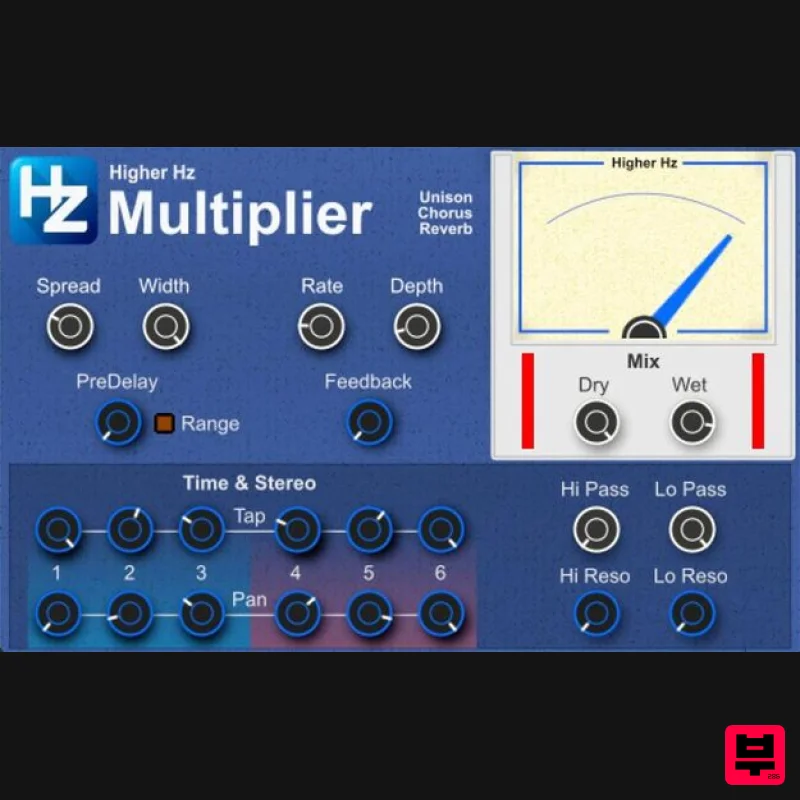
- in this case) that deliver a more organic charm and personality. User-friendly interface The GUI has two sections; the upper section and the lower section. Upper section: The main controls for the plugin’s core functions. Lower section: Time & Stereo area (Echo Tap and Pan settings) and filter controls. You can control the plugin’s primary effects (Unison/Chorus) using just the white knobs
- making it easy to get started and encouraging experimentation. Output signal activity is loosely represented by a visually pleasing VU Meter (not intended to be accurate). Additional visual feedback comes from Input/Output Meters displaying average levels. Please see the HZ Multiplier User Manual for a complete list of control names and descriptions. How it works? HZ Multiplier takes a stereo input signal and echoes it straight to the Dry Output. The stereo input signal destined for the Wet Output splits; the Left signal is sent to Taps 1-3
- and the Right to Taps 4-6. The signal flow
- along with well-defined functions
- provides complete control over the stereo position and the desired purpose of the plugin as a Unison/Doubler
- traditional Delay
- or experimental sound design tool. Filter settings ensure consistent tonal shaping as the adjustments are not cumulative. Delayed Taps carry the phase of the LFO back by the defined amount of time
- which encapsulates the organic/natural character of HZ Multiplier. Features Intuitive GUI: Easy to use with color-coded core controls (Spread
- Width
- Rate
- Depth
- Hi/Lo Pass) Six Delay/Pan Taps: Control the interaction between time and pan by setting the Delay offset and stereo position for each Tap. Feedback: Set the regeneration amount per Tap
- and emphasize the effect as Reverb or Flanger (PreDelay/Spread at or close to zero). Hi/Lo Pass Filters: 12db filters with resonance offer tonal shaping. Presets: Eight preset patches showcase some common use cases of HZ Multiplier. System Requirements macOS 10.7 or higher - AU Windows 7
- 10 or 11 - VST 2.4 / VST 3 64-bit only Note: HZ Delay is used as the example. Mac 1. Click the 'DOWNLOAD' button in your Plugin Boutique account. 2. Extract the .zip folder. 3. Right-click and copy the HZ Delay.component folder. 4. Navigate to ~/Library/Audio/Plug-Ins/Components > Right-click and paste the folder. 5. Launch your DAW > Insert HZ Delay as an insert on a new track. 6. Right-click and copy the HigherHz folder. 7. Navigate to ~/Library/Audio/Presets > Right-click the folder > Paste the copied folder to this location. Your software is now installed and ready to use. Windows 1. Click the 'DOWNLOAD' button in your Plugin Boutique account. 2. Extract the .zip folder. 3. Right-click and copy the relevant VST 3 or VST 2.4 folder that you wish to install. 4. Paste the copied folder in the relevant location > VST3: C:\Program Files\Common Files\VST3 or VST 2.4: C:\Program Files\VSTPlugins 5. Launch your DAW > Insert HZ Delay as an insert on a new track. Your software is now installed and ready to use.
Additional Information
About the Higher Hz HZ Multiplier
Experience the quality and tone that makes the Higher Hz HZ Multiplier a popular choice for musicians.
Why Choose the Higher Hz HZ Multiplier?
- •Authentic Higher Hz craftsmanship and design
- •Versatile sound suitable for multiple musical genres
- •Professional build quality and reliable performance
- •Part of Higher Hz's respected Multi Effect lineup
Compare & Explore
Browse our complete selection of Higher Hz instruments or explore other Multi Effect options. Use our comparison tools to find the perfect match for your musical style and budget.
Similar Products

Sinevibes Cache
Multi Effect

Quantum DSP Q-Series Invader
Multi Effect

UVI Asteroid
Multi Effect

UVI Whoosh FX
Multi Effect

Jungle Audio DUKE
Multi Effect

UVI Xtreme FX 2
Multi Effect

Jonas Eriksson Tape Fiasco
Multi Effect

UVI Click
Multi Effect

