
Future Audio Workshop Notes
Professional music gear - detailed information and where to buy
Future Audio Workshop
Notes
Product Info
* Prices may vary. Check retailer for current pricing and availability.
Product Description
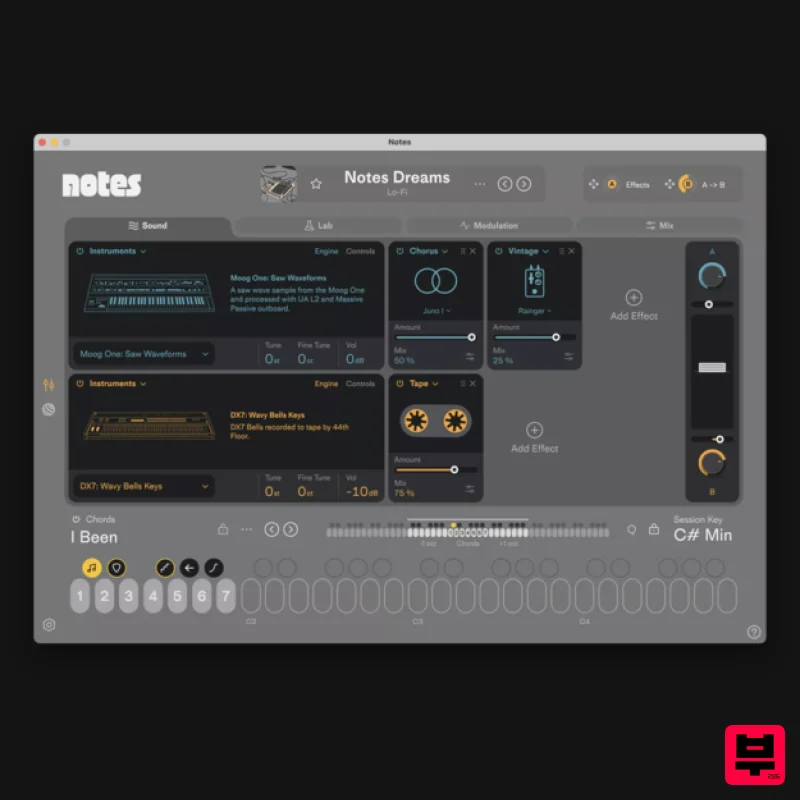
- The Ideas Machine. A new class of instrument built to break out of creative blocks and move from idea to music faster. Notes is a new style of instrument that brings dynamic chords
- authentic sounds
- and composition tools together in one plugin. Not your typical VST — it’s an Ideas Machine built to break creative blocks and turn ideas into finished tracks. How it works: Browse through genre-focused sound packs to find an inspiring starting point. Every sound is paired with instantly playable
- fully customizable chord sets – composed and performed by real musicians. Play full
- expressive chords with white keys. Transform them in real time with black keys and record everything straight into your DAW. Notes comes packed with six distinct sound packs
- from dusty lo-fi textures and glitchy accents to shimmering analog synths
- combined with hundreds of unique chord progressions. Only in Notes: The Lab is your place to quickly build custom chord progressions. Drop in any audio or midi file and Notes automatically detects the chords and maps them to keys
- ready to play and transform instantly. Or create progressions from scratch by typing chord names and switching between voicing styles—Wide
- Ghibli
- House
- Dilla
- Caesar—to change the vibe in one click. Richie Souf “SubLab is in a league of its own when it comes to hard-hitting sub-bass sounds. This is a game-changer." Audio Plugin Guy "SubLab will lay the bass sauce thick onto any modern electronic and hip-hop production. It puts all the tools of the trade in one place for everyone to enjoy." Available as VST2
- VST3
- and AU Tested in FL Studio
- Ableton Live
- and Logic Compatible with Mac OS 10.12 and higher
- 64-bit Intel® processor or M1/2/3 Compatible with Windows 10 and higher Notes can be used offline but you need to be connected to the internet to activate SubLab XL is used as the example Mac Installation & Activation 1. Download the Mac SubLab XL installer from your Plugin Boutique User Account. 2. Double-click the .dmg file to launch the installer application. 3. Double-click the 'XL" logo to begin the installation process. 4. Click 'Continue.' 5. Read the information and click 'Continue.' 6. Read the licence agreement > click 'Continue' then 'Agree.' 7. Click 'Install.' 8. The installation of the software has successfully completed > click 'Close.' 9. Open your DAW
- then locate and load the software onto a MIDI track. 10. Click the link in the bottom-right of the plugin window
- next to the prompt 'Have an activation code from another shop?'. 11. Log in or sign up using the email and password boxes provided
- then copy and paste the serial number from within your Plugin Boutique Library into the box underneath (make sure you remove any spaces from your serial number!). Next
- click 'Activate' to authorise the software. The Software is Now Ready for Use! Windows Installation & Activation 1. Download the PC SubLab XL installer from your Plugin Boutique User Account. 2. Double-click the .zip folder to extract the contents and then double-click the .exe file to begin the installation process > click 'More info' > then click 'Run anyway'. 3. Read through the licence agreement and select 'I accept the agreement' > click 'Next.' 4. Select the software format(s) that you wish to install and click 'Next.' 5. Select the folder (s) in which to install the component file (s) into > click 'Next.' 6. Click 'Next'. 7. Use the checkbox to select whether or not to create a desktop shortcut for SubLab XL
- then click 'Next'. 8. Review the installation and click 'Install.' 9. The installation of the software has successfully completed > click 'Finish.' 10. Open your DAW
- then locate and load the software onto a MIDI track. 11. Click the link in the bottom-right of the plugin window
- next to the prompt 'Have an activation code from another shop?'. 12. Log in or sign up using the email and password boxes provided
- then copy and paste the serial number from within your Plugin Boutique User Account into the box underneath (make sure you remove any spaces from your serial number!). Next
- click 'Activate' to authorise the software. The Software is Now Ready for Use!
Additional Information
About the Future Audio Workshop Notes
Discover the distinctive sound and feel of the Future Audio Workshop Notes, a standout choice among Synth.
Why Choose the Future Audio Workshop Notes?
- •Authentic Future Audio Workshop craftsmanship and design
- •Versatile sound suitable for multiple musical genres
- •Professional build quality and reliable performance
- •Part of Future Audio Workshop's respected Synth lineup
Compare & Explore
Browse our complete selection of Future Audio Workshop instruments or explore other Synth options. Use our comparison tools to find the perfect match for your musical style and budget.
Similar Products

ThaLoops Templetone
Synth

discoDSP OB-Xd
Synth

discoDSP Discovery Pro
Synth

Reflekt Audio Xonex
Synth

discoDSP Discovery
Synth

Thenatan Audio Poizen VST
Synth

AngelicVibes ELITE PIANIST
Synth

discoDSP OPL
Synth

