
Expressive E Imagine
Professional music gear - detailed information and where to buy
Expressive E
Imagine
Product Info
* Prices may vary. Check retailer for current pricing and availability.
Product Description
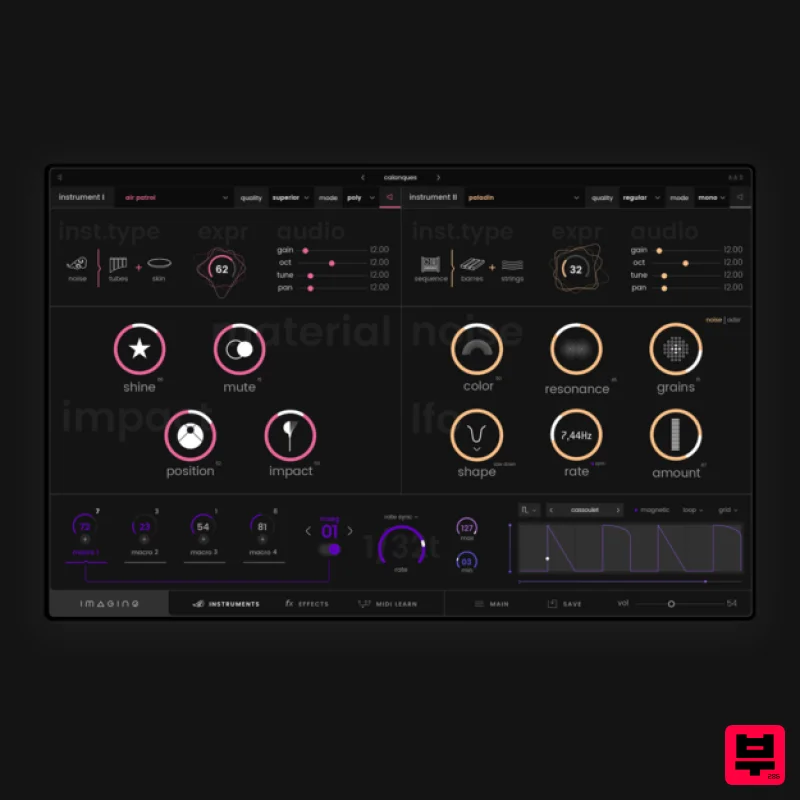
- A Playful World of Unknown Acoustic Sounds Multidimensional Acoustic Tones Imagine digs deep inside the body of real-life instruments
- modifies and combines their acoustic characteristics to create an imaginary acoustic landscape. Thanks to a playful multidimensional approach
- Imagine offers texture manipulations
- mysterious unknown sound dimensions that still sound familiar. Atypical Instruments Imagine offers hundreds of instrument layers
- meticulously modelled to bring their very own character. Each preset combines two of these instrument layers to offer unprecedented acoustic timbres. Playful Sound Design Each instrument has its very own character that can be easily adjusted with great flexibility. Discover a playful sound design experience by combining and tweaking your instruments to your taste. Vivid Textures
- Morphing Acoustic Combine the layers of instruments and modulate their characteristics in real-time
- as well as additional textures for an extraordinary expressive experience. Enhance and Articulate Imagine offers a complete toolset of effects ideal for enhancing your sounds. Everything is designed for real-time manipulation to easily create fluid articulations
- breaks drops
- or to dynamically modify reverbs and delays. Built for Real-Time Modulation Multi-Stage Envelope Generators For further expressive possibilities
- Imagine contains MSEGs that pack a huge collection of modulations for your sounds. Intelligent Modulation System Behind the scenes
- everything is optimized to provide you with the best expressive experience possible: no dead zones; sensitivity curves and ranges are continuously scaled. Optimized Macros Significant optimization work has been carried out to allow you to modulate the sound of your instruments in real-time
- resulting in a unique expressive perspective. System Requirements Mac macOS 10.13 and higher (64-bit only) AU / VST / VST3 (No Standalone version) Intel Core i5-7400 or Ryzen 5 2600
- 4 GB RAM Windows Windows 10 (64-bit only) VST / VST3 (No Standalone version) Intel Core i5-7400 or Ryzen 5 2600
- 4 GB RAM Paul (1/2 of Synapson) "Imagine is a very musical synth which brings acoustic resonances to your production." Olivier Arson "Another playful and sensitive instrument from Expressive E! It feels extremely responsive and I really like how you can explore completely different timbres and behaviours with just one patch." Chapelier Fou "Imagine offers a very unique combination of physical modelling
- audio effects and modulation sequencers
- which makes it a joy for both movie scores and sound design." Windows Registration 1. Go to the Expressive E registration page > Enter your details > Click Save to create an Expressive E account (or login to your existing account). 2. Go to 'Product Registration' > enter the activation code found in your Plugin Boutique account > Click 'ok'. 3. Click 'CONTINUE'. 4. Under My Downloads and Serials > Click 'win' to download the Windows installer. Installation 1. Double-click the .zip folder to extract its contents > Double-click the .exe file to start the installation process. 2. Click 'Next'. 3. Read the License Agreement > Click 'I Agree'. 4. Select the components you would like to install > Click 'Next'. 5. Choose your preferred install location > Click 'Install'. 6. Click 'Finish'. Activation 1. Launch your DAW > Open Imagine > Click ‘Activate’. 2. Enter the 30-digit activation code found in your Plugin Boutique account > Click 'Next'. 3. Enter your email address > Click 'Register with my existing iLok account' > Click 'Continue'. 4. Enter your iLok User ID and password > Click 'Next'. 5. Select your activation location > Click 'Next'. 6. Click 'Continue'. Your software is now activated and ready to use in your DAW! Mac Registration 1. Go to the Expressive E registration page > Enter your details > Click Save to create an Expressive E account (or login to your existing account). 2. Go to 'Product Registration' > Enter the activation code found in your Plugin Boutique account > Click 'ok'. 3. Click 'CONTINUE'. 4. Under 'Downloads' > Click 'mac'. Installation 1. Double-click the .zip folder to extract its contents > Double-click the .pkg to start the installation process. (If you are on macOS 10.15 Catalina / macOS 11 Big Sur > right-click the .pkg file > Select 'Open') 2. Click 'Continue'. 3. Read the Important Information > click 'Continue'. 4. Read the Software License Agreement > Click 'Continue' > Click 'Agree'. 5. Choose the disk install destination > Click 'Continue'. 6. Choose your preferred install location > Click 'Install'. 7. Click 'Close'. Activation 1. Launch your DAW > Click ‘Activate’. 2. Enter the activation found in your Plugin Boutique account > Click 'Next'. 3. Enter your email address > Click 'Register with my existing iLok account' > Click 'Continue'. 4. Enter your iLok User ID and Password > Click 'Next'. 5. Select your activation location > Click 'Next'. 6. Click 'Continue'. Your software is now activated and ready to use in your DAW!
Additional Information
About the Expressive E Imagine
The Expressive E Imagine represents excellent craftsmanship in the Synth category.
Why Choose the Expressive E Imagine?
- •Authentic Expressive E craftsmanship and design
- •Versatile sound suitable for multiple musical genres
- •Professional build quality and reliable performance
- •Part of Expressive E's respected Synth lineup
Compare & Explore
Browse our complete selection of Expressive E instruments or explore other Synth options. Use our comparison tools to find the perfect match for your musical style and budget.
Similar Products

discoDSP Discovery
Synth
$30
Discovery is a virtual analog Nord Lead 2 inspired synthesizer featuring multi-layering, a morphing engine, high...

Reflekt Audio Xonex
Synth
$30
Xonex is a futuristic plugin that we have used time and time again to make a variety of beats. Xonex has offered me a...

ThaLoops Templetone
Synth
$30
The Ultimate Hip-Hop Production Plugin – Featuring a Vast Collection of Hip-Hop Sounds. Choose between wild drums,...

AngelicVibes ELITE PIANIST
Synth
$30
Your next go-to virtual instrument. Real piano recordings with unique sound and effects 50 high-quality presets for...

discoDSP OPL
Synth
$30
The OPL is a digital sound synthesis chip developed by Yamaha in the mid 1980s. Among other products, it was used in...

discoDSP Discovery Pro
Synth
$30
discoDSP’s Discovery was one of the company’s first and finest efforts. Heavily inspired by Clavia’s Nord Lead...

Thenatan Audio Poizen VST
Synth
$30
Thenatan and Global Audio Tools have teamed up again to bring music makers across the globe a jam packed powerful tool...

discoDSP OB-Xd
Synth
$30
OB-Xd is based on the Oberheim OB-X. It attempts to recreate its sound and behavior, but as the original was very...
Frequently Asked Questions
The Expressive E Imagine stands out for its exceptional Expressive E craftsmanship and innovative design.
Yes! With its affordable price point and quality construction, it's perfect for learning synth.
Browse the similar products section to see how it stacks up against other synth.

