
Eventide EChannel
Professional music gear - detailed information and where to buy
Eventide
EChannel
Product Info
* Prices may vary. Check retailer for current pricing and availability.
Product Description
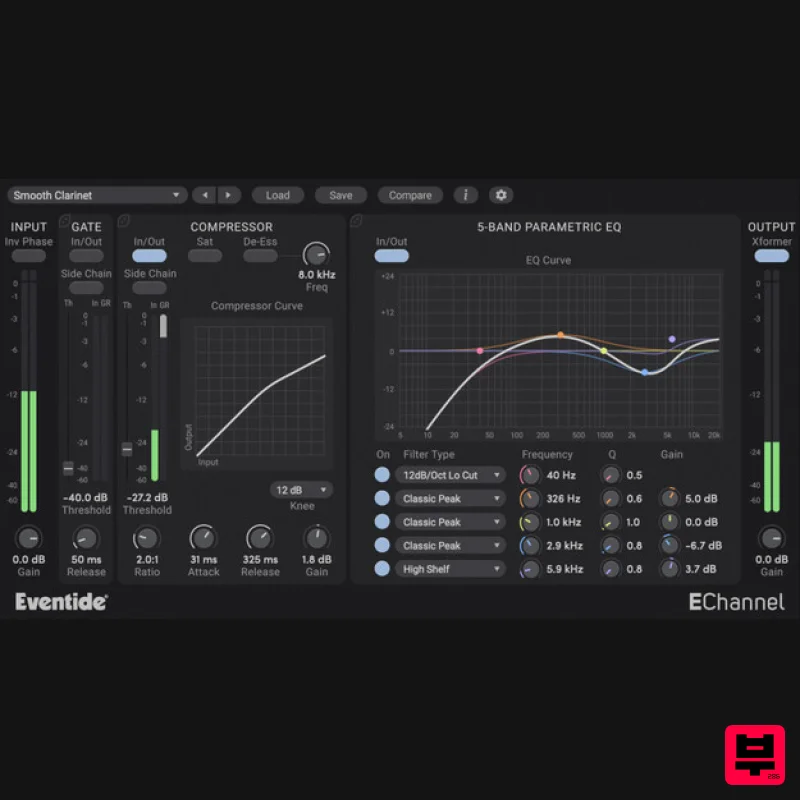
- EChannel Lightweight Modular Channel Strip EChannel is a versatile and lightweight channel strip plug-in that includes a routable Gate
- Parametric EQ
- and Compressor. Its modular design allows for flexible signal processing routing
- while its graphical displays enable precise frequency adjustments. With a powerful suite of controls
- this plugin offers an extensive range of options to generate the exact tone and frequency characteristics you desire. Features Intuitive and easy-to-learn Over 100 presets tailored for various instruments and use cases FlexiPath™ Routing allows processors to be ordered based on the desired workflow. Gate module removes signals below the designated threshold; great for multi-miked drum kits or fret noise. Compressor alters the dynamics of your input signal
- with optional soft saturation and de-esser. Use the side chain to trigger gain reduction for competing instruments. 5-Band Parametric EQ allows for precise frequency manipulation throughout the entire audio spectrum. Output Transformer emulation adds a subtle yet distinct effect on signals with lots of low-frequency content or can be driven into saturation for analog warmth. System Requirements Windows Windows 10 and later (Windows 11 supported) (64-bit only) AAX
- VST2
- VST3 Mac macOS 10.14 and later (Intel / Apple Silicon supported) (64-bit only) AAX
- VST2
- VST3 Important Notes: Eventide tests their desktop plugins in Ableton Live
- Cubase
- FL Studio
- Logic Pro
- Pro Tools
- and Studio One (However
- their plugins should work with any compatible host.) No iLok dongle is required to run this software - only a FREE iLok account/Manager is required for authorisation. Please note: Blackhole is used as an example. Registration 1. Create an iLok account by following the steps from our help centre article - Getting Started with the iLok License Manager. If you already have an iLok account
- skip this step. 2. Go to https: //www.eventideaudio.com/login > Click 'Create Account' at the bottom of the page. 3. Enter your details (including your iLok Account User ID) > Click 'Register'. 4. You will now be redirected to your My Account page. 5. In the bottom right corner of the page
- enter the license key (format 1234-1234-1234) found in your Plugin Boutique account
- as well as your iLok Account User ID > Click 'Register'. Please note: a Serial Number is now not required Please note: Make sure there are no spaces at the beginning or after your license key. 6. Your software is now registered. 7. Launch the iLok License Manager application > Sign into your account. 8. Enter your iLok user ID and password > Click 'Sign in'. 9. Your license should now be listed within your iLok account. 10. Double-click on the license to bring up additional options > Click 'Activate' (located on the right of the screen). 11. Select where you wish the license to be activated > Click 'Activate'. 12. Click 'OK'. 13. Click 'OK'. Mac Installation 1. Download the Mac installer from https://www.eventideaudio.com/downloads/ > Run the installation > Click 'Next'. 2. Click to accept the license agreement > Click 'Next'. 3. Choose which plugin formats you'd like to install > Click 'Next'. Please note: If you're unsure
- leave all options selected or check out our help centre article Plugin Formats Explained for more information. 4. Select the destination folders (or leave them as the defaults) > Click 'Next'. 5. Click 'Next'. 6. Click 'Finish'. Your new software is now fully activated and ready to use within your DAW! Windows Installation 1. Download the Windows installer from https: //www.eventideaudio.com/downloads/ > Run the installation > Click 'Next'. 2. Read the License Agreement > Select 'I accept the agreement > Click 'Next'. 3. Choose which plugin formats you'd like to install > Click 'Next'. If you're unsure
- leave all options selected or check out our help centre article Plugin Formats Explained for more information. 4. Select the destination folders (or leave them as the defaults) > Click 'Next'. 5. Click 'Next'. 6. Click 'Finish'. Your new software is now fully activated and ready to use within your DAW!
Additional Information
About the Eventide EChannel
The Eventide EChannel combines traditional design with modern performance for Multi Effect enthusiasts.
Why Choose the Eventide EChannel?
- •Authentic Eventide craftsmanship and design
- •Versatile sound suitable for multiple musical genres
- •Professional build quality and reliable performance
- •Part of Eventide's respected Multi Effect lineup
Compare & Explore
Browse our complete selection of Eventide instruments or explore other Multi Effect options. Use our comparison tools to find the perfect match for your musical style and budget.
Similar Products

Jonas Eriksson Tape Fiasco
Multi Effect

Quantum DSP Q-Series Invader
Multi Effect

UVI Whoosh FX
Multi Effect

Sinevibes Cache
Multi Effect

UVI Click
Multi Effect

UVI Xtreme FX 2
Multi Effect

Jungle Audio DUKE
Multi Effect

UVI Asteroid
Multi Effect

