
Ear Candy Technologies Esmeralda
Professional music gear - detailed information and where to buy
Ear Candy Technologies
Esmeralda
Product Info
* Prices may vary. Check retailer for current pricing and availability.
Product Description
- The Place Your Sound Deserves Spatialize Your Sound
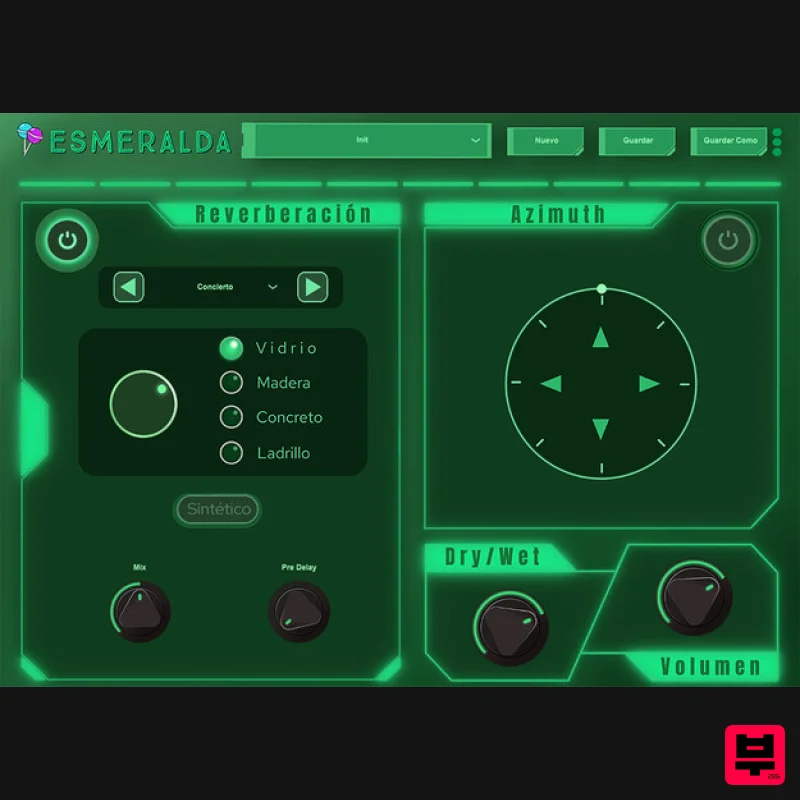
- Define Presence and Add that Distinctive Touch Reverb A classic reverb that allows you to choose between 4 possible spaces to position your sound and give it a characterization that you can customize
- choosing between 4 different materials. Synthetic Mode Synthetic mode adds one more reverb option. A combination between the famous Schroeder algorithm and convolution. Binaural A new pan through the binaural module is incorporated with a 360° azimuth slider for better spatiality. System Requirements Mac macOS 10.10 or later (Intel / M1 Apple Silicon supported) (64-bit only) AU / VST3 / VST / AAX 4 GB RAM required (8 GB recommended) 2.5 GHz CPU (Intel
- AMD or M1 Apple Silicon) 30 MB Free Disk Space Windows Windows 7 or later (64-bit only) VST3 / VST / AAX 4 GB RAM required (8 GB recommended) 2.5 GHz CPU (Intel or AMD) 30 MB Free Disk Space Please Note: Esmeralda is not supported on 32-bit platforms. Estudio Sin Nombre "In general I loved everything
- the interface is very simple
- I loved the presets
- my favourite is Una pesadilla." Ethan Muller "I love the possibilities that can be given with Esmeralda when mixing a song." Mac 1. Download the .zip folder from your Plugin Boutique User Account > Double-click it to open and extract the installer file > Right-click the correct .pkg installer file corresponding to your Intel OR Apple M1 System > Click 'Open'. 2. If you are shown this message
- click 'Open'. 3. Click 'Continue'. 4. Click 'Continue'. 5. Click 'Continue' > Accept the license agreement. 6. Click 'Install'. 7. Enter your system password > Click 'Install Software'. 8. Click 'OK'. 9. Click 'Close'. 10. Launch your DAW > Insert Esmeralda on a new audio track. Esmeralda is now installed and ready to use. Windows 1. Download the .zip folder from your Plugin Boutique User Account > Double-click it to open and extract the installer file > Launch the .exe installer file. 2. Select your setup language > Click 'OK'. 3. Click 'Next'. 4. Select 'I accept the agreement' > Click 'Next'. 5. Select components for installation > Click 'Next'. 6. Confirm the correct directory for installation > Click 'Next'. 7. Click 'Install'. 8. Click 'Finish'. 9. Launch your DAW > Insert Esmeralda on a new audio track. Esmeralda is now installed and ready to use.
Additional Information
About the Ear Candy Technologies Esmeralda
The Ear Candy Technologies Esmeralda combines traditional design with modern performance for Reverb enthusiasts.
Why Choose the Ear Candy Technologies Esmeralda?
- •Authentic Ear Candy Technologies craftsmanship and design
- •Versatile sound suitable for multiple musical genres
- •Professional build quality and reliable performance
- •Part of Ear Candy Technologies's respected Reverb lineup
Compare & Explore
Browse our complete selection of Ear Candy Technologies instruments or explore other Reverb options. Use our comparison tools to find the perfect match for your musical style and budget.
Similar Products

Initial Audio AR1 Reverb
Reverb

PSP Audioware PSP Pianoverb 2
Reverb

Vegas Audio Fabricverb
Reverb

PSP Audioware PSP Nexcellence
Reverb

DDMF MagicVerb
Reverb

DDMF Envelope
Reverb

XHUN Audio ShineVerb
Reverb

PSP Audioware PSP EasyVerb
Reverb

