
DHPlugins HALO FX
Professional music gear - detailed information and where to buy
DHPlugins
HALO FX
Product Info
* Prices may vary. Check retailer for current pricing and availability.
Product Description
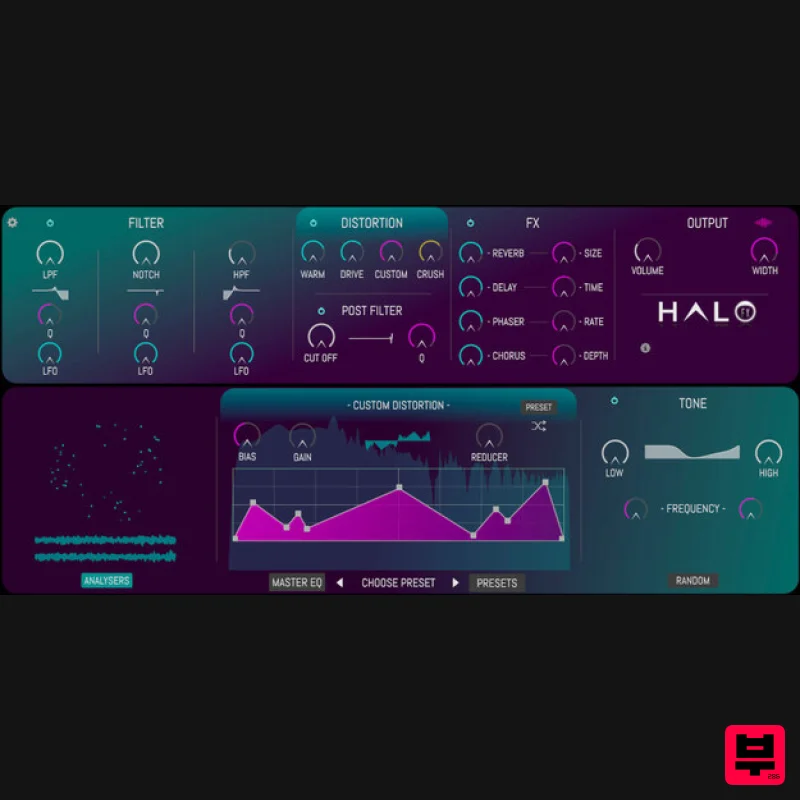
- Please Note: HALO FX is also a part of the HALO-2 package and can be purchased together. The HALO FX plug-in brings the pristine filters
- customisable distortions
- fx and modulations from the HALO virtual instrument directly into your plug-in effect chain. With a signal flow comprising of a triple multi filter complete with individual LFOs
- four distortions including a customisable waveshaper and bit-crusher
- a post distortion filter with LFO
- a reverb
- delay
- phaser
- chorus
- limiter and a choice of two EQs HALO FX is the fastest way of dialling in experimental FX ever created. Within only a few clicks you can add any or all of the processing available in HALO FX. The Random Preset Generator will create totally new
- useable
- interesting settings to shape your sounds in ways you never would otherwise. Via the extensive Preset collection you can easily access a range of fine tuned settings
- from intense distortions
- huge reverbs
- cavernous delays
- rhythmic modulations and glitchy effects. Filters Galore Featuring a total of 4 filters
- each with multiple filter modes
- and each with their own LFO there is a world of creative possibilities at your fingertips in HALO FX. Creating movement in your sounds couldn't be easier. Select between Low-Pass
- High-Pass
- Notch
- Peak
- BandPass and finally an all-pass Phase filter. With a further choice on a Tone EQ and Master parametric EQ the sonic shaping abilities in HALO FX are unparalleled in a single plugin. The Filter LFO clock will sync with your DAW enabling the LFO movements to be consistent when scrolling and rendering audio. Push
- Warm
- Mangle
- Crush or Destroy! With 4 distortion modes HALO FX provides an endless sonic palette to play with. Experiment with a choice of Warm Saturation
- Amp style Drive
- Customisable Waveshaping distortion
- and Bitcrushing. The versatile Waveshaper allows complete control over the Waveshape
- Bias
- Gain and Rate Reduction
- whilst also featuring a preset browser of it's own to instantly select pre-made shapes from the HALO library or quickly saving your own for recall later and in other sessions. Features 50 Fine Tuned Presets Custom Waveshaping Distortion Parametric Master EQ 3 Multi-mode Filters with Modulation Post Distortion Multi Filter + LFO Reverb
- Delay
- Phaser & Chorus FX Tone EQ for Easy EQ Shaping Master Peak Limiter Precision Analysers Random Preset Generation System Requirements PC Windows 7 or later (64-bit only) 1GB RAM minimum 1GB storage space VST3 Mac MacOS 10.8 or later (Apple Silicon Compatible) 1GB RAM minimum 1GB storage space AU/VST3 Note: HALO-2 is used as the example. The process for HALO FX is the same
- but does not require installation of the secondary 'SAMPLES' file. Windows 1. Download the installation pack from within your Plugin Boutique User Account
- and unzip the contents. 2. Launch the 'HALO-2 PIB' installer. 3. Select 'I accept the agreement'
- then click 'Next'. 4. Select 'Install'. 5. Once installation has concluded
- click 'Finish'. 6. Launch the 'HALO-2 SAMPLES' file from within your installer pack. Click 'Download'. 7. Click 'OK'
- and select a folder in which to store your samples. 8. Once installation is completed
- close the application. Do not click 'Cancel'. 9. Launch Halo 2 within your DAW
- and enter the License Key found within your Plugin Boutique User Account. 10. Your plugin is now installed and ready to use! Mac 1. Download the installation pack from within your Plugin Boutique User Account
- and open the dmg file. 2. Launch the 'HALO-2 PIB' installer. 3. Click 'Continue'. 4. Click 'Continue'. 5. Click 'Continue'. 6. Click 'Agree'. 7. Click 'Continue'. 8. Click 'Install'. 9. Click 'Close'. 10. Launch the 'HALO-2 SAMPLES' file from within your installer pack
- and enter the License Key found within your Plugin Boutique User Account. 11. Click 'Download'. 12. Click 'OK'
- and select a folder in which to store your samples. 13. Once installation is completed
- close the application. Do not click 'Cancel'. 14. Launch Halo 2 within your DAW
- and enter the License Key found within your Plugin Boutique User Account. 15. Your plugin is now installed and ready to use!
Additional Information
About the DHPlugins HALO FX
The DHPlugins HALO FX represents excellent craftsmanship in the Multi Effect category.
Why Choose the DHPlugins HALO FX?
- •Authentic DHPlugins craftsmanship and design
- •Versatile sound suitable for multiple musical genres
- •Professional build quality and reliable performance
- •Part of DHPlugins's respected Multi Effect lineup
Compare & Explore
Browse our complete selection of DHPlugins instruments or explore other Multi Effect options. Use our comparison tools to find the perfect match for your musical style and budget.
Similar Products

Jonas Eriksson Tape Fiasco
Multi Effect

UVI Asteroid
Multi Effect

Quantum DSP Q-Series Invader
Multi Effect

Jungle Audio DUKE
Multi Effect

UVI Click
Multi Effect

Sinevibes Cache
Multi Effect

UVI Xtreme FX 2
Multi Effect

UVI Whoosh FX
Multi Effect

