
Devious Machines Texture
Professional music gear - detailed information and where to buy
Devious Machines
Texture
Product Info
* Prices may vary. Check retailer for current pricing and availability.
Product Description
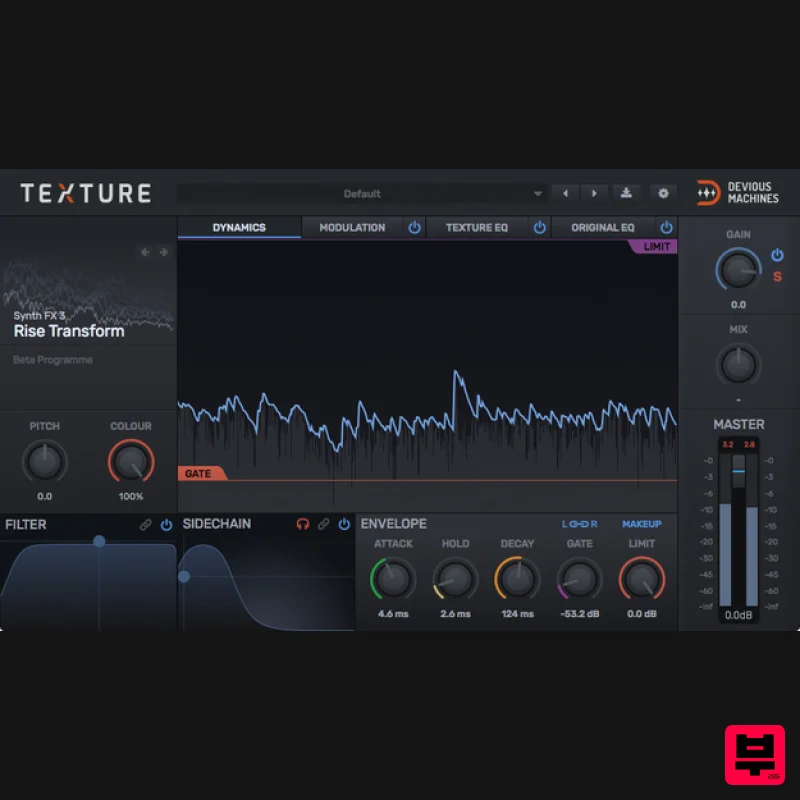
- The Effects Plugin with the Heart of a Synth A New Breed of Effect Drawing from a library of over 300 acoustic and electronic sources
- Texture synthesises new layers which track the dynamics of your sound. Want to “glue” your hi-hats transients by adding dynamic filtered noise? Or how about beefing up that kick drum by automatically adding a low sine wave? Texture makes this is easy
- intuitive and fast. But its uses don’t stop at mix enhancement. Experimental musicians and sound designers will find a plethora of leftfield sound at their fingertips. How about having bubbling water track a keyboard part
- or adding ferocious fire crackle to the roar of a monster? Texture makes all this and more possible. Enhance
- Shape and Transform 340+ inspirational textures to choose from Instantly add body or bite to drums Use as a subharmonic synth for heavyweight bass Inspire your beats and breathe new movement into lifeless rhythm tracks Add sonic glue to programmed drum tracks Overlay instant dirt with vinyl crackle
- tape hiss and digital noise Increase width and depth with percussive reverb tails Generate radical new sounds from rhythmic source material Add organic layers including Foley
- crowd noise and ambience Quickly whip up risers and pitch modulated special FX And much more… Features Over 340 sampled
- granular and generative sound sources Advanced envelope with attack
- hold and decay controls Dual filter
- to quickly shape your chosen texture Independent EQ sections for the wet and dry signal paths Source-specific synthesis controls include colour
- pitch
- density and octave. Modulate a Texture’s controls and filter cutoff using LFO and envelope signals Tweak the response to the source signal with the sidechain filter Squash the Texture sound using limiting and make-up gain Global control of Texture level
- Mix and Master level Intuitive user interface
- for fast results New in Texture 1.5 Import your own samples and manipulate with four sampling types Use your existing audio to trigger and sequence sample playback Familiar sampler controls including Start Time
- End Time
- Looping Transform your sounds with granular synthesis
- including random mode Repitch
- Compress and ReColour your imported audio material Drag and Drop from your Browser
- DAW or anywhere else Define playback behaviour of your own samples with trigger parameters Expanded control set for easy tweaking of sampling and triggering More detailed audio analysis from within the onboard EQs System Requirements Mac OSX 10.9 or later (Intel / M1 Apple Silicon supported) (64-bit only) VST
- AAX PC Windows 10 or later (64-bit) VST
- AAX Rich Carrigan - Mouldy Soul "I'm pretty sure this is gonna be a mainstay in my productions." Morgan Page "Loving Texture. It's a really clever idea for a plugin and very useful on synths that need that extra flavour." Oli Cash - Far Too Loud "Really awesome
- so much potential for sound design." Devious Machines Texture review Text appeal The debut release from industry veterans Jim Credland and Dom is a plugin effect that analyses the dynamic envelope of the input and uses it as the amplitude control signal for the playback of a sample-based source sound from its onboard library. Feed Texture a ... Read More Note: Duck is used as an example. Installation Instructions macOS: Installation 1. Download the .pkg file from your Plugin Boutique User Account > Double-click it to begin the installation. 2. Click 'Continue'. 3. Click 'Continue'. 4. Click 'Continue'. 5. Click 'Agree'. 6. Click 'Continue'. 7. Click 'Install'. 8. Enter your computer Username and Password > Click 'Install Software'. 9. Click 'Close'. Activation 1. Open the plugin in your DAW > Click the 'X' icon. 2. Click the menu drop-down icon (located within the red box in the image below) to open the drop-down menu. 3. Click 'License'. 4. Copy the serial number from within your Plugin Boutique User Account > Click 'License'. Note: Be sure to include the ---START--- and ---END--- of the serial number when copying it from your Plugin Boutique User Account. 5. Click 'Close'. Your product is now activated and ready to use within your DAW. Windows: Installation 1. Download the .zip file from your Plugin Boutique User Account and double-click it to extract the contents > Double-click the .exe file to begin the installation. 2. Select 'I Accept the Agreement' > Click 'Next'. 3. Click 'Next'. 4. Click 'Next' 5. Click 'Next' 6. Click 'Next' 7. Click 'Install' 8. Click 'Next' 9. Click 'Finish' Activation 1. Open the plugin in your DAW > Click the 'X' icon. 2. Click the menu drop-down icon (located within the red box in the image below) to open the drop-down menu. 3. Click 'License'. 4. Copy the serial number from within your Plugin Boutique User Account > Click 'License'. Note: Be sure to include the ---START--- and ---END--- of the serial number when copying it from your Plugin Boutique User Account. 5. Click 'Close'. Your product is now activated and ready to use within your DAW.
Additional Information
About the Devious Machines Texture
The Devious Machines Texture combines traditional design with modern performance for Multi Effect enthusiasts.
Why Choose the Devious Machines Texture?
- •Authentic Devious Machines craftsmanship and design
- •Versatile sound suitable for multiple musical genres
- •Professional build quality and reliable performance
- •Part of Devious Machines's respected Multi Effect lineup
Compare & Explore
Browse our complete selection of Devious Machines instruments or explore other Multi Effect options. Use our comparison tools to find the perfect match for your musical style and budget.
Similar Products

UVI Click
Multi Effect

Jonas Eriksson Tape Fiasco
Multi Effect

UVI Xtreme FX 2
Multi Effect

Quantum DSP Q-Series Invader
Multi Effect

UVI Whoosh FX
Multi Effect

Sinevibes Cache
Multi Effect

Jungle Audio DUKE
Multi Effect

UVI Asteroid
Multi Effect

