
Daniel Gergely Emergence
Professional music gear - detailed information and where to buy
Daniel Gergely
Emergence
Product Info
* Prices may vary. Check retailer for current pricing and availability.
Product Description
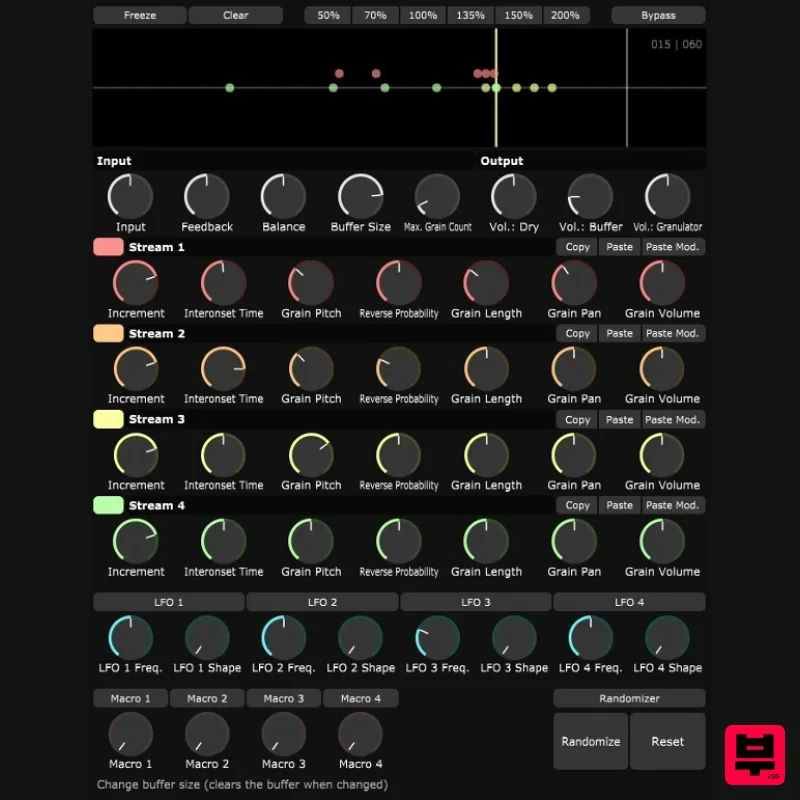
Emergence Emergence occurs when an entity is observed to have properties its parts do not have on their own, properties or behaviours which emerge only when the parts interact in a wider whole. This plugin is a real-time granulator. It continuously records the input signal into a buffer. The content of the buffer is played back as many short pieces of sound called grains. Up to 600 grains can be generated in 4 streams, each having its own set of parameters that control grain generation. A single grain is not that interesting. The most exciting things happen when hundreds of overlapping grains play together, creating anything from complex delay patterns to strange noises to beautifully layered soundscapes. If you like this plugin you can support Daniel Gergely's work on Patreon or itch. Features Up to 600 grains (depending on your CPU). 4-grain generation streams with independent parameters. Modulation system with LFOs, Macros and parameter randomization. High-quality grain pitch transposition (+/- 24 semitones). Freeze buffer contents. Built-in help ( over controls and see text at the bottom). Resizable UI. System Requirements Mac macOS 10.9 or newer (64-bit only) VST3 / AU OpenGL 3 or higher PC Windows 10 or later (64-bit only) VST3 OpenGL 3 or higher Mac 1. Download the .zip folder from your Plugin Boutique account. 2. Run the .pkg installer (This will install the VST3 and AU formats to the default system folder - /Library/Audio/Plug-ins) 3. Open your DAW and load Emergence (you may need to rescan your DAW's plugin list). Note: If you're having trouble using this plugin on your Mac due to it being made by a third-party developer, you may need to authorise them in Preferences > Security & Privacy. Windows 1. Download the .zip folder from your Plugin Boutique account. 2. Locate the VST3 file within the folder > Copy and paste it to C:\Program Files\Common Files\VST3. 3. Open your DAW and load Emergence (you may need to rescan your DAW's plugin list).
Additional Information
About the Daniel Gergely Emergence
Experience the quality and tone that makes the Daniel Gergely Emergence a popular choice for musicians.
Why Choose the Daniel Gergely Emergence?
- •Authentic Daniel Gergely craftsmanship and design
- •Versatile sound suitable for multiple musical genres
- •Professional build quality and reliable performance
- •Part of Daniel Gergely's respected Granular FX lineup
Compare & Explore
Browse our complete selection of Daniel Gergely instruments or explore other Granular FX options. Use our comparison tools to find the perfect match for your musical style and budget.
Similar Products
Thenatan Audio DelayGrain
Granular FX

W. A. Production Venom
Granular FX

DataMind Audio Combobulator
Granular FX
Imaginando GRFX
Granular FX

DataMind Audio Concatenator
Granular FX
Thenatan Audio Aura
Granular FX

Excite Audio Motion: Fractal Lite
Granular FX
Sound Particles Density | Educational Version
Granular FX

