
D16 Group Spacerek
Professional music gear - detailed information and where to buy
Product Description
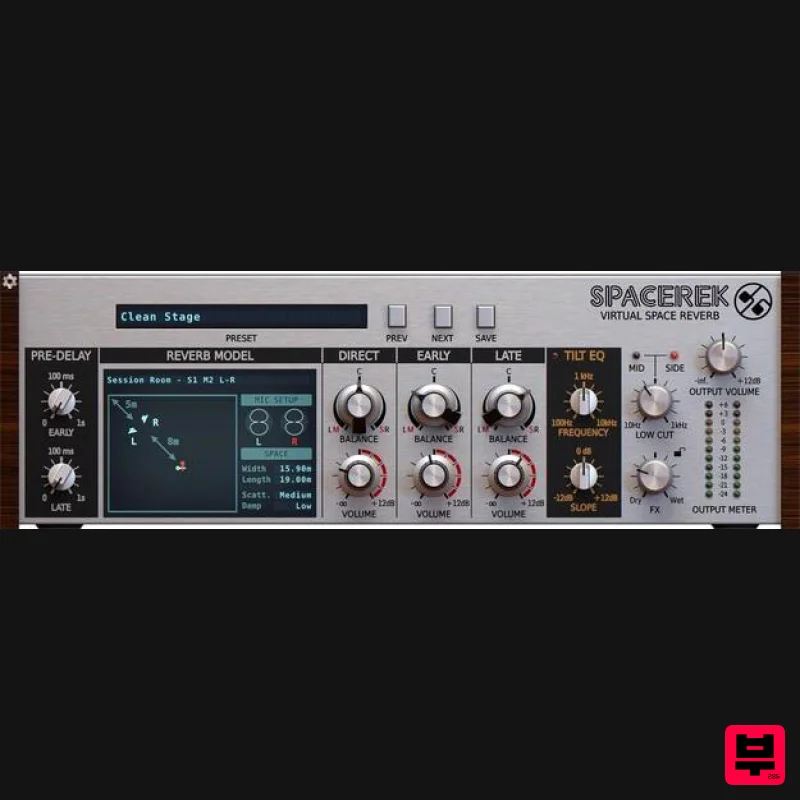
- The Virtual Space Reverb Early reflections are generated through painstakingly accurate simulation of a diverse range of real-world spaces
- and the positioning of speakers and microphones within them. Hybrid Algorithm for Quality and Performance A dynamic delay network defines the Late reflections
- blending seamlessly with the Virtual Space simulation to create super-realistic rooms
- at a surprisingly low cost to your CPU. 114 Stunning Reverb Models Choose from dozens of room types
- each with multiple microphones and speaker configurations for extensive mixing flexibility and sonic control. Convenient Mixer Effortlessly balance the direct signal
- early reflections and late reflections using a simple three-channel mixer. Tilt EQ and Low Cut filter Sit your reverb perfectly in the mix with the musical Tilt EQ and mid-side-compatible Low Cut filter. Overview This compact
- intuitive reverb plugin creates amazingly authentic real-world spaces without bogging you down in complex parameters. The hybrid algorithm at the heart of Spacerek fuses modelled virtual spaces to a dynamic delay network
- generating reverb tails with supremely realistic early reflections
- dense
- colourful late reflections
- and separately adjustable ER and LR pre-delay times. Dozens of emulated room types take in halls
- towers
- chambers
- tunnels and much more
- and each one integrates a variety of preset stereo microphone and speaker setups. Spacerek also makes balancing the Direct signal
- Early reflections and Late reflections easy with its three-channel mixer; while the highly musical Tilt EQ and Low Cut filter modules provide effortless shaping of the overall tail. And as each Reverb Model is pre-configured for left-right or mid-side stereo operation
- tweaking width and spatialisation is a snap. Spacerek doesn’t put the squeeze on your system
- either – indeed
- when you hear it
- you can’t fail to be impressed by its CPU-friendliness. The Virtual Space Reverb Spacerek’s early reflections are generated by D16's proprietary Virtual Space Reverb engine
- which simulates a diverse array of real-world spaces with painstaking accuracy. Each Reverb Model defines not only the acoustic properties of the space it represents but also the positioning of the stereo speakers and microphones used to send the source signal through that space
- for even greater environmental realism and versatility. Hybrid Algorithm for Quality and Performance The late reflections are built up by a responsive dynamic delay network
- which blends seamlessly with the Virtual Space Reverb’s early reflections to create an incredibly natural-sounding reverb tail. Independent Early and Late reflection Pre-Delay controls allow up to 1 second of start time offset to be applied to each
- adjustable in nanoseconds
- microseconds and milliseconds. And despite the quality and complexity of the acoustic modelling involved
- Spacerek’s innovative optimised hybrid design keeps CPU usage lower than you might expect. 114 Stunning Reverb Models Spacerek’s expansive roster of modelled rooms lets you summon up vivid virtual stages of many kinds – from booths
- chambers and halls to tunnels
- chapels and towers – and switch between them at a click. Each room takes in multiple microphones and speaker configurations
- for a total of 114 different Reverb Models
- covering all your mixing and sound design bases. Convenient Mixer Spacerek’s three-component signals – Direct
- Early reflections and Late reflections – come together in a straightforward mixer. Quickly and easily set levels and stereo positioning
- the latter in left-right or mid-side mode
- depending on the selected Reverb Model. Tilt EQ and Low Cut Filter Two stages of musical frequency shaping enable tonal customisation of the tail
- for applying those crucial finishing touches to your reverb. The Tilt EQ provides instant boosting of lows or highs
- while the Low Cut filter is ideal for clearing mud and rumble out of the mid and/or side signals. Features Hybrid room reverb algorithm
- combining Virtual Space Reverb simulation for Early reflections and a dynamic delay network for Late reflections: 114 Reverb Models
- taking in dozens of room types
- each with multiple mic and speaker setups Direct signal / Early reflections / Late reflections mixer Volume control for each channel Balance control for each channel
- with L-R or M-S stereo mode determined by the Reverb Model Independent Pre-delay controls for Early and Late reflections Tilt EQ Low Cut filter independently activated for Mid and/or Side stereo components 64-bit internal processing Tag-based preset browser Resizable GUI MIDI Learn for easy controller assignment System Requirements Windows Windows 7 - 10 (32 or 64-bit) CPU - Single-core 3.2 GHz SSE (Multi-core 4.0 GHz SSE recommended) RAM - 8 GB (16 GB Recommended) Plugin Formats - VST2
- VST3
- AAX Mac macOS 10.13 - macOS 12 Monterey (64-bit only) CPU - Intel 1.8 GHz / Apple M1 (Intel 2.4 GHz / Apple M1 recommended) RAM - 8 GB (16 GB Recommended) Plugin Formats - VST2
- VST3
- AAX Please Note: This is not a standalone program - a host application (DAW) is required to use it. Important Note: D16 Repeater is used as the example. Windows 1. Visit the D16 Group website to create or login into your user account. 2. Once logged into your account
- select the '+ Add Licence' tab 3. Copy and paste the serial number provided in your Plugin Boutique User Account into the box and click 'Add.' Note: Ensure there are no spaces at the beginning and end of the licence before clicking 'Add' to register it. 4. Once the licence has successfully been added to your account
- click 'Close.' 5. Select the 'Download' tab to reveal the drop-down list and click your preferred 32 and/or 64-bit Windows Installer option to obtain the software. 6. Once downloaded
- double-click the .msi installer file to begin the installation process > then click 'Run.' 7. Click 'Next.' 8. Read through and select 'I accept the terms in the licence agreement' and click 'Next.' 9. Select the format (s) i.e VST/AAX that you wish to install and click 'Next.' 10. Click 'Install' to complete the installation process. 11. The installation of the software has successfully completed > click 'Finish.' Activation 1. Open and load the software within your DAW and then click the 'Activate' tab. Note: If the software fails to appear
- rescan your DAW's plugin selection and/or restart your computer. 2. Enter your D16 Group user account email and password > then click 'Sign-In.' 3. Close the plugin and then reopen it to complete activation of the software. The Software is now Activated and Ready for Use! Mac 1. Visit the D16 Group website to create or login into your user account. 2. Once logged into your account
- select the '+ Add Licence' tab 3. Copy and paste the serial number provided in your Plugin Boutique User Account into the box and click 'Add.' Note: Ensure there are no spaces at the beginning and end of the licence before clicking 'Add' to register it. 4. Once the licence has successfully been added to your account
- click 'Close.' 5. Select the 'Download' tab to reveal the drop-down list and click your preferred Mac OS X Installer option to obtain the software. 6. Once downloaded
- double-click the .dmg installer file to unpack the .pkg file. 7. Double-click the .dmg .pkg installer file to begin the installation process > then click 'Continue.' 8. Read through the licence agreement > click 'Continue' then 'Agree.' 9. Click 'Install.' 10. The installation of the software has successfully completed > click 'Close.' Activation 1. Open and load the software within your DAW and then click the 'Activate' tab. Note: If the software fails to appear
- rescan your DAW's plugin selection and/or restart your computer. 2. Enter your D16 Group user account email and password > then click 'Sign-In.' 3. Close the plugin and then reopen it to complete activation of the software. The Software is now Activated and Ready for Use!
Additional Information
About the D16 Group Spacerek
Discover the distinctive sound and feel of the D16 Group Spacerek, a standout choice among Reverb.
Why Choose the D16 Group Spacerek?
- •Authentic D16 Group craftsmanship and design
- •Versatile sound suitable for multiple musical genres
- •Professional build quality and reliable performance
- •Part of D16 Group's respected Reverb lineup
Compare & Explore
Browse our complete selection of D16 Group instruments or explore other Reverb options. Use our comparison tools to find the perfect match for your musical style and budget.
Similar Products

PSP Audioware PSP Pianoverb 2
Reverb
$30
PSP PianoVerb2 is a redesigned and improved creative resonant reverb plug-in based on our famous and beloved freeware...

PSP Audioware PSP Nexcellence
Reverb
$30
PSP Nexcellence is a rich-sounding, spring reverb emulation inspired by and modeled after classic “necklace-type”...

Vegas Audio Fabricverb
Reverb
$30
Get the signature sound of the UK’s most famous nightclub on your digital audio workstation! Our new convolution...

DDMF Envelope
Reverb
$30
Envelope is a true stereo reverb plugin featuring 8 different room simulations, all of which can be adjusted for size,...

XHUN Audio ShineVerb
Reverb
$30
Creative Reverb Processor ShineVerb is a creative tool specially designed for reverberation, spatialization and sound...

DDMF MagicVerb
Reverb
$30
MagicVerb is the latest result of the collaboration between MagicDeathEye aka Ian Sefchick and DDMF. This journey was...

Initial Audio AR1 Reverb
Reverb
$30
Quality Algorithmic Reverb Plugin AR1 is an algorithmic reverb plugin designed to sound great on all types of...

PSP Audioware PSP EasyVerb
Reverb
$30
PSP EasyVerb is a reverberation effect plug-in (VST, RTAS and AAX for Windows; VST, AudioUnit, RTAS and AAX for Mac OS...
Frequently Asked Questions
The D16 Group Spacerek stands out for its exceptional D16 Group craftsmanship and innovative design.
Yes! With its affordable price point and quality construction, it's perfect for learning reverb.
Browse the similar products section to see how it stacks up against other reverb.

