
AudioThing Philicorda
Professional music gear - detailed information and where to buy
AudioThing
Philicorda
Product Info
* Prices may vary. Check retailer for current pricing and availability.
Product Description
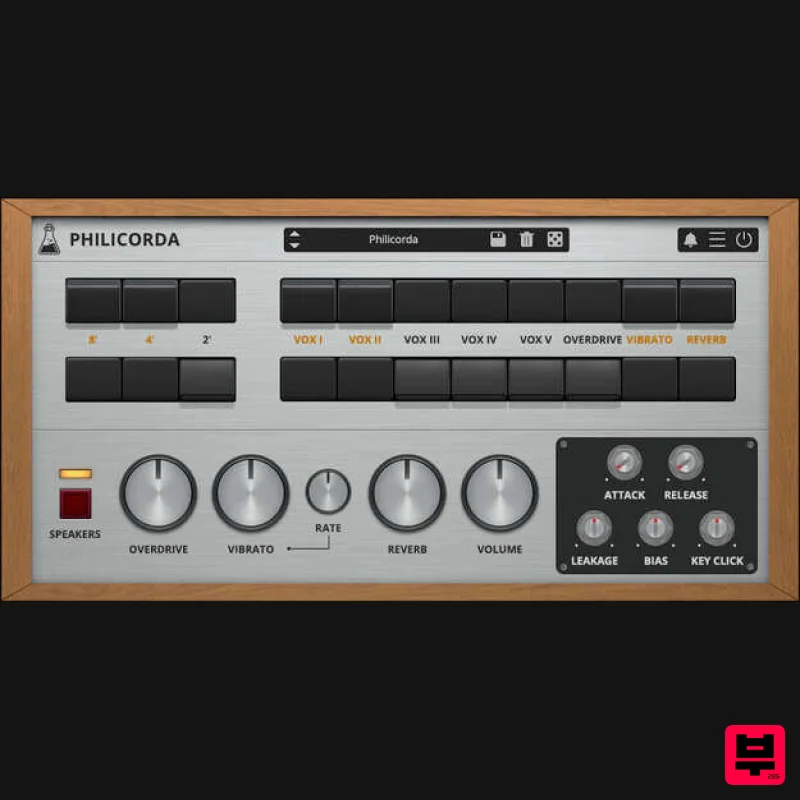
- Vintage Transistor Organ Philicorda is a faithful plugin emulation of the legendary 1960s Philips* Philicorda organ. This plugin replicates the transistor-based sound of the later GM751 models
- delivering the distinctively warm yet clear tones that made the Philicorda a classic. Like the original hardware
- Philicorda features a vibrato circuit
- a spring reverb
- and two speakers. AudioThing have also added some extra features: overdrive
- envelope generator
- leakage
- bias
- and key click. The Philicorda organ
- introduced in the 1960s
- was the first musical instrument produced by Philips. The model emulated
- the GM751
- had several revisions. Early versions had tube preamps
- and later ones were all-transistor. This emulation is based on an all-transistor model. Top Octave Generator The Philicorda utilizes a Top Octave Synthesizer circuit
- featuring 12 oscillators for the upper octave notes
- with ‘octave divider’ circuits generating lower octaves. This technology ensures that the same notes on different octaves are in sync and won’t generate the classic phasing issues of sample-based instruments. Each oscillator generates a saw-like waveform by layering multiple overdriven sine waves (nearly squares) at different octaves and volumes. The bias controls the mix between these layers. The Plugin The plugin captures the unique character of the Philicorda
- including the signature spring reverb (on some models called Reverbeo). While the spring reverb and speakers are meticulously sampled to preserve their original sound
- the core of the Philicorda’s tone generation is fully algorithmic
- allowing for a realistic and accurate emulation
- surpassing the limitations of sample-based instruments. Features Octave Selectors (8′
- 4′
- 2′) VOX Selectors (I to V) Vibrato Spring Reverb Overdrive Envelope Generator Leakage Control Bias Control Key Click Emulation Preset system with randomizer System Requirements Windows Windows 7-11 2GHz CPU
- 4 GB RAM VST2
- VST3
- CLAP (64-bit) Mac OS X 10.13 – macOS 14 Apple Silicon (M chips) Native (Universal 2 Binary) 2GHz CPU
- 4 GB RAM VST2
- VST3
- CLAP (64-bit) Universal 2 Binary Please note: Speaker is used as the example. Windows 1. Visit the AudioThing Login/Registration Page and enter your personal details to set up an account > then read the 'Privacy Policy' and tick the box before clicking 'Sign Up'. Note: If you already have an existing AudioThing account
- Login here and skip to step 3 of the installation process. 2. A confirmation email will now be sent to your registered email > click the link within the email to activate your account and Login here. 3. Once logged into your account
- visit the Redeem Page and copy and paste the serial number from your User Account into the box provided > then click 'Redeem'. 4. Download your preferred installer as well as the Activation Licence Key. Note: Click the ‘license.atl’ file
- e.g ‘speaker_license.atl’ to download it to your computer > be sure to save this to a memorable computer location so that you can easily locate and upload it when activating your software. 5. Double-click the compressed folder to reveal the installer file. 6. Double-click the extracted .exe file > click ‘Run' to open the installation window. 7. Read through the license agreement and click ‘I accept the agreement’ > click ‘Next’. 8. Select the component (s) that you wish to install > click ‘Next’. 9. Choose and confirm the 64-bit plugin directory in which to save your software to > click ‘Next’. 10. Choose and confirm the 32-bit plugin directory in which to save your software to > click ‘Next’. 11. Review the installation and click ‘Install’. 12. The installation of your software has successfully completed > click ‘Finish’. Offline Activation 1. Restart your DAW
- and rescan your plugin selection to show the new installation (in the event it fails to appear). 2. Locate and open the plugin on an appropriate track. You will be greeted by the window shown below > click 'Offline'. 3. Load or drag and drop the downloaded Key License File into the box to activate your software. 4. The software is now activated and ready for use within your DAW. Online Activation 1. Restart your DAW
- and rescan your plugin selection to show the new installation (in the event it fails to appear). 2. Locate and open the plugin on an appropriate track. You will be greeted by the window shown below > click 'Online'. 3. Enter your registered account email and password details > click 'Log In'. 4. The software is now activated and ready for use within your DAW. Mac 1. Visit the AudioThing Login/Registration Page and enter your personal details to set up an account > then read the 'Privacy Policy' and tick the box before clicking 'Sign Up'. Note: If you already have an existing AudioThing account
- Login here and skip to step 3 of the installation process. 2. A confirmation email will now be sent to your registered email > click the link within the email to activate your account and Login here. 3. Once logged into your account
- visit the Redeem Page and copy and paste the serial number from your User Account into the box provided > then click 'Redeem'. 4. Download your preferred installer as well as the Activation Licence Key. Note: Click the ‘license.atl’ file
- e.g ‘speaker_license.atl’ to download it to your computer > be sure to save this to a memorable computer location so that you can easily locate and upload it when activating your software. 5. Double-click the .dmg file to open the installer window. 6. Double-click the installer icon to begin the installation process > click ‘Continue’. 7. Read the info and click ‘Continue’. 8. Read the Software License Agreement > click ‘Continue’ and then ‘Agree’. 8. Select the component (s) that you wish to install to your computer
- and click ‘Continue’. 9. Review the installation and click ‘Install’. 10. The installation of your software has successfully completed > click ‘Close’. Offline Activation 1. Restart your DAW
- and rescan your plugin selection to show the new installation (in the event it fails to appear). 2. Locate and open the plugin on an appropriate track. You will be greeted by the window shown below > click 'Offline'. 3. Load or drag and drop the downloaded Key License File into the box to activate your software. 4. The software is now activated and ready for use within your DAW. Online Activation 1. Restart your DAW
- and rescan your plugin selection to show the new installation (in the event it fails to appear). 2. Locate and open the plugin on an appropriate track. You will be greeted by the window shown below > click 'Online'. 3. Enter your registered account email and password details > click 'Log In'. 4. The software is now activated and ready for use within your DAW.
Additional Information
About the AudioThing Philicorda
The AudioThing Philicorda represents excellent craftsmanship in the Synth category.
Why Choose the AudioThing Philicorda?
- •Authentic AudioThing craftsmanship and design
- •Versatile sound suitable for multiple musical genres
- •Professional build quality and reliable performance
- •Part of AudioThing's respected Synth lineup
Compare & Explore
Browse our complete selection of AudioThing instruments or explore other Synth options. Use our comparison tools to find the perfect match for your musical style and budget.
Similar Products

discoDSP OB-Xd
Synth
$30
OB-Xd is based on the Oberheim OB-X. It attempts to recreate its sound and behavior, but as the original was very...

AngelicVibes ELITE PIANIST
Synth
$30
Your next go-to virtual instrument. Real piano recordings with unique sound and effects 50 high-quality presets for...

Thenatan Audio Poizen VST
Synth
$30
Thenatan and Global Audio Tools have teamed up again to bring music makers across the globe a jam packed powerful tool...

Reflekt Audio Xonex
Synth
$30
Xonex is a futuristic plugin that we have used time and time again to make a variety of beats. Xonex has offered me a...

ThaLoops Templetone
Synth
$30
The Ultimate Hip-Hop Production Plugin – Featuring a Vast Collection of Hip-Hop Sounds. Choose between wild drums,...

discoDSP OPL
Synth
$30
The OPL is a digital sound synthesis chip developed by Yamaha in the mid 1980s. Among other products, it was used in...

discoDSP Discovery
Synth
$30
Discovery is a virtual analog Nord Lead 2 inspired synthesizer featuring multi-layering, a morphing engine, high...

discoDSP Discovery Pro
Synth
$30
discoDSP’s Discovery was one of the company’s first and finest efforts. Heavily inspired by Clavia’s Nord Lead...
Frequently Asked Questions
The AudioThing Philicorda stands out for its exceptional AudioThing craftsmanship and innovative design.
Yes! With its affordable price point and quality construction, it's perfect for learning synth.
Browse the similar products section to see how it stacks up against other synth.

