
AudioThing miniVerb
Professional music gear - detailed information and where to buy
AudioThing
miniVerb
Product Info
* Prices may vary. Check retailer for current pricing and availability.
Product Description
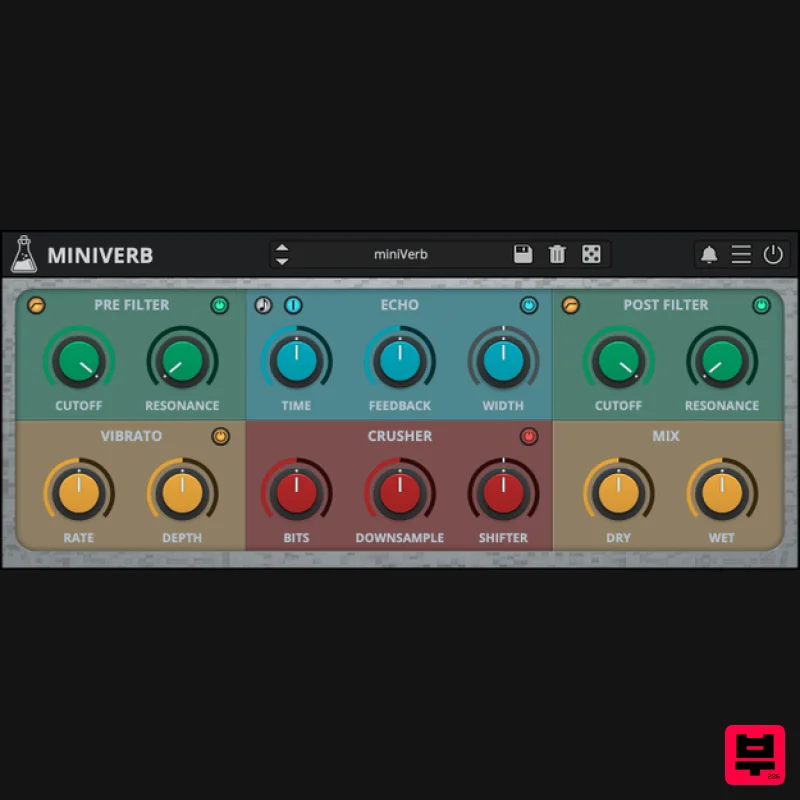
- 8bit Echo Reverb Effect Chiptune Echo Reverb miniVerb is an 8-bit/chiptune and lofi reverb effect inspired by the sound of 80s game consoles and retro computers. Early consoles didn’t have much power for DSP effects
- so the video game composers at that time had to improvise. The most common way to add a sense of space/reverb to the sound was to sacrifice one of the internal tracks to play a delayed version of the original sound
- essentially using a slapback echo to add depth. The technique evolved and eventually
- consoles started to take advantage of more power for real internal effects. miniVerb recreates that classic digital echo/reverb sound
- made famous by iconic consoles such as the NES and SNES
- topping it with two flters (post/pre)
- vibrato
- and crusher (bit crusher
- downsampler
- pitch shifter). <iframe allow="accelerometer; autoplay; clipboard-write; encrypted-media; gyroscope; picture-in-picture; web-share" allowfullscreen="" frameborder="0" height="315" src="https: //www.youtube.com/embed/pZ53lU9vi14?si=Qo3EpWVemLAVvvh-" title="YouTube video player" width="560"></iframe> Echo Section and Tips The Echo Section can be used to simulate the tricks used in early video game consoles to add a sense of space/reverb to the sounds. The most common way was to sacrifice one of the internal tracks of the sound chip to play a delayed version of the original track
- essentially creating a slapback echo effect. To achieve this NES-like reverb sound
- you can use a single delay line
- very short time
- no feedback
- and width set to mono. To simulate a 90s fake reverb/echo (like the SNES) instead
- you can play with longer times and add some feedback to simulate a reverb tail. For a more modern approach
- you can switch the Echo to Double Delay Line by clicking on the blue button (in the top-left corner) and increasing the width to a wider setting. Classic Consoles miniVerb was inspired by the sound of classic game consoles and retro computers of the 80s and 90s. For even more 8-bit/chiptune sounds
- check out AudioThing's synthesizer plugin miniBit. Features Pre/Post Filter (LP/HP) Echo (single/double mode) Vibrato Crusher (bit-crusher
- downsampler
- pitch shifter) 45 Presets Preset randomizer Audio Demos <iframe allow="autoplay" frameborder="no" height="450" src="https://w.soundcloud.com/player/?url=https%3A//api.soundcloud.com/playlists/soundcloud%253Aplaylists%253A602972853&color=%23ff5500&auto_play=false&hide_related=false&show_comments=false&show_user=false&show_reposts=false&show_teaser=false" width="100%"></iframe> Windows Windows 7 – 11 2GHz CPU
- 4 GB RAM VST2
- VST3
- CLAP (64-bit) Mac macOS 10.13 – macOS 26 2GHz CPU
- 4 GB RAM VST2
- VST3
- CLAP (64-bit) Universal 2 Binary Linux Ubuntu 20.04 LTS 2GHz CPU
- 4 GB RAM VST2
- VST3
- CLAP (64-bit) Note: Wave Box is used as the example. Windows 1. Visit the AudioThing Account Signup Page and enter your personal details to set up an account. Click the Verification and "I've read and agree to the Privacy Policy" > Click Sign Up. Note: If you already have an existing AudioThing account
- Login here and skip to step 3 of the installation process. 2. A confirmation email will now be sent to your registered email > click the link within the email to activate your account and Login here. 3. Once logged into your account
- visit the Redeem Page and enter Redeem Code from your Plugin Boutique User Account into the box > Click 'Redeem'. 4. Download the PC installer and the Offline Activation License. Note: Save the Offline Activation License to a memorable location on your computer for activating the software. 5. Double-click the downloaded .zip folder to extract its contents. 6. Double-click the extracted .exe file > click 'I accept the agreement and click 'Next'. 7. Click 'Next'. 8. Select the components that you wish to install > Click ‘Next’. 9. Click ‘Next’. 10. Click 'Install'. 11. Click ‘Finish’. Offline Activation 1. Open Wave Box inside of your DAW > Click 'Offline'. 2. Click 'Load Licence File' and navigate to your Offline Activation License. 3. Click the X to close the box. The software is now activated and ready to use inside your DAW! Online Activation 1. Open Wave Box inside of your DAW > Click 'Online'. 2. Enter your AudioThing email and password > Click 'Log In'. 3. Click the X to close the box. The software is now activated and ready to use inside your DAW! Mac 1. Visit the AudioThing Account Signup Page and enter your personal details to set up an account. Click the Verification and "I've read and agree to the Privacy Policy" > Click Sign Up. Note: If you already have an existing AudioThing account
- Login here and skip to step 3 of the installation process. 2. A confirmation email will now be sent to your registered email > click the link within the email to activate your account and Login here. 3. Once logged into your account
- visit the Redeem Page and enter Redeem Code from your Plugin Boutique User Account into the box > Click 'Redeem'. 4. Download the MAC installer and the Offline Activation License. Note: Save the Offline Activation License to a memorable location on your computer for activating the software. 5. Double-click the downloaded .dmg folder to extract its contents > Double-click the .pkg file to run the installer 6. Click 'Continue'. 7. Click ‘Continue’. 8. Click 'Continue'. 9. Click ‘Agree’. 10. Select the components you would like to install > Click 'Continue'. 11. Click ‘Install’. 12. Click 'Close'. Offline Activation 1. Open Wave Box inside of your DAW > Click 'Offline'. 2. Click 'Load Licence File' and navigate to your Offline Activation License. 3. Click the X to close the box. The software is now activated and ready to use inside your DAW! Online Activation 1. Open Wave Box inside of your DAW > Click 'Online'. 2. Enter your AudioThing email and password > Click 'Log In'. 3. Click the X to close the box. The software is now activated and ready to use inside your DAW!
Additional Information
About the AudioThing miniVerb
Discover the distinctive sound and feel of the AudioThing miniVerb, a standout choice among Reverb.
Why Choose the AudioThing miniVerb?
- •Authentic AudioThing craftsmanship and design
- •Versatile sound suitable for multiple musical genres
- •Professional build quality and reliable performance
- •Part of AudioThing's respected Reverb lineup
Compare & Explore
Browse our complete selection of AudioThing instruments or explore other Reverb options. Use our comparison tools to find the perfect match for your musical style and budget.
Similar Products

DDMF MagicVerb
Reverb
$30
MagicVerb is the latest result of the collaboration between MagicDeathEye aka Ian Sefchick and DDMF. This journey was...

Initial Audio AR1 Reverb
Reverb
$30
Quality Algorithmic Reverb Plugin AR1 is an algorithmic reverb plugin designed to sound great on all types of...

PSP Audioware PSP Nexcellence
Reverb
$30
PSP Nexcellence is a rich-sounding, spring reverb emulation inspired by and modeled after classic “necklace-type”...

DDMF Envelope
Reverb
$30
Envelope is a true stereo reverb plugin featuring 8 different room simulations, all of which can be adjusted for size,...

XHUN Audio ShineVerb
Reverb
$30
Creative Reverb Processor ShineVerb is a creative tool specially designed for reverberation, spatialization and sound...

PSP Audioware PSP EasyVerb
Reverb
$30
PSP EasyVerb is a reverberation effect plug-in (VST, RTAS and AAX for Windows; VST, AudioUnit, RTAS and AAX for Mac OS...

PSP Audioware PSP Pianoverb 2
Reverb
$30
PSP PianoVerb2 is a redesigned and improved creative resonant reverb plug-in based on our famous and beloved freeware...

Vegas Audio Fabricverb
Reverb
$30
Get the signature sound of the UK’s most famous nightclub on your digital audio workstation! Our new convolution...
Frequently Asked Questions
The AudioThing miniVerb stands out for its exceptional AudioThing craftsmanship and innovative design.
Yes! With its affordable price point and quality construction, it's perfect for learning reverb.
Browse the similar products section to see how it stacks up against other reverb.

